HYBRID CONTROL SYSTEM, Diagnostic DTC:P060B-134, P060B-135, P060B-570

| DTC Code | DTC Name |
|---|---|
| P060B-134 | Internal Control Module A/D Processing Performance |
| P060B-135 | Internal Control Module A/D Processing Performance |
| P060B-570 | Internal Control Module A/D Processing Performance |
DESCRIPTION
The power management control ECU monitors its internal operation and it will set this DTC when it detects an internal malfunction. If this DTC is output, replace the power management control ECU.
| DTC No. | INF Code | DTC Detection Condition | Trouble Area |
|---|---|---|---|
| P060B | 134 | ECU internal error (1 trip detection logic) |
Power management control ECU |
| 135 | |||
| 570 |
MONITOR DESCRIPTION
The power management control ECU performs diagnostic tests to verify proper operation of internal ECU systems. One of these monitors the rationality of internal analog (signal) to digital conversions. The power management control ECU monitors the internal A/D (Analog/Digital converter) value. If there is an A/D converter malfunction, the power management control ECU will illuminate the MIL and set a DTC.
MONITOR STRATEGY
| Related DTCs | P060B (INF 134/135/570): Internal control module A/D processing performance |
| Required sensors / components | Power management control ECU |
| Frequency of operation | Continuous |
| Duration | TMC's intellectual property |
| MIL operation | Immediately |
| Sequence of operation | None |
TYPICAL ENABLING CONDITIONS
| The monitor will run whenever the following DTCs are not present | TMC's intellectual property |
| Other conditions belong to TMC's intellectual property | - |
TYPICAL MALFUNCTION THRESHOLDS
| TMC's intellectual property | - |
COMPONENT OPERATING RANGE
| Power management control ECU | DTC P060B (INF 134/135/570) is not detected |
CONFIRMATION DRIVING PATTERN
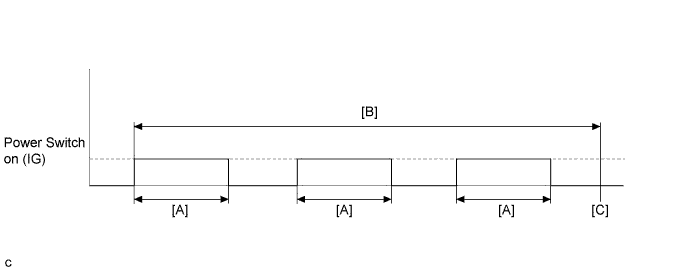
-
Connect the Techstream to the DLC3.
-
Turn the power switch on (IG) and turn the Techstream on.
-
Clear the DTCs (even if no DTCs are stored, perform the clear DTC procedure).
-
Turn the power switch off and wait for 30 seconds or more.
-
Turn the power switch on (IG) and wait for 15 seconds or more, turn the power switch off. [A]
-
Repeat [A] 3 times. [B]
-
Turn the power switch on (IG) and turn the Techstream on.
-
Enter the following menus: Powertrain / Hybrid Control / Trouble Codes. [C]
-
Read the current DTCs.
Tech Tips
-
If a permanent DTC is output, the system is malfunctioning.
-
If no permanent DTC is output, the system is normal.
-
-
Check that the permanent DTCs are cleared.
INSPECTION PROCEDURE
Tech Tips
After the repair, clear the DTCs and perform the following procedure to check that DTCs are not output.
-
Turn the power switch off and wait for 30 seconds or more.
-
Turn the power switch on (IG) and wait for 15 seconds or more.
