SFI SYSTEM, Diagnostic DTC:P0101

| DTC Code | DTC Name |
|---|---|
| P0101 | Mass Air Flow Circuit Range / Performance Problem |
DESCRIPTION
Refer to DTC P0102 Click here.
| DTC No. | DTC Detection Condition | Trouble Area |
|---|---|---|
| P0101 | All of the following conditions continue for more than 10 seconds (2 trip detection logic). (a) The engine is running. (b) The engine coolant temperature is 70°C (158°F) or higher. (c) The throttle position sensor voltage is 0.2 V or higher, and less than 2 V. (d) The average engine load value ratio is less than 0.85, or higher than 1.15 (varies with estimated engine load). Average engine load value ratio = Average engine load based on mass air flow meter sub-assembly output / Average engine load estimated from driving conditions (e) The average air fuel ratio is less than -20%, or higher than 20%. |
|
MONITOR DESCRIPTION
The mass air flow meter sub-assembly is a sensor that measures the amount of air flowing through the throttle valve. The ECM uses this information to determine fuel injection timing and to provide an appropriate air fuel ratio. Inside the mass air flow meter sub-assembly, there is a heated platinum wire which is exposed to the flow of intake air. By applying a specific electrical current to the wire, the ECM heats it to a specific temperature. The flow of incoming air cools both the wire and an internal thermistor, affecting their resistance. To maintain a constant current value, the ECM varies the voltage applied to the mass air flow meter sub-assembly. The voltage level is proportional to the airflow through the sensor, and the ECM uses it to calculate the intake air volume.
The ECM monitors the average engine load value ratio to check the mass air flow meter sub-assembly for malfunctions. The average engine load value ratio is obtained by comparing the average engine load calculated from the mass air flow meter sub-assembly output to the average engine load estimated from the driving conditions, such as the engine speed and the throttle opening angle. If the average engine load value ratio is below the threshold value, the ECM determines that the intake air volume is low, and if the average engine load value ratio is above the threshold value, the ECM determines that the intake air volume is high.
If this is detected in 2 consecutive driving cycles, the MIL is illuminated and the DTC is stored.
MONITOR STRATEGY
| Related DTCs | P0101: Mass air flow meter rationality |
| Required Sensors/Components (Main) | Mass air flow meter sub-assembly |
| Required Sensors/Components (Related) | Crankshaft position sensor Camshaft position sensor Engine coolant temperature sensor Throttle position sensor |
| Frequency of Operation | Continuous |
| Duration | 10 times |
| MIL Operation | 2 driving cycles |
| Sequence of Operation | None |
TYPICAL ENABLING CONDITIONS
| Monitor runs whenever the following DTCs are not stored | None |
| All of the following conditions are met | - |
| (Throttle sensor voltage - (learned throttle sensor closed position voltage + ISC voltage)) | 0.2 V or higher, and less than 2 V |
| Time after engine start | 5 seconds or more |
| Auxiliary battery voltage | 10.5 V or higher |
| Engine coolant temperature | 70°C (158°F) or higher |
| Estimated load | 30% or higher, and less than 70% |
| Mass air flow meter circuit fail (P0102, P0103) | Not detected |
| Intake air temperature sensor circuit fail (P0112, P0113) | Not detected |
| Engine coolant temperature sensor circuit fail (P0115, P0117, P0118) | Not detected |
| Crankshaft position sensor circuit fail (P0335) | Not detected |
| Throttle position sensor circuit fail (P0120, P0121, P0122, P0123, P0220, P0222, P0223, P2135) | Not detected |
| EVAP system pressure sensor circuit fail (P0452, P0453) | Not detected |
| Leak detection pump fail (P2401, P2402) | Not detected |
| EVAP system vent valve fail (P2419, P2420) | Not detected |
TYPICAL MALFUNCTION THRESHOLDS
| Both of the following conditions are met | - |
| Average engine load value ratio | Less than 0.85, or higher than 1.15 (varies with estimated engine load) |
| Average air fuel ratio | Less than -20%, or higher than 20% |
CONFIRMATION DRIVING PATTERN
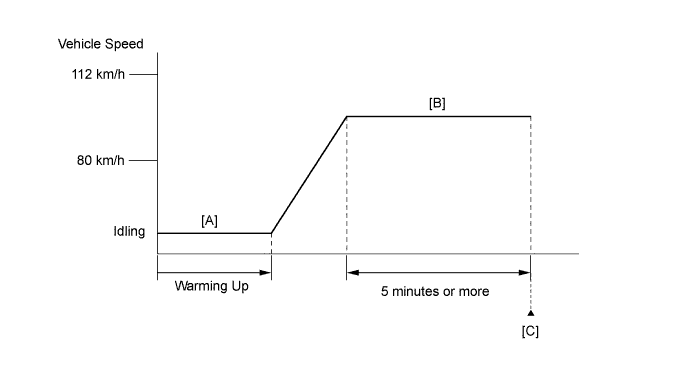
-
Connect the Techstream to the DLC3.
-
Turn the power switch on (IG).
-
Turn the Techstream on.
-
Clear the DTCs (even if no DTCs are stored, perform the clear DTC procedure).
-
Turn the power switch off and wait for at least 30 seconds.
-
Turn the power switch on (IG) and turn the Techstream on.
-
Put the engine in inspection mode (maintenance mode) Click here.
-
Start the engine and warm it up until the engine coolant temperature reaches 70°C (158°F) or higher [A].
-
Drive the vehicle at approximately 80 km/h (50 mph) to 112 km/h (70 mph) for 5 minutes or more [B].
CAUTION:
When performing the confirmation driving pattern, obey all speed limits and traffic laws.
Tech Tips
Drive while keeping the engine load as stable as possible.
-
Enter the following menus: Powertrain / Engine and ECT / Trouble Codes [C].
-
Read the pending DTCs.
Tech Tips
-
If a pending DTC is output, the system is malfunctioning.
-
If a pending DTC is not output, perform the following procedure.
-
-
Enter the following menus: Powertrain / Engine and ECT / Utility / All Readiness.
-
Input the DTC: P0101.
-
Check the DTC judgment result.
Techstream Display Description NORMAL
-
DTC judgment completed
-
System normal
ABNORMAL
-
DTC judgment completed
-
System abnormal
INCOMPLETE
-
DTC judgment not completed
-
Perform driving pattern after confirming DTC enabling conditions
N/A
-
Unable to perform DTC judgment
-
Number of DTCs which do not fulfill DTC preconditions has reached ECU memory limit
Tech Tips
-
If the judgment result shows NORMAL, the system is normal.
-
If the judgment result shows ABNORMAL, the system has a malfunction.
-
If the judgment result shows INCOMPLETE or N/A, perform steps [B] and [C] again.
-
-
If no pending DTC is output, perform a universal trip and check for permanent DTCs Click here.
Tech Tips
-
If a permanent DTC is output, the system is malfunctioning.
-
If no permanent DTC is output, the system is normal.
-
WIRING DIAGRAM
Refer to DTC P0102 Click here.
INSPECTION PROCEDURE
Tech Tips
Read freeze frame data using the Techstream. The ECM records vehicle and driving condition information as freeze frame data the moment a DTC is stored. When troubleshooting, freeze frame data can help determine if the vehicle was moving or stationary, if the engine was warmed up or not, if the air fuel ratio was lean or rich, and other data from the time the malfunction occurred.
PROCEDURE
-
CHECK ANY OTHER DTCS OUTPUT (IN ADDITION TO DTC P0101)
-
Connect the Techstream to the DLC3.
-
Turn the power switch on (IG).
-
Turn the Techstream on.
-
Enter the following menus: Powertrain / Engine and ECT / Trouble Codes.
-
Read the DTCs.
Result Result Proceed to DTC P0101 is output A DTC P0101 and other DTCs are output B Tech Tips
If any DTCs other than P0101 are output, troubleshoot those DTCs first.
B 
GO TO DTC CHART Click here
A 
-
-
CHECK INTAKE SYSTEM
-
Check the intake system for vacuum leaks Click here.
OK No leaks from intake system. Tech Tips
Perform "Inspection After Repair" after repairing or replacing the intake system Click here.
NG
REPAIR OR REPLACE INTAKE SYSTEM
OK
-
-
CHECK PCV HOSE CONNECTIONS
-
Check the PCV hose connections Click here.
OK PCV valve and hose are connected correctly and are not damaged.
NG
REPAIR OR REPLACE PCV HOSE
OK
-
-
PERFORM ACTIVE TEST USING TECHSTREAM (CONTROL THE EGR STEP POSITION)
-
Connect the Techstream to the DLC3.
-
Turn the power switch on (IG).
-
Turn the Techstream on.
-
Put the engine in inspection mode (maintenance mode) Click here.
-
Start the engine and warm it up until the engine coolant temperature reaches 75°C (167°F) or higher.
Tech Tips
The A/C switch and all accessory switches should be off.
-
Enter the following menus: Powertrain / Engine and ECT / Active Test / Control the EGR Step Position / Primary / Throttle Idle Position and MAP.
-
Confirm that the Throttle Idle Position is ON and check the MAP value in the Data List while performing the Active Test.
Tech Tips
-
Do not leave the EGR valve open for 10 seconds or more during the Active Test.
-
Be sure to return the EGR valve to step 0 when the Active Test is completed.
-
Do not open the EGR valve 30 steps or more during the Active Test.
OK MAP change in response to EGR step position when Throttle Idle Position is ON in Data List. Standard - EGR Step Position (Active Test) 0 Steps 0 to 30 Steps MAP
(Data List)
(EGR valve is fully closed) MAP value is at least +10 kPa (75 mmHg) higher than when EGR valve is fully closed Tech Tips
-
While performing the Active Test, if the increase in the value of MAP is small, the EGR valve assembly may be a malfunctioning.
-
Even if the EGR valve assembly is malfunctioning, rough idling or an increase in the value of MAP may occur while performing the Active Test. However, the amount that the value of MAP increases will be smaller than normal.
Result Result Proceed to NG A OK B -
B 
REPLACE MASS AIR FLOW METER SUB-ASSEMBLY Click here
A
-
-
INSPECT EGR VALVE ASSEMBLY
-
Remove the EGR valve assembly Click here.
-
Check if the EGR valve is stuck open.
OK EGR valve is tightly closed. Tech Tips
Perform "Inspection After Repair" after replacing the EGR valve assembly Click here.
NG
REPLACE EGR VALVE ASSEMBLY Click here
OK
-
-
REPLACE MASS AIR FLOW METER SUB-ASSEMBLY
-
Replace the mass air flow meter sub-assembly Click here.
Tech Tips
Perform "Inspection After Repair" after replacing the mass air flow meter sub-assembly Click here.
NEXT
-
-
CONFIRM WHETHER MALFUNCTION HAS BEEN SUCCESSFULLY REPAIRED
-
Connect the Techstream to the DLC3.
-
Turn the power switch on (IG).
-
Turn the Techstream on.
-
Clear the DTCs Click here.
-
Turn the power switch off and wait for at least 30 seconds.
-
Turn the power switch on (IG).
-
Turn the Techstream on.
-
Put the engine in inspection mode (maintenance mode) Click here.
-
Start the engine and warm it up.
-
Drive the vehicle in accordance with the driving pattern described in Confirmation Driving Pattern.
-
Enter the following menus: Powertrain / Engine and ECT / Utility / All Readiness.
-
Input the DTC: P0101.
-
Check the DTC judgment.
Result Techstream Display Description NORMAL
-
DTC judgment completed
-
System normal
ABNORMAL
-
DTC judgment completed
-
System abnormal
INCOMPLETE
-
DTC judgment not completed
-
Perform driving pattern after confirming DTC enabling conditions
N/A
-
Unable to perform DTC judgment
-
Number of DTCs which do not fulfill DTC preconditions has reached ECU memory limit
-
NEXT 
END
-