WIRELESS CHARGING SYSTEM OPERATION CHECK

-
CHECK WIRELESS CHARGING SYSTEM OPERATION
-
Turn the engine switch on (IG or ACC).
-
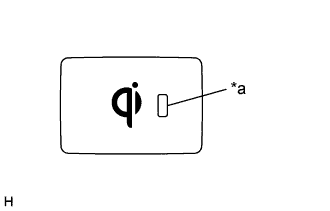
Text in Illustration *a Switch Indicator Light Press the mobile wireless charger switch and check that the switch indicator light illuminates.
-
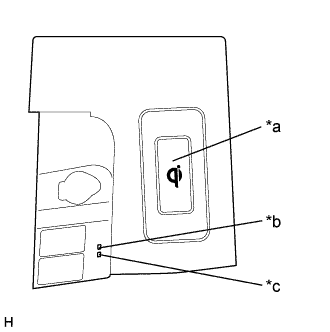
Text in Illustration *a Charging Area *b Indicator Light (Amber) *c Indicator Light (Green) Place a rechargeable device on the charging area and check that the indicator light (amber) illuminates, indicating a charge is in progress.
-
Check that the indicator lights (amber and green) are illuminated when charging is complete.
Tech Tips
-
Some phones, cases or cover type wireless chargers may not cause the green indicator to illuminate even though it is fully charged.
-
Check the mobile device to confirm charge status.
Please refer to precaution for the details Click here.
-
-