VEHICLE STABILITY CONTROL SYSTEM CALIBRATION

-
DESCRIPTION
-
Refer to the table below and then perform the necessary operation according to the part to be replaced in order to perform calibration.
Parts to be Replaced Necessary Operation Skid control ECU (Brake actuator assembly) Perform system variant learning
-
-
SYSTEM VARIANT LEARNING (When Using the Techstream)
-
Perform System Variant Learning.
Tech Tips
-
System variant learning is automatically performed immediately after Test Mode is entered.
-
If learning has not yet been performed, the slip indicator light will remain on and DTC C1288 (Error in Matching of ECUs) will be stored.
-
Turn the ignition switch off.
-
Connect the Techstream to the DLC3.
-
Turn the ignition switch to ON.
-
Turn the Techstream on.
-
Switch the skid control ECU to Test Mode using the Techstream. Enter the following menus: Chassis / ABS/VSC/TRAC / Utility / Test Mode.
-
Check that the ABS warning and slip indicator lights blink in the Test Mode pattern.
Tech Tips
After the skid control ECU enters Test Mode, the slip indicator light may remain on for approximately 9 seconds before starting to blink in the Test Mode pattern.
-
Turn the ignition switch off and disconnect the Techstream.
-
-
-
SYSTEM VARIANT LEARNING (When not Using the Techstream)
-
Perform System Variant Learning.
Tech Tips
-
System variant learning is automatically performed immediately after Test Mode is entered.
-
If learning has not yet been performed, the slip indicator light will remain on and DTC 88 (Error in Matching of ECUs) will be stored.
-
Turn the ignition switch off.
-
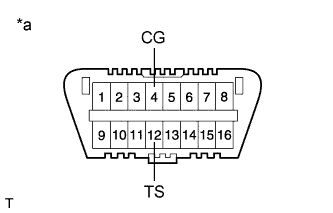
Text in Illustration *a Front view of DLC3 Using SST, connect terminals TS and CG of the DLC3.
- SST
- 09843-18040
-
Turn the ignition switch to ON.
-
Check that the ABS warning and slip indicator lights blink in the Test Mode pattern.
Tech Tips
After the skid control ECU enters Test Mode, the slip indicator light may remain on for approximately 9 seconds before starting to blink in the Test Mode pattern.
-
Turn the ignition switch off and disconnect SST from the DLC3.
-
-