SFI SYSTEM, Diagnostic DTC:P0705

| DTC Code | DTC Name |
|---|---|
| P0705 | Transmission Range Sensor Circuit Malfunction (PRNDL Input) |
DESCRIPTION
The park/neutral position switch assembly detects the shift lever position and sends signals to the ECM.
| DTC No. | DTC Detection Condition | Trouble Area |
|---|---|---|
| P0705 | One of the following conditions A, B or C is met (2 trip detection logic): A. One of the following conditions (a), (b) or (c) is met for 2 seconds or more: (a) Any 2 or more signals of the following are on simultaneously:
(b) Any 2 or more signals of the following are on simultaneously:
(c) Any 2 or more signals of the following are on simultaneously:
B. Any of the following conditions is met for 2 seconds or more in the S position:
C. All switches are off simultaneously for NSW, P, R, N and D for 1 minute or more. |
|
MONITOR DESCRIPTION
These DTCs indicate a problem with the park/neutral position switch assembly and the wire harness in the park/neutral position switch assembly circuit.
The park/neutral position switch assembly detects the shift lever position and sends a signal to the ECM.
For security, the park/neutral position switch assembly detects the shift lever position so that the engine can be started only when the shift lever is in P or N.
The park/neutral position switch assembly sends a signal to the ECM according to the shift lever position (P, R, N, D, or S). The ECM determines that there is a problem with the switch or related parts if it receives more than 1 position signal simultaneously. The ECM illuminates the MIL and stores the DTC.
MONITOR STRATEGY
| Related DTCs | P0705: Transmission range switch verify switch input |
| Required Sensors/Components (Main) | Park/Neutral position switch assembly |
| Required Sensors/Components (Related) | - |
| Frequency of Operation | Continuous |
| Duration | 2 seconds: Case 1 and 3 60 seconds: Case 2 |
| MIL Operation | 2 driving cycles |
| Sequence of Operation | None |
TYPICAL ENABLING CONDITIONS
| Monitor runs whenever the following DTCs are not stored | None |
| All of the following conditions are met | - |
| Battery voltage | 10.5 V or higher |
| Engine switch | On (IG) |
| Starter | Off |
| Monitor runs whenever the following DTCs are not stored | None |
| All of the following conditions are met | - |
| Battery voltage | 10.5 V or higher |
| Engine switch | On (IG) |
| Starter | Off |
| One of the following conditions is met | (a), (b), (c) or (d) |
| (a) Park position switch | On |
| (b) Neutral position switch | On |
| (c) Park/Neutral position switch | On |
| (d) R range position switch | On |
TYPICAL MALFUNCTION THRESHOLDS
| Any two of the following conditions are met | 1, 2 and 3 |
| 1. One of the following conditions is met | (a), (b) or (c) |
| (a) Park position switch | On |
| (b) Neutral position switch | On |
| (c) Park/Neutral position switch | On |
| 2. R range position switch | On |
| 3. D range position switch | On |
| All of the following conditions are met | - |
| Park position switch | Off |
| Neutral position switch | Off |
| Park/Neutral position switch | Off |
| R range position switch | Off |
| D range position switch | Off |
| S range position switch | On |
CONFIRMATION DRIVING PATTERN
-
Connect the Techstream to the DLC3.
-
Turn the engine switch on (IG) and turn the Techstream on.
-
Clear the DTCs (even if no DTCs are stored, perform the clear DTC procedure).
-
Turn the engine switch off and wait for at least 30 seconds.
-
Turn the engine switch on (IG) and turn the Techstream on.
-
Move the shift lever to R and wait 2 seconds or more.
-
Move the shift lever to N and wait 2 seconds or more.
-
Move the shift lever to D and wait 2 seconds or more.
-
Move the shift lever to S and wait 2 seconds or more.
-
Move the shift lever to P and wait 2 seconds or more.
-
Wait 1 minute or more.
-
Enter the following menus: Powertrain / Engine / Trouble Codes.
-
Read the pending DTCs.
Tech Tips
-
If a pending DTC is output, the system is malfunctioning.
-
If a pending DTC is not output, perform the following procedure.
-
-
Enter the following menus: Powertrain / Engine / Utility / All Readiness.
-
Input the DTC: P0705.
-
Check the DTC judgment result.
Techstream Display Description NORMAL
-
DTC judgment completed
-
System normal
ABNORMAL
-
DTC judgment completed
-
System abnormal
INCOMPLETE
-
DTC judgment not completed
-
Perform driving pattern after confirming DTC enabling conditions
N/A
-
Unable to perform DTC judgment
-
Number of DTCs which do not fulfill DTC preconditions has reached ECU's memory limit
Tech Tips
-
If the judgment result shows NORMAL, the system is normal.
-
If the judgment result shows ABNORMAL, the system has a malfunction.
-
-
If the test result is INCOMPLETE or N/A and no pending DTC is output, perform a universal trip and check for permanent DTCs Click here.
Tech Tips
-
If a permanent DTC is output, the system is malfunctioning.
-
If no permanent DTC is output, the system is normal.
-
WIRING DIAGRAM
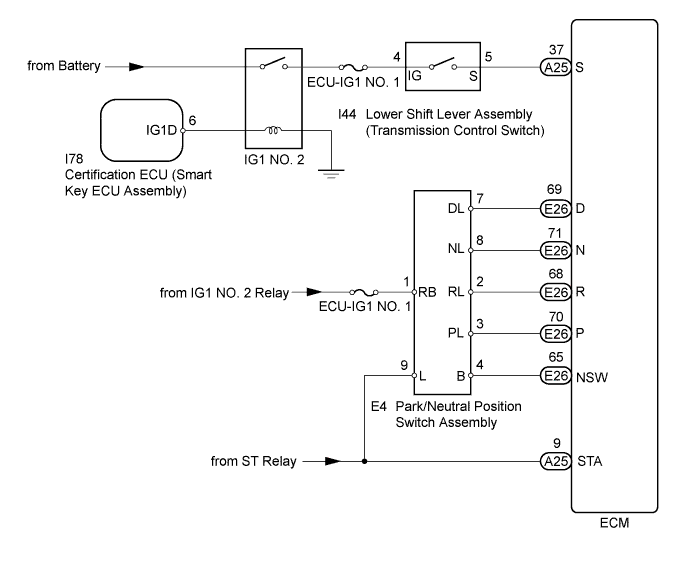
INSPECTION PROCEDURE
Note
Inspect the fuses for circuits related to this system before performing the following inspection procedure.
Tech Tips
Using the Techstream to read the Data List allows the values or states of switches, sensors, actuators and other items to be read without removing any parts. This non-intrusive inspection can be very useful because intermittent conditions or signals may by discovered before parts or wiring is disturbed. Reading the Data List information early in troubleshooting is one way to save diagnostic time.
-
DATA LIST
Note
In the table below, the values listed under "Normal Condition" are reference values. Do not depend solely on these reference values when deciding whether a part is faulty or not.
-
Warm up the engine.
-
Turn the engine switch off.
-
Connect the Techstream to the DLC3.
-
Turn the engine switch on (IG).
-
Turn the Techstream on.
-
Enter the following menus: Powertrain / Engine / Data List / AT.
-
Read the values displayed on the Techstream.
Techstream Display Measurement Item/Range Normal Condition Diagnostic Note Shift SW Status (R Range) Park/Neutral position switch assembly status:
ON or OFF
-
ON: Shift lever in R
-
OFF: Shift lever not in R
When shift lever position displayed on Techstream differs from actual position, adjustment of park/neutral position switch assembly or shift cable may be incorrect Shift SW Status (P Range) Park/Neutral position switch assembly status:
ON or OFF
-
ON: Shift lever in P
-
OFF: Shift lever not in P
When shift lever position displayed on Techstream differs from actual position, adjustment of park/neutral position switch assembly or shift cable may be incorrect Shift SW Status (N Range) Park/Neutral position switch assembly status:
ON or OFF
-
ON: Shift lever in N
-
OFF: Shift lever not in N
When shift lever position displayed on Techstream differs from actual position, adjustment of park/neutral position switch assembly or shift cable may be incorrect Shift SW Status (D Range) Park/Neutral position switch assembly status:
ON or OFF
-
ON: Shift lever in D or S
-
OFF: Shift lever not in D or S
When shift lever position displayed on Techstream differs from actual position, adjustment of park/neutral position switch assembly or shift cable may be incorrect Sports Mode Selection SW Sport mode select switch status:
ON or OFF
-
ON: Shift lever in S
-
OFF: Shift lever not in S
- -
-
PROCEDURE
-
READ VALUE USING TECHSTREAM (NEUTRAL POSITION SW SIGNAL AND SHIFT SW STATUS)
-
Connect the Techstream to the DLC3.
-
Turn the engine switch on (IG).
-
Turn the Techstream on.
-
Enter the following menus: Powertrain / Engine / Data List / AT / Neutral Position SW Signal and Shift SW Status (R, P, N and D Range).
-
Read the values displayed on the Techstream.
OK Techstream Display Shift Lever Position Specified Condition Neutral Position SW Signal P or N ON Except P or N OFF Shift SW Status (R Range) R ON Except R OFF Shift SW Status (P Range) P ON Except P OFF Shift SW Status (N Range) N ON Except N OFF Shift SW Status (D Range) D or S ON Except D or S OFF
NG 
CHECK TERMINAL VOLTAGE (POWER SOURCE OF PARK/NEUTRAL POSITION SWITCH ASSEMBLY) Click here
OK 
-
-
READ VALUE USING TECHSTREAM (SPORTS MODE SELECTION SW)
-
Connect the Techstream to the DLC3.
-
Turn the engine switch on (IG).
-
Turn the Techstream on.
-
Enter the following menus: Powertrain / Engine / Data List / AT / Sports Mode Selection SW.
-
Read the values displayed on the Techstream.
OK Techstream Display Shift Lever Position Specified Condition Sports Mode Selection SW S ON Except S OFF
NG
INSPECT LOWER SHIFT LEVER ASSEMBLY (TRANSMISSION CONTROL SWITCH) Click here
OK 
CHECK FOR INTERMITTENT PROBLEMS Click here
-
-
INSPECT LOWER SHIFT LEVER ASSEMBLY (TRANSMISSION CONTROL SWITCH)
-
Inspect the transmission control switch Click here.
NG 
REPLACE LOWER SHIFT LEVER ASSEMBLY (TRANSMISSION CONTROL SWITCH) Click here
OK
-
-
CHECK HARNESS AND CONNECTOR (ECM - TRANSMISSION CONTROL SWITCH)
-
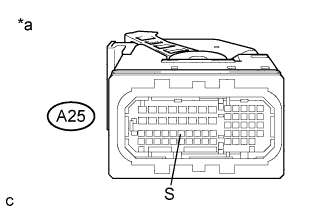
Text in Illustration *a Front view of wire harness connector
(to ECM)
Disconnect the ECM connector.
-
Turn the engine switch on (IG).
-
Measure the voltage according to the value(s) in the table below.
Standard Voltage Tester Connection Shift Lever Position Switch Condition Specified Condition A25-37 (S) - Body ground S Engine switch on (IG) 11 to 14 V Not in S Engine switch on (IG) 0 to 1.5 V
NG
REPAIR OR REPLACE HARNESS OR CONNECTOR
OK
REPLACE ECM Click here
-
-
CHECK TERMINAL VOLTAGE (POWER SOURCE OF PARK/NEUTRAL POSITION SWITCH ASSEMBLY)
-
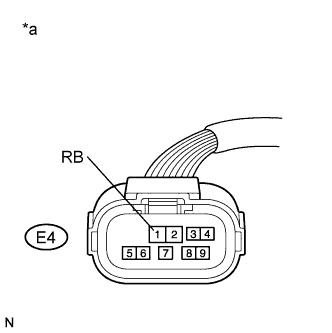
Text in Illustration *a Front view of wire harness connector
(to Park/Neutral Position Switch Assembly)
Disconnect the park/neutral position switch assembly connector.
-
Turn the engine switch on (IG).
-
Measure the voltage according to the value(s) in the table below.
Standard Voltage Tester Connection Switch Condition Specified Condition E4-1 (RB) - Body ground Engine switch on (IG) 11 to 14 V
NG
REPAIR OR REPLACE HARNESS OR CONNECTOR (PARK/NEUTRAL POSITION SWITCH ASSEMBLY POWER SOURCE CIRCUIT)
OK
-
-
INSPECT PARK/NEUTRAL POSITION SWITCH ASSEMBLY
-
Inspect the park/neutral position switch assembly Click here.
NG
REPLACE PARK/NEUTRAL POSITION SWITCH ASSEMBLY Click here
OK
-
-
CHECK HARNESS AND CONNECTOR (PARK/NEUTRAL POSITION SWITCH ASSEMBLY - ECM)
-
Disconnect the park/neutral position switch assembly connector.
-
Disconnect the ECM connector.
-
Measure the resistance according to the value(s) in the table below.
Standard Resistance Tester Connection Condition Specified Condition E4-7 (DL) - E26-69 (D) Always Below 1 Ω E4-8 (NL) - E26-71 (N) Always Below 1 Ω E4-2 (RL) - E26-68 (R) Always Below 1 Ω E4-3 (PL) - E26-70 (P) Always Below 1 Ω E4-4 (B) - E26-65 (NSW) Always Below 1 Ω E4-7 (DL) or E26-69 (D) - Body ground Always 10 kΩ or higher E4-8 (NL) or E26-71 (N) - Body ground Always 10 kΩ or higher E4-2 (RL) or E26-68 (R) - Body ground Always 10 kΩ or higher E4-3 (PL) or E26-70 (P) - Body ground Always 10 kΩ or higher E4-4 (B) or E26-65 (NSW) - Body ground Always 10 kΩ or higher
NG
REPAIR OR REPLACE HARNESS OR CONNECTOR
OK
REPLACE ECM Click here
-