REAR BUMPER(for Standard) REASSEMBLY
PROCEDURE
-
INSTALL REAR BUMPER NO. 2 SIDE BRACKET (w/ Tire Carrier)
-
Attach the 7 claws and 2 clips to install the rear bumper No. 2 side bracket and rear bumper No. 3 side bracket.
-
Install the 2 screws.
-
-
INSTALL REAR BUMPER STEP CUSHION
Tech Tips
When installing the rear bumper step cushion, heat the rear bumper cover using a heat light.
Standard Item Temperature Rear Bumper Cover 20 to 30°C (68 to 86°F) Note
Do not heat the rear bumper cover excessively.
-
When using a new rear bumper cover:
-
Clean the surface of a new rear bumper cover.
-
Using a heat light, heat the rear bumper cover surface.
-
-
When reusing the rear bumper cover:
-
Using a heat light, heat the rear bumper cover surface.
-
Remove the double-sided tape from the rear bumper cover.
-
Wipe off any tape adhesive residue with cleaner.
-
-
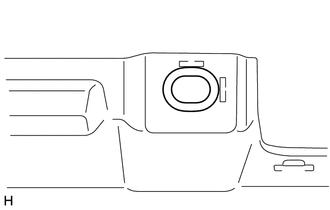
Install a new rear bumper step cushion.
Tech Tips
Use the same procedure for all rear bumper step cushions.
-
Remove the peeling paper from the face of a new rear bumper step cushion.
Tech Tips
After removing the peeling paper, keep the exposed adhesive free from foreign matter.
-
Install the rear bumper step cushion as shown in the illustration.
Tech Tips
Press the rear bumper step cushion firmly to install it.
-
-
-
INSTALL REAR BUMPER PAD LH
Tech Tips
When installing the rear bumper pad LH, heat the rear bumper cover using a heat light.
Standard Item Temperature Rear Bumper Cover 20 to 30°C (68 to 86°F) Note
Do not heat the rear bumper cover excessively.
-
When using a new rear bumper cover:
-
Clean the surface of a new rear bumper cover.
-
Using a heat light, heat the rear bumper cover surface.
-
-
When reusing the rear bumper cover:
-
Using a heat light, heat the rear bumper cover surface.
-
Remove the double-sided tape from the rear bumper cover.
-
Wipe off any tape adhesive residue with cleaner.
-
-
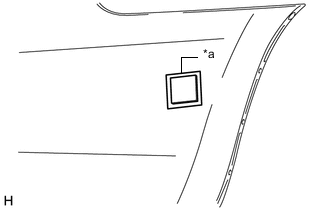
Text in Illustration *a Mark-off Line Install a new rear bumper pad LH.
-
Remove the peeling paper from the face of a new rear bumper pad LH.
Tech Tips
After removing the peeling paper, keep the exposed adhesive free from foreign matter.
-
Align the rear bumper pad LH with the mark-off line of the rear bumper cover and install it as shown in the illustration.
Tech Tips
Press the rear bumper pad LH firmly to install it.
-
-
-
INSTALL REAR BUMPER PAD RH
Tech Tips
Use the same procedure described for the LH side.
-
INSTALL REFLEX REFLECTOR ASSEMBLY LH (w/o Rear Fog Light)
-
Attach the guide to install the reflex reflector assembly LH.
-
Install the 3 screws.
-
-
INSTALL REFLEX REFLECTOR ASSEMBLY RH (w/o Rear Fog Light)
Tech Tips
Use the same procedure described for the LH side.
-
INSTALL REAR FOG LIGHT ASSEMBLY LH (w/ Rear Fog Light)
-
INSTALL REAR FOG LIGHT ASSEMBLY RH (w/ Rear Fog Light)
Tech Tips
Use the same procedure described for the LH side.
-
INSTALL REAR BUMPER ENERGY ABSORBER
-
Attach the 8 claws to install the rear bumper energy absorber.
-
-
INSTALL NO. 2 ULTRASONIC SENSOR (w/ TOYOTA Parking Assist-sensor System)
-
INSTALL NO. 2 FRAME WIRE
-
w/ TOYOTA Parking Assist-sensor System, w/ Rear Fog Light:
-
Attach the 14 clamps to install the No. 2 frame wire.
-
Connect the 6 connectors.
-
-
w/ TOYOTA Parking Assist-sensor System, w/o Rear Fog Light:
-
Attach the 12 clamps to install the No. 2 frame wire.
-
Connect the 4 connectors.
-
-
w/o TOYOTA Parking Assist-sensor System, w/ Rear Fog Light:
-
Attach the 13 clamps to install the No. 2 frame wire.
-
Connect the 2 connectors.
-
-