REAR BUMPER(for Double Swing Out Type) REMOVAL
CAUTION / NOTICE / HINT
Tech Tips
If the bumper is damaged, there is a possibility that the installation area of the blind spot monitor sensor may be deformed and the blind spot monitor system may not operate correctly, so visually inspect the blind spot monitor sensor installation area (frame, stud bolt) to make sure it is not dented or bent.
If the visual inspection finds a problem, check the installation condition of the blind spot monitor sensor, and adjust the installation position of the blind spot monitor sensor as necessary.
PROCEDURE
-
REMOVE SPARE WHEEL CARRIER HINGE BRACKET (w/ Tire Carrier)
-
REMOVE SPARE WHEEL COVER SUB-ASSEMBLY (w/ Tire Carrier)
-
REMOVE SPARE WHEEL CARRIER SUB-ASSEMBLY (w/ Tire Carrier)
-
REMOVE PINTLE HOOK ASSEMBLY (w/ Pintle Hook)
-
REMOVE REAR QUARTER PANEL MUDGUARD LH
-
REMOVE REAR QUARTER PANEL MUDGUARD RH
-
REMOVE REAR BUMPER NO. 1 PLATE
-
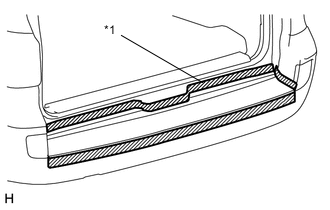
Text in Illustration *1 Protective Tape Put protective tape around the rear bumper No. 1 plate.
-
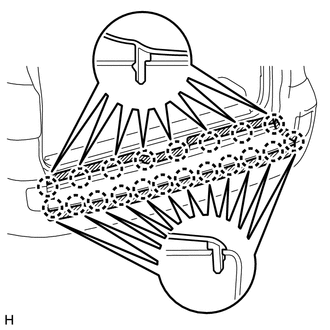
Detach the 20 claws and remove the rear bumper No. 1 plate.
-
-
REMOVE REAR BUMPER COVER
-
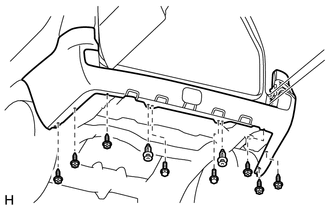
Remove the 6 screws, 2 clips and 2 bolts.
-
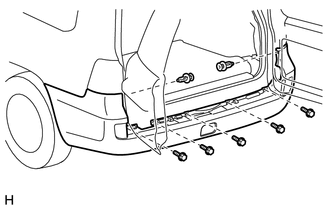
Remove the 2 clips and 5 bolts.
-
Put protective tape around the rear bumper cover.
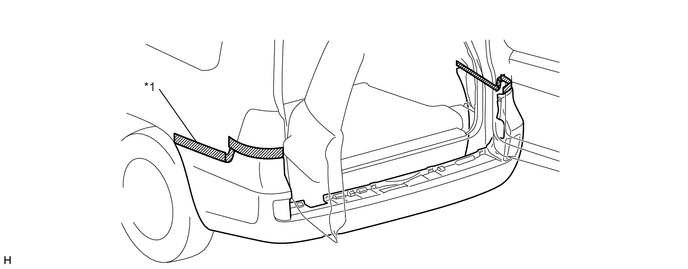
Text in Illustration *1 Protective Tape - - -
Open the back doors one notch.
-
Disconnect the No. 2 frame wire connector.
-
Detach the 14 claws and remove the rear bumper cover.
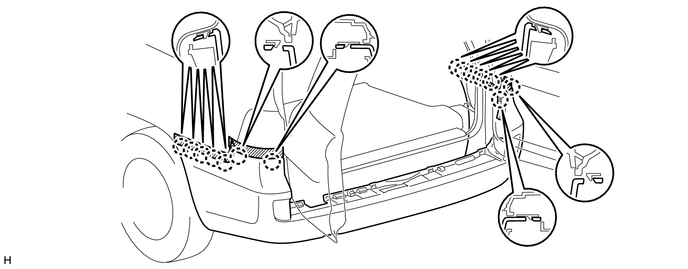
-
-
REMOVE REAR COMBINATION LIGHT ASSEMBLY LH
-
REMOVE REAR COMBINATION LIGHT ASSEMBLY RH
Tech Tips
Use the same procedure described for the LH side.
-
REMOVE REAR BUMPER UPPER RETAINER LH
-
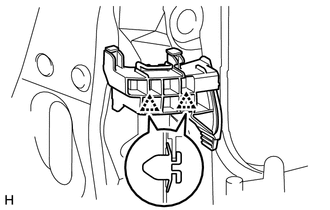
Detach the 2 clips and remove the rear bumper upper retainer.
-
-
REMOVE REAR BUMPER UPPER RETAINER RH
Tech Tips
Use the same procedure described for the LH side.
-
REMOVE REAR BUMPER SIDE SUPPORT LH
-
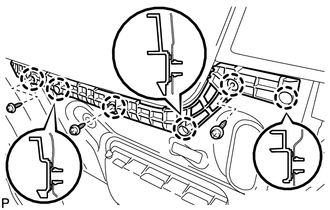
Remove the 3 screws.
-
Detach the 6 claws and remove the rear bumper side support.
-
-
REMOVE REAR BUMPER SIDE SUPPORT RH
Tech Tips
Use the same procedure described for the LH side.
-
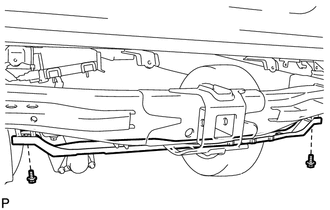
REMOVE REAR BUMPER NO. 2 REINFORCEMENT
-
Remove the 2 bolts and rear bumper No. 2 reinforcement.
-
-
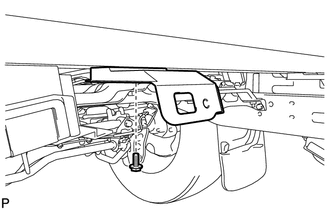
REMOVE REAR BUMPER ARM BRACKET
Tech Tips
Use the same procedure for both rear bumper arm brackets.
-
Remove the bolt and rear bumper arm bracket.
-
-
REMOVE REAR BUMPER ARM BRACKET LH
-
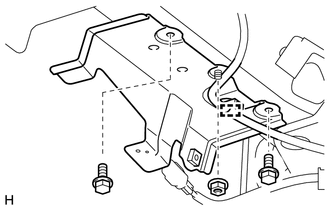
Detach the clamp.
-
Remove the 2 bolts and nut and remove the rear bumper arm bracket.
-
-
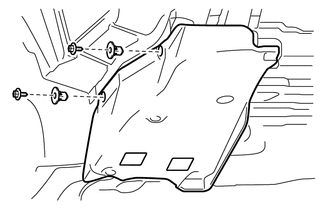
REMOVE NO. 2 LUGGAGE COMPARTMENT SIDE COVER PROTECTOR
-
Remove the 2 screws, 2 grommets and No. 2 luggage compartment side cover protector.
-
-
REMOVE NO. 1 LUGGAGE COMPARTMENT SIDE COVER PROTECTOR
Tech Tips
Use the same procedure described for the No. 2 luggage compartment side cover protector.