METER / GAUGE SYSTEM Operating Light Control Rheostat does not Change Light Brightness
DESCRIPTION
w/ Multi-information Display:
When the light control rheostat knob is turned to the left, the combination meter and vehicle interior illumination will become brighter. When the light control rheostat knob is turned to the right, the combination meter and vehicle illumination will dim.
WIRING DIAGRAM
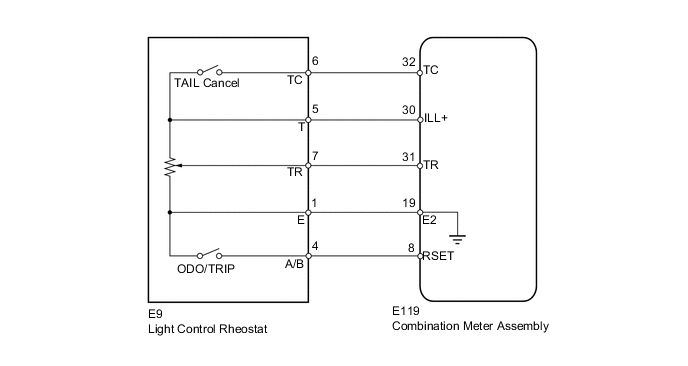
PROCEDURE
-
READ VALUE USING GTS (LIGHT CONTROL RHEOSTAT)
-
Operate the GTS according to the display and select Data List Click here.
Combination Meter Tester Display Measurement Item/Range Normal Condition Diagnostic Note Tail Cancel SW* TAIL cancel switch condition/ON or OFF ON: TAIL cancel switch ON
OFF: TAIL cancel switch OFF
- Rheostat value Light control rheostat switch input/Min.: 0, Max.: 100 Light control rheostat switch is fully turned right (0) → fully turned left (100) Unit: % Tech Tips
*: w/ TAIL Cancel Switch
OK Light brightness can be changed within specified range by manual operation.
OK 
REPLACE COMBINATION METER ASSEMBLY Click here
NG 
-
-
INSPECT LIGHT CONTROL RHEOSTAT
-
Remove the light control rheostat Click here.
-
Inspect the light control rheostat Click here.
NG
REPLACE LIGHT CONTROL RHEOSTAT Click here
OK
-
-
CHECK HARNESS AND CONNECTOR (COMBINATION METER - LIGHT CONTROL RHEOSTAT)
-
Disconnect the E119 meter connector.
-
Disconnect the E9 rheostat connector.
-
Measure the resistance according to the value(s) in the table below.
Standard Resistance Tester Connection Condition Specified Condition E119-30 (ILL+) - E9-5 (T) Always Below 1 Ω E119-31 (TR) - E9-7 (TR) E119-19 (E2) - E9-1 (E) E119-32 (TC) - E9-6 (TC)
OK
REPLACE COMBINATION METER ASSEMBLY Click here
NG
REPAIR OR REPLACE HARNESS OR CONNECTOR
-