ENGINE IMMOBILISER SYSTEM(w/o Entry and Start System), Diagnostic DTC:B2796
| DTC Code | DTC Name |
|---|---|
| B2796 | No Communication in Immobiliser System |
DESCRIPTION
This DTC is stored when a key is inserted into the ignition key cylinder but no communication occurs between the key and transponder key ECU assembly.
| DTC No. | DTC Detection Condition | Trouble Area | DTC Output Confirmation Operation |
|---|---|---|---|
| B2796 | The key ID code cannot be transmitted to the transponder key ECU assembly (1 trip detection logic*). |
|
Insert the key into the ignition key cylinder |
*: Only output while a malfunction is present.
| Vehicle Condition when Malfunction Detected | Fail-safe Operation when Malfunction Detected |
|---|---|
| Engine cannot be started | - |
| DTC No. | Data List and Active Test |
|---|---|
| B2796 | - |
WIRING DIAGRAM
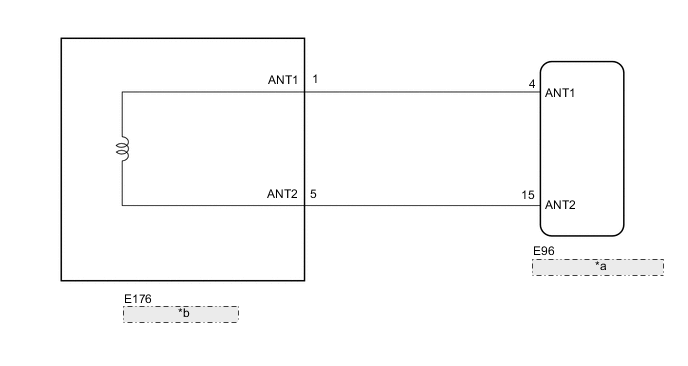
| *a | Transponder Key ECU Assembly |
| *b | Transponder Key Coil |
CAUTION / NOTICE / HINT
Note
-
If the transponder key ECU assembly or key is replaced, refer to the Service Bulletin.
-
After repair, confirm that no DTCs are output by performing "DTC Output Confirmation Operation".
-
When using the GTS with the vehicle ignition switch off, connect the GTS to the vehicle and turn a courtesy light switch on and off at intervals of 1.5 seconds or less until communication between the GTS and the vehicle begins. Then select the Model Code "KEY REGIST" under manual mode and enter the following menus: Body Electrical / Immobiliser. While using the GTS, periodically turn a courtesy light switch on and off at intervals of 1.5 seconds or less to maintain communication between the GTS and the vehicle.
PROCEDURE
-
CLEAR DTC
-
Clear the DTCs Click here.
NEXT 
-
-
CHECK FOR DTC
-
Insert and remove each registered key one at a time, and check for DTCs each time Click here.
Tech Tips
Before checking for DTCs, perform the "DTC Output Confirmation Operation" procedure.
OK DTC B2796 is not output. Result Result Proceed to DTC B2796 is not output A DTC B2796 is output for all of the keys B DTC B2796 is output for any of the keys C
A 
USE SIMULATION METHOD TO CHECK Click here
C 
REPLACE KEY Click here
B
-
-
REPLACE TRANSPONDER KEY ECU ASSEMBLY
-
Replace the transponder key ECU assembly with a new one.
Tech Tips
Refer to the Service Bulletin.
Note
Key ID code registration is necessary when replacing the transponder key ECU assembly.
Refer to the Service Bulletin.
NEXT
-
-
CLEAR DTC
-
Clear the DTCs Click here.
NEXT
-
-
CHECK FOR DTC
-
Check for DTCs Click here.
Tech Tips
Before checking for DTCs, perform the "DTC Output Confirmation Operation" procedure.
OK DTC B2796 is not output.
OK
END (TRANSPONDER KEY ECU ASSEMBLY WAS DEFECTIVE)
NG
REPLACE KEY FOR WHICH DTC WAS OUTPUT
-
-
REPLACE KEY
-
Replace the key for which the DTC was stored.
Note
Key ID code registration is necessary when replacing the key.
Refer to the Service Bulletin.
NEXT
-
-
CLEAR DTC
-
Clear the DTCs Click here.
NEXT
-
-
CHECK FOR DTC
-
Check for DTCs Click here.
Tech Tips
Before checking for DTCs, perform the "DTC Output Confirmation Operation" procedure.
OK DTC B2796 is not output. Result Result Proceed to B2796 is not output A B2796 is output B
A
END (KEY WAS DEFECTIVE)
B
REPLACE TRANSPONDER KEY ECU ASSEMBLY
-