Click here
| DTC Code | DTC Name |
|---|---|
| G-BOOK Service cannot be Used |
Click here
PROCEDURE
- Click here
CHECK CONTRACT FLAG
-
Check the contract flag.
-
Enter diagnostic mode (Click here).
-
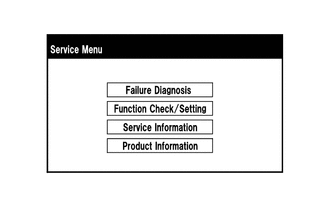
Select "Service Information" on the "Service Menu" screen.
-
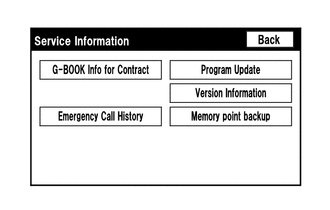
Select "G-BOOK Info for Contract" on the "Service Information" screen.
-
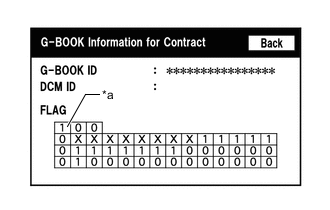
Check if the flag information indicates "1" as shown in the illustration.
Table 1. Text in Illustration *a Cell to be Checked Table 2. Result Result Proceed to "1" is not indicated. A "1" is indicated. B
-
- AClick here
- B
CONTACT G-BOOK SUPPORT CENTER
-
- Click here
PERFORM OPERATION AGAIN
-
Perform the contract procedure again.
-
Select "G-BOOK.com" and perform the contract procedure again (Click here).
-
Check for the problem symptom.
Table 3. Result Result Proceed to System returns to normal. A System does not return to normal. B
-
- A
END
- B
CONTACT G-BOOK SUPPORT CENTER
-