REAR SEAT ENTERTAINMENT ECU INSTALLATION
CAUTION / NOTICE / HINT
Tech Tips
A bolt without a torque specification is shown in the standard bolt chart Click here.
PROCEDURE
-
INSTALL NO. 1 NAVIGATION WIRE
-
Attach the clamps to install the No. 1 navigation wire.
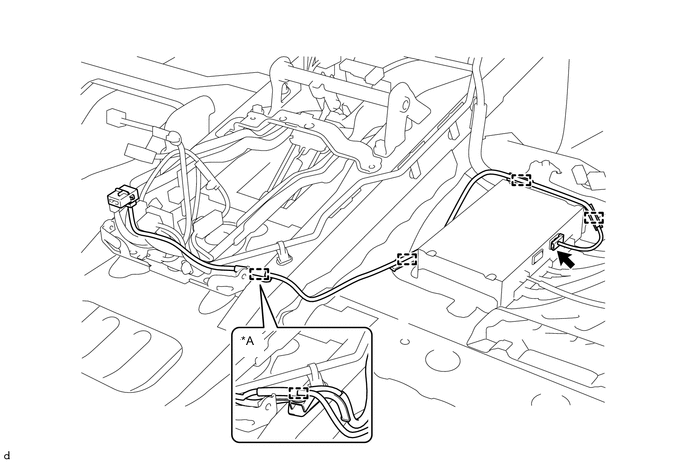
Text in Illustration *A w/ DCM(Telematics Transceiver) - - -
Connect the connector.
-
-
INSTALL FRONT CONSOLE BOX
w/o Cool Box Click here
w/o Cool Box Click here
-
INSTALL NO. 3 MULTI-DISPLAY CONTROLLER BRACKET
-
Install the bracket with the 2 bolts.
-
-
INSTALL NO. 2 MULTI-DISPLAY CONTROLLER BRACKET
-
Install the bracket with the 2 bolts.
-
-
INSTALL MULTI-DISPLAY CONTROLLER SUB-ASSEMBLY
-
Install the multi-display controller sub-assembly with the 3 bolts.
-
Attach the clamps and connect the connectors.
-
-
INSTALL FRONT FLOOR CARPET ASSEMBLY
-
Install the carpet that was pulled back to remove the selector. For further details, refer to the installation procedure Click here.
-
-
INSTALL FRONT DOOR SCUFF PLATE RH
-
INSTALL COWL SIDE TRIM BOARD RH
-
INSTALL INSTRUMENT SIDE PANEL RH
-
INSTALL FRONT SEAT ASSEMBLY RH
for Manual Seat Click here.
for Power Seat Click here.
-
CONNECT CABLE TO NEGATIVE BATTERY TERMINAL
Note
When disconnecting the cable, some systems need to be initialized after the cable is reconnected Click here.
-
CHECK SRS WARNING LIGHT
-
Check the SRS warning light Click here.
-