PROCEDURE
- Click here
PRECAUTION
Note:After turning the ignition switch off, waiting time may be required before disconnecting the cable from the battery terminal. Therefore, make sure to read the disconnecting the cable from the battery terminal notice before proceeding with work (Click here).
- Click here
DISCONNECT CABLE FROM NEGATIVE BATTERY TERMINAL
Note:When disconnecting the cable, some systems need to be initialized after the cable is reconnected (Click here).
- Click here
REMOVE NO. 2 INSTRUMENT PANEL FINISH PANEL CUSHION
- Click here
REMOVE LOWER INSTRUMENT PANEL PAD SUB-ASSEMBLY LH
- Click here
REMOVE NO. 1 INSTRUMENT PANEL FINISH PANEL CUSHION
- Click here
REMOVE LOWER INSTRUMENT PANEL PAD SUB-ASSEMBLY RH
- Click here
REMOVE LOWER CENTER INSTRUMENT CLUSTER FINISH PANEL SUB-ASSEMBLY
- Click here
REMOVE NO. 1 SPEAKER OPENING COVER ASSEMBLY
- Click here
REMOVE NO. 3 INSTRUMENT PANEL REGISTER ASSEMBLY
- Click here
REMOVE NO. 4 INSTRUMENT PANEL REGISTER ASSEMBLY
- Click here
REMOVE MULTI-DISPLAY ASSEMBLY WITH BRACKET
- Click here
REMOVE MULTI-MEDIA MODULE RECEIVER ASSEMBLY WITH BRACKET
-
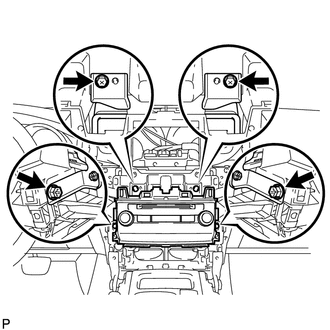
Remove the 2 screws and 2 bolts.
-
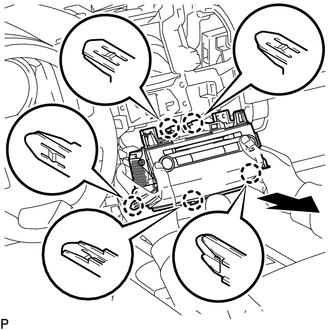
Pull the multi-media module receiver assembly to detach the 5 claws on the backside of the multi-media module receiver assembly.
-
Disconnect the connectors and remove the multi-media module receiver assembly.
-
- Click here
REMOVE NO. 1 RADIO BRACKET
-
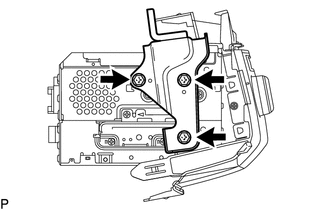
Remove the 3 bolts and No. 1 radio bracket.
-
- Click here
REMOVE NO. 2 RADIO BRACKET
-
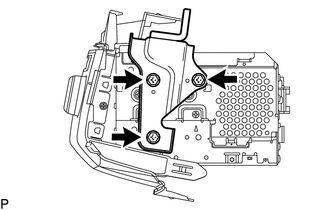
Remove the 3 bolts and No. 2 radio bracket.
-