| DTC Code | DTC Name |
|---|---|
| B15B8 | Harddisk Malfunction |
DESCRIPTION
This DTC is stored when the hard disc which is built into the multi-media module receiver assembly has an initialization malfunction or read/write errors occur more than a specified number of times.
| DTC Code | DTC Detection Condition | Trouble Area |
|---|---|---|
| B15B8 | Hard Disk Drive (HDD) malfunction | Hard disc |
PROCEDURE
- Click here
CHECK HARD DISC (OPERATION CHECK)
-
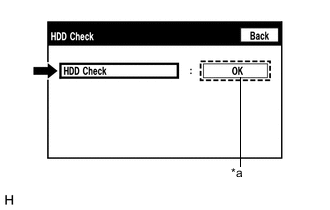
Enter the "Failure Diagnosis" screen. [Refer to Check Hard Disc in Operation Check (Click here)]
-
Select "HDD Check" and check the result.
OK "OK" is displayed. Tip:
-
After selecting "HDD Check", it may take a while until the result is displayed.
-
If the cabin temperature is -20°C (-4°F) or lower, or 65°C (149°F) or higher, the hard disc may not operate normally, and "NG" may be shown on the display. Make sure to perform the inspection with the cabin at an appropriate temperature.
Table 1. Text in Illustration *a Result -
- OKClick here
- NGClick here
-
- Click here
CLEAR DTC
-
Clear the DTCs (Click here).
- NEXTClick here
-
- Click here
CHECK FOR DTC
-
Recheck for DTCs and check if the same DTCs are output again (Click here).
OK No DTCs are output. Tip:The hard disc may be malfunctioning even if DTC B15B8 is not output.
- OK
USE SIMULATION METHOD TO CHECK (Click here)
- NG
REPLACE HARD DISC (Click here)
-
- Click here
REPLACE HARD DISC
-
Replace the hard disc with a new or known good one (Click here).
- NEXTClick here
-
- Click here
CLEAR DTC
-
Clear the DTCs (Click here).
- NEXTClick here
-
- Click here
CHECK FOR DTC
-
Recheck for DTCs and check if the same DTCs are output again (Click here).
OK No DTCs are output. Tip:The hard disc may be malfunctioning even if DTC B15B8 is not output.
- OK
END (HARD DISC IS DEFECTIVE)
- NG
REPLACE MULTI-MEDIA MODULE RECEIVER ASSEMBLY (Click here)
-