REAR VIEW MONITOR SYSTEM TERMINALS OF ECU
-
CHECK RADIO AND DISPLAY RECEIVER ASSEMBLY
-
Disconnect the F120 and F124 radio and display receiver assembly connectors.
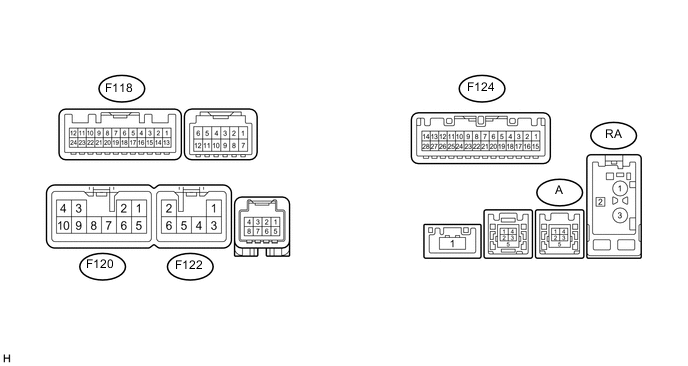
-
Measure the voltage and resistance according to the value(s) in the table below.
Terminal No. (Symbol) Wiring Color Terminal Description Condition Specified Condition F120-3 (ACC1) - Body ground BE - Body ground Power source Engine switch on (ACC) 11 to 14 V Engine switch off Below 1 V F120-4 (+B1) - Body ground V - Body ground Power source Always 11 to 14 V F120-7 (GND1) - Body ground W-B - Body ground Ground Always Below 1 Ω F124-1 (IG) - Body ground B - Body ground Power source Engine switch on (IG) 11 to 14 V Engine switch off Below 1 V -
Reconnect the F120 and F124 radio and display receiver assembly connectors.
-
Measure the waveform according to the value(s) in the table below.
Terminal No. (Symbol) Wiring Color Terminal Description Condition Specified Condition F118-11 (CA+) - F118-23 (CGND) B - Shielded Power source Engine switch on (ACC) 5.5 to 7.05 V F118-12 (V+) - F118-24 (V-) R - W Display signal Engine switch on (IG), shift lever in R Pulse generation (See waveform 1) Engine switch on (IG), shift lever in R, screen blacked out by covering camera lens Pulse generation (See waveform 2) F124-2 (REV) - Body ground L - Body ground Reverse signal Engine switch on (IG), shift lever in R 7.5 to 14 V Engine switch on (IG), shift lever not in R Below 1 V -
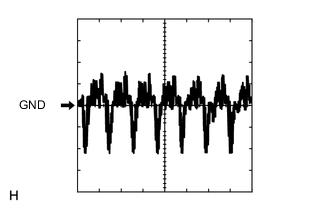
Using an oscilloscope, check waveform 1.
Waveform Item Content Terminal No. (Symbol) F118-12 (V+) - F118-24 (V-) Tool Setting 0.2 V/DIV., 50 μs/DIV. Condition Engine switch on (IG), shift lever in R -
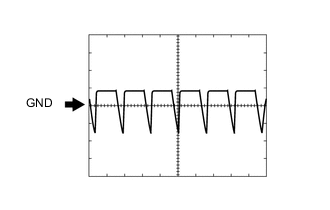
Using an oscilloscope, check waveform 2.
Waveform Item Content Terminal No. (Symbol) F118-12 (V+) - F118-24 (V-) Tool Setting 0.2 V/DIV., 50 μs/DIV. Condition Engine switch on (IG), shift lever in R and camera lens is covered, blacking out the screen
-