AIR PUMP(w/ Secondary Air Injection System) INSTALLATION
PROCEDURE
-
INSTALL AIR PUMP ASSEMBLY
-
Connect the 6 air pump insulators to the 2 air pump assemblies and install the 2 air pump assemblies to the air pump bracket.
-
Attach the 2 wire harness clamps to the bracket.
-
-
INSTALL NO. 1 AIR INJECTION SYSTEM HOSE
-
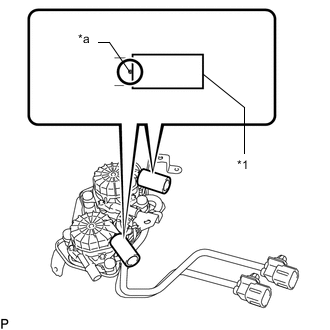
Text in Illustration *1 No. 1 Air Injection System Hose *a Stopper Install the 2 No. 1 air injection system hoses to the air pump assembly.
Tech Tips
Insert the hoses until the hose ends contact the stoppers as shown in the illustration.
-
-
INSTALL AIR PUMP INLET
-
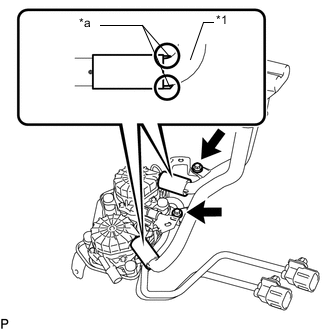
Text in Illustration *1 Air Pump Inlet *a Stopper Connect the air pump inlet to the 2 No. 1 air injection system hoses.
Tech Tips
Insert the inlet until the inlet stoppers contact the No.1 air injection system hoses as shown in the illustration.
-
Install the air pump inlet with the 2 bolts.
- Torque:
- 8.0 N*m { 82 kgf*cm, 71 in.*lbf }
-
-
INSTALL AIR PUMP ASSEMBLY WITH BRACKET
-
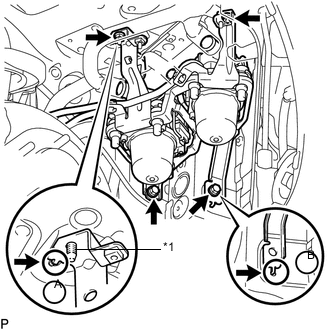
Text in Illustration *1 Stud Bolt Install the air pump assembly with bracket to the vehicle.
-
Insert the bracket tab into the slot and insert the stud bolt into the bracket hole as shown in illustration A. Then slide the bracket.
-
Insert the bracket tab into the slot shown in illustration B.
-
Install the 2 bolts and 2 nuts.
- Torque:
- 18 N*m { 184 kgf*cm, 13 ft.*lbf }
-
-
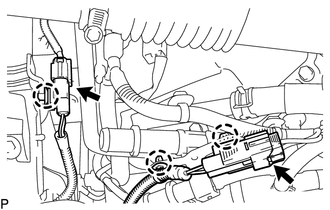
Connect the 2 air pump assembly connectors and attach the 3 wire harness clamps.
-
-
INSTALL NO. 3 AIR INJECTION SYSTEM HOSE
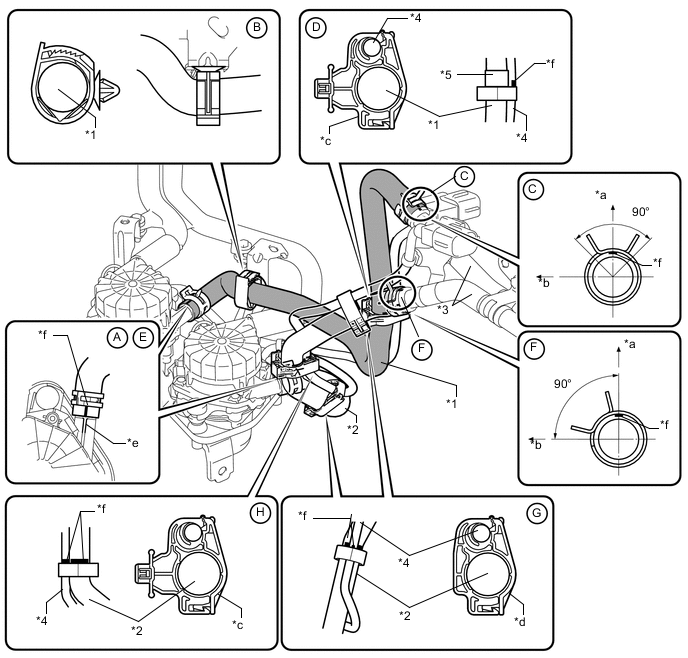
Text in Illustration *1 No. 3 Air Injection System Hose *2 No. 2 Air Injection System Hose *3 Air Tube *4 Wire Harness *5 Protector - - *a Upper *b Front *c Black Colored Clamp *d White Colored Clamp *e Rib *f Paint Mark
-
Connect the No. 3 air injection system hose so that its paint mark aligns with the rib of the air pump assembly, and slide the clamp to secure it as shown in the illustration labeled A.
Tech Tips
Make sure the direction of the hose clamp is as shown in the illustration.
-
Attach the clamp to the No. 3 air injection system hose shown in the illustration labeled B.
-
Connect the No. 3 air injection system hose to the air tube sub-assembly, and slide the clamp to secure it shown in the illustration labeled C.
Tech Tips
-
Make sure the paint mark of the No. 3 air injection system hose is facing upward.
-
Make sure the direction of the hose clamp is as shown in the illustration.
-
-
Attach the clamp to the No. 3 air injection system hose and wire harness shown in the illustration labeled D.
Tech Tips
Align the protector of the No. 3 air injection system hose and paint mark of the wire harness with the edge of the clamp.
-
-
INSTALL NO. 2 AIR INJECTION SYSTEM HOSE
-
Connect the No. 2 air injection system hose so that its paint mark aligns with the rib of the air pump assembly, and slide the clamp to secure it as shown in the illustration labeled E.
Tech Tips
Make sure the direction of the hose clamp is as shown in the illustration.
-
Connect the No. 2 air injection system hose to the air tube sub-assembly, and slide the clamp to secure it shown in the illustration labeled F.
Tech Tips
-
Make sure the paint mark of the No. 2 air injection system hose is facing upward.
-
Make sure the direction of the hose clamp is as shown in the illustration.
-
-
Attach the 2 white colored clamps to the No. 2 air injection system hose and wire harness shown in the illustration labeled G.
Tech Tips
-
Make sure the paint mark on the wire harness is aligned with the mark on the No. 2 air injection system hose.
-
Make sure the mark on the wire harness is aligned with the edge of the clamp.
-
-
Attach the black colored clamp to the No. 2 air injection system hose and wire harness shown in the illustration labeled H.
Tech Tips
Align the paint mark of the No. 2 air injection system hose and paint mark of the wire harness with the edge of the clamp.
-
-
INSTALL AIR CLEANER ASSEMBLY
-
INSTALL AIR CLEANER HOSE ASSEMBLY
-
INSTALL V-BANK COVER SUB-ASSEMBLY
-
INSTALL FRONT FENDER APRON SEAL FRONT RH
-
INSTALL FRONT FENDER LINER RH
-
Install the front fender liner RH to the body panel with the 5 clips.
-
Using a T30 "TORX" socket, install the 3 screws.
-
Connect the liner to the front bumper cover with the screw.
-
-
INSTALL FRONT FENDER SPLASH SHIELD SUB-ASSEMBLY RH
-
CONNECT CABLE TO NEGATIVE BATTERY TERMINAL
Note
When disconnecting the cable, some systems need to be initialized after the cable is reconnected Click here.