FRONT BUMPER INSTALLATION
CAUTION / NOTICE / HINT
Tech Tips
When the front bumper is damaged or deformed due to an accident or contact with other objects, etc., or the bumper installation area on the body is repaired, it is necessary to perform millimeter wave radar sensor adjustment.
PROCEDURE
-
INSTALL FRONT BUMPER ASSEMBLY
-
w/ Headlight Cleaner System:
-
Connect the headlight cleaner hose to the windshield washer motor and pump assembly.
-
-
Connect each connector.
-
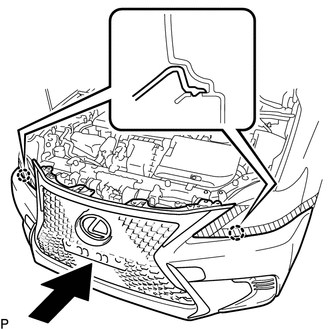
Engage the 2 claws as shown in the illustration.
-
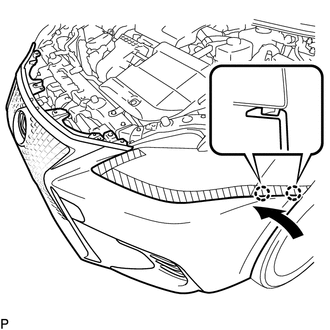
Engage the 2 claws as shown in the illustration.
Tech Tips
Use the same procedure for the RH side and LH side.
-
Install the 2 clips.
-
Install the 2 bolts.
-
Install the 6 screws.
-
Install the front bumper seal bracket.
Note
Do not pull the front bumper assembly after the front bumper seal bracket is installed, or the front bumper assembly may be damaged.
Tech Tips
Use the same procedure for the RH side and LH side.
-
Install the screw.
Tech Tips
Use the same procedure for the RH side and LH side.
-
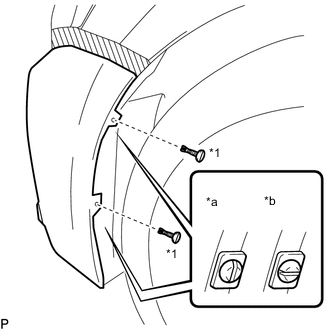
*1 Pin Hold Clip *a Correct *b Incorrect Install the 2 pin hold clips.
Note
Insert the pin hold clip with the slot aligned vertically. Do not rotate the clip after inserting it. After installation, confirm that the slot is aligned vertically.
Tech Tips
Use the same procedure for the RH side and LH side.
-
w/ Lexus Safety System+:
-
Connect the connector.
-
Engage the clamp.
-
-
-
INSTALL HOOD CENTER CUSHION
-
Install the 2 hood center cushions.
-
-
INSTALL RADIATOR SUPPORT OPENING COVER
-
Install the radiator support opening cover with the 7 clips.
-
-
INSTALL FRONT SPOILER COVER (w/ Front Spoiler)
-
ADD WASHER FLUID (w/ Headlight Cleaner System)
-
ADJUST FOG LIGHT ASSEMBLY (w/ Fog Light)