LIGHTING SYSTEM, Diagnostic DTC:B2430, B2431
| DTC Code | DTC Name |
|---|---|
| B2430 | LED Headlight LH |
| B2431 | LED Headlight RH |
DESCRIPTION
These DTCs are stored when the low beam headlights do not illuminate, or a malfunction is detected in the communication between the headlight assembly and main body ECU (multiplex network body ECU).
| DTC No. | DTC Detection Condition | Trouble Area |
|---|---|---|
| B2430 | LED headlight LH circuit malfunction |
|
| B2431 | LED headlight RH circuit malfunction |
|
Tech Tips
DTC B2430 and B2431 are not stored until 12 seconds have elapsed after turning the power switch on (READY).
WIRING DIAGRAM
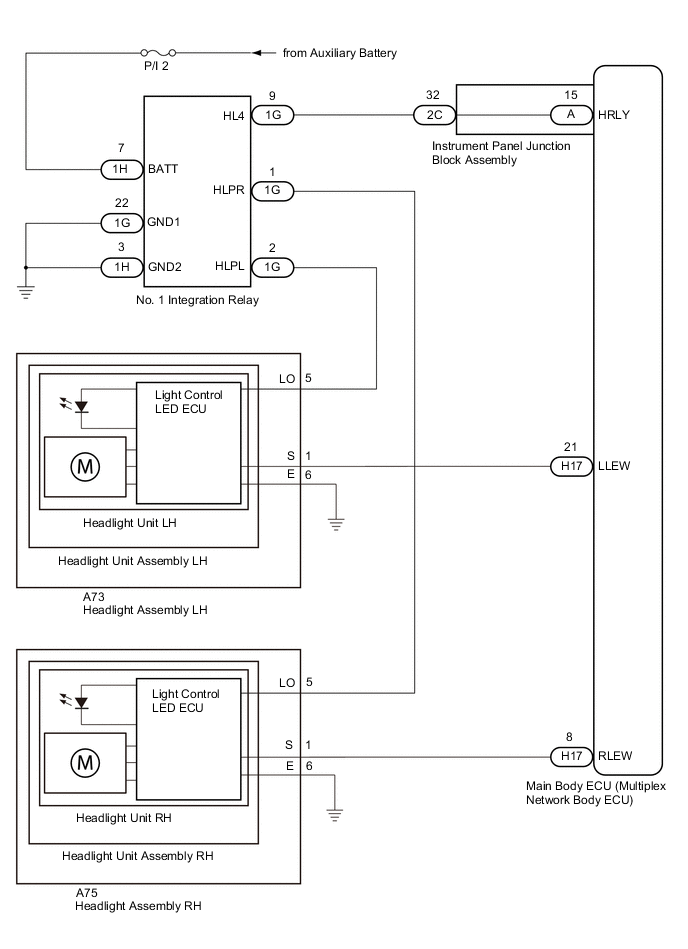
CAUTION / NOTICE / HINT
Note
Inspect the fuses for circuits related to this system before performing the following procedure.
PROCEDURE
-
CLEAR DTC
-
Connect the GTS to the DLC3.
-
Turn the power switch on (IG).
-
Turn the GTS on.
-
Enter the following menus: Body Electrical / Main Body / Trouble Codes.
-
Clear the DTCs.
Result Proceed to NEXT
NEXT 
-
-
CHECK FOR DTC
-
Connect the GTS to the DLC3.
-
Turn the power switch on (IG).
-
Operate the light control switch to turn on the low beam headlights and wait 12 seconds or more.
-
Turn the GTS on.
-
Enter the following menus: Body Electrical / Main Body / Trouble Codes.
-
Check for DTCs.
Result Result Proceed to Both DTC B2430 and B2431 are not output A Both DTC B2430 and B2431 are output B DTC B2430 or B2431 is output C
A 
USE SIMULATION METHOD TO CHECK Click here
C 
CHECK HARNESS AND CONNECTOR (HEADLIGHT ASSEMBLY LO TERMINAL VOLTAGE) Click here
B
-
-
CHECK HARNESS AND CONNECTOR (POWER SOURCE - NO. 1 INTEGRATION RELAY)
-
Remove the No. 1 integration relay.
-
Measure the voltage according to the value(s) in the table below.
Standard Voltage Tester Connection Condition Specified Condition 1H-7 (BATT) - Body ground Power switch off 11 to 14 V Result Proceed to OK NG
NG
REPAIR OR REPLACE HARNESS OR CONNECTOR
OK
-
-
CHECK HARNESS AND CONNECTOR (NO. 1 INTEGRATION RELAY - BODY GROUND)
-
Measure the resistance according to the value(s) in the table below.
Standard Resistance Tester Connection Condition Specified Condition 1G-22 (GND1) - Body ground Always Below 1 Ω 1H-3 (GND2) - Body ground Always Below 1 Ω Result Proceed to OK NG
NG
REPAIR OR REPLACE HARNESS OR CONNECTOR
OK
-
-
CHECK HARNESS AND CONNECTOR (NO. 1 INTEGRATION RELAY - INSTRUMENT PANEL JUNCTION BLOCK ASSEMBLY)
-
Disconnect the 2C instrument panel junction block assembly connector.
-
Measure the resistance according to the value(s) in the table below.
Standard Resistance Tester Connection Condition Specified Condition 1G-9 (HL4) - 2C-32 Always Below 1 Ω 1G-9 (HL4) or 2C-32 - Body ground Always 10 kΩ or higher Result Proceed to OK NG
NG
REPAIR OR REPLACE HARNESS OR CONNECTOR
OK
-
-
INSPECT INSTRUMENT PANEL JUNCTION BLOCK ASSEMBLY
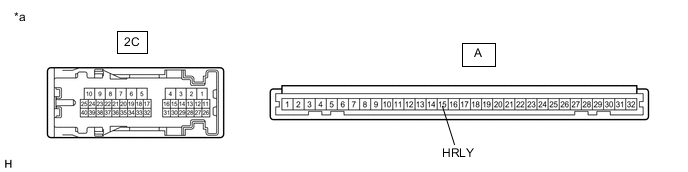
*a Component without harness connected
(Instrument Panel Junction Block Assembly)
- -
-
Remove the instrument panel junction block assembly.
-
Remove the main body ECU (multiplex network body ECU) from the instrument panel junction block assembly.
-
Measure the resistance according to the value(s) in the table below.
Standard Resistance Tester Connection Condition Specified Condition 2C-32 - A-15 (HRLY) Always Below 1 Ω Result Proceed to OK NG
NG
REPLACE INSTRUMENT PANEL JUNCTION BLOCK ASSEMBLY Click here
OK
-
-
REPLACE NO. 1 INTEGRATION RELAY
-
Replace the No. 1 integration relay with a new or a known good one.
Result Proceed to NEXT
NEXT
-
-
CLEAR DTC
-
Connect the GTS to the DLC3.
-
Turn the power switch on (IG).
-
Turn the GTS on.
-
Enter the following menus: Body Electrical / Main Body / Trouble Codes.
-
Clear the DTCs.
Result Proceed to NEXT
NEXT
-
-
CHECK FOR DTC
-
Connect the GTS to the DLC3.
-
Turn the power switch on (IG).
-
Operate the light control switch to turn on the low beam headlights and wait 12 seconds or more.
-
Turn the GTS on.
-
Enter the following menus: Body Electrical / Main Body / Trouble Codes.
-
Check for DTCs.
OK DTC B2430 and B2431 are not output. Result Proceed to OK NG
OK
END (NO. 1 INTEGRATION RELAY WAS DEFECTIVE)
NG
REPLACE MAIN BODY ECU (MULTIPLEX NETWORK BODY ECU) Click here
-
-
CHECK HARNESS AND CONNECTOR (HEADLIGHT ASSEMBLY LO TERMINAL VOLTAGE)
-
Disconnect the A73 or A75 headlight assembly connector.
-
Measure the voltage according to the value(s) in the table below.
Standard Voltage LH Side Tester Connection Condition Specified Condition A73-5 (LO) - Body ground Light control switch in head position 11 to 14 V RH Side Tester Connection Condition Specified Condition A75-5 (LO) - Body ground Light control switch in head position 11 to 14 V Result Proceed to OK NG
NG
CHECK HARNESS AND CONNECTOR (NO. 1 INTEGRATION RELAY - HEADLIGHT ASSEMBLY) Click here
OK
-
-
CHECK HARNESS AND CONNECTOR (HEADLIGHT ASSEMBLY - BODY GROUND)
-
Measure the resistance according to the value(s) in the table below.
Standard Resistance LH Side Tester Connection Condition Specified Condition A73-6 (E) - Body ground Always Below 1 Ω RH Side Tester Connection Condition Specified Condition A75-6 (E) - Body ground Always Below 1 Ω Result Proceed to OK NG
NG
REPAIR OR REPLACE HARNESS OR CONNECTOR
OK
-
-
CHECK HARNESS AND CONNECTOR (HEADLIGHT ASSEMBLY S TERMINAL VOLTAGE)
-
Measure the voltage according to the value(s) in the table below.
Standard Voltage LH Side Tester Connection Condition Specified Condition A73-1 (S) - Body ground Power switch on (IG) 11 to 14 V RH Side Tester Connection Condition Specified Condition A75-1 (S) - Body ground Power switch on (IG) 11 to 14 V Result Proceed to OK NG
NG
CHECK HARNESS AND CONNECTOR (HEADLIGHT ASSEMBLY - MAIN BODY ECU (MULTIPLEX NETWORK BODY ECU)) Click here
OK
-
-
INSPECT HEADLIGHT UNIT ASSEMBLY
-
Remove the headlight unit assembly.
-
Inspect the headlight unit assembly.
Result Proceed to OK NG
OK
REPLACE HEADLIGHT UNIT Click here
NG
REPLACE HEADLIGHT UNIT ASSEMBLY Click here
-
-
CHECK HARNESS AND CONNECTOR (HEADLIGHT ASSEMBLY - MAIN BODY ECU (MULTIPLEX NETWORK BODY ECU))
-
Disconnect the H17 main body ECU (multiplex network body ECU) connector.
-
Measure the resistance according to the value(s) in the table below.
Standard Resistance LH Side Tester Connection Condition Specified Condition A73-1 (S) - H17-21 (LLEW) Always Below 1 Ω A73-1 (S) or H17-21 (LLEW) - Body ground Always 10 kΩ or higher RH Side Tester Connection Condition Specified Condition A75-1 (S) - H17-8 (RLEW) Always Below 1 Ω A75-1 (S) or H17-8 (RLEW) - Body ground Always 10 kΩ or higher Result Proceed to OK NG
OK
REPLACE MAIN BODY ECU (MULTIPLEX NETWORK BODY ECU) Click here
NG
REPAIR OR REPLACE HARNESS OR CONNECTOR
-
-
CHECK HARNESS AND CONNECTOR (NO. 1 INTEGRATION RELAY - HEADLIGHT ASSEMBLY)
-
Disconnect the 1G No. 1 integration relay connector.
-
Measure the resistance according to the value(s) in the table below.
Standard Resistance LH Side Tester Connection Condition Specified Condition 1G-2 (HLPL) - A73-5 (LO) Always Below 1 Ω 1G-2 (HLPL) or A73-5 (LO) - Body ground Always 10 kΩ or higher RH Side Tester Connection Condition Specified Condition 1G-1 (HLPR) - A75-5 (LO) Always Below 1 Ω 1G-1 (HLPR) or A75-5 (LO) - Body ground Always 10 kΩ or higher Result Proceed to OK NG
OK
REPLACE NO. 1 INTEGRATION RELAY Click here
NG
REPAIR OR REPLACE HARNESS OR CONNECTOR
-