POWER OUTLET SOCKET INSTALLATION
PROCEDURE
-
INSTALL NO. 2 POWER OUTLET SOCKET COVER (for Front Side)
-
Engage the 2 claws to install the No. 2 power outlet socket cover.
-
-
INSTALL NO. 3 POWER OUTLET SOCKET ASSEMBLY (for Front Side)
-
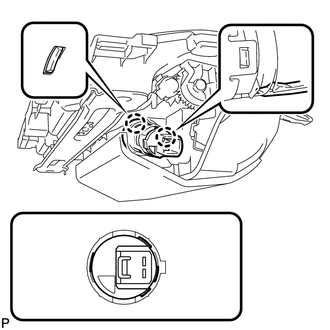
As shown in the illustration, align the protrusion of the No. 3 power outlet socket assembly and the notch of the No. 2 power outlet socket cover.
-
Engage the 2 claws to install the No. 3 power outlet socket assembly to No. 2 power outlet socket cover.
-
-
INSTALL INSTRUMENT PANEL BOX ASSEMBLY (for Front Side)
-
Connect the connector.
-
Engage the 2 clamps.
-
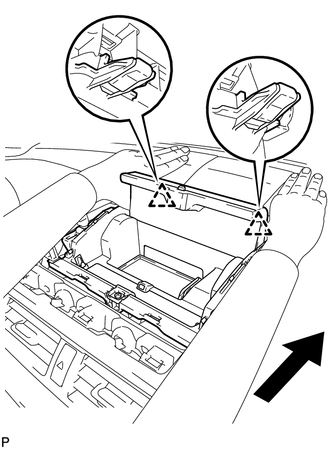
Engage the 2 clips as shown in the illustration.
-
Install the instrument panel box assembly with the 2 screws.
-
Engage the 4 guides and 3 claws, and install the instrument panel finish panel end.
-
Close the instrument panel box assembly door.
-
-
INSTALL INSTRUMENT CLUSTER FINISH PANEL SUB-ASSEMBLY (for Front Side)
-
INSTALL CENTER INSTRUMENT PANEL REGISTER ASSEMBLY (for Front Side)
-
INSTALL NO. 2 POWER OUTLET SOCKET COVER (for Rear Side)
-
Engage the 2 claws to install the No. 2 power outlet socket cover.
-
-
INSTALL NO. 3 POWER OUTLET SOCKET ASSEMBLY (for Rear Side)
-
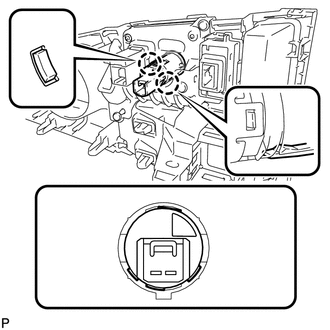
As shown in the illustration, align the protrusion of the No. 3 power outlet socket assembly and the notch of the No. 2 power outlet socket cover.
-
Engage the 2 claws to install the No. 3 power outlet socket assembly to No. 2 power outlet socket cover.
-
-
INSTALL UPPER CONSOLE PANEL SUB-ASSEMBLY (for Rear Side)
-
INSTALL UPPER NO. 1 CONSOLE PANEL GARNISH (for Rear Side)
-
INSTALL UPPER NO. 2 CONSOLE PANEL GARNISH (for Rear Side)
-
INSTALL LOWER CENTER INSTRUMENT PANEL FINISH PANEL (for Rear Side)