METER / GAUGE SYSTEM Fuel Receiver Gauge Malfunction
DESCRIPTION
-
The meter ECU uses the fuel sender gauge assembly to determine the level of the fuel in the fuel tank. The resistance of the fuel sender gauge will vary between approximately 12 Ω with the float at the full position, and 415 Ω with the float at the empty position. The meter outputs auxiliary battery voltage through two resistors of 820 Ω that are mounted in parallel inside the meter ECU. The meter ECU measures the voltage between the variable resistor in the fuel sender gauge and the two resistors mounted in parallel in the meter. Voltage measured at this point will vary as the float of the fuel sender gauge is moved. The highest voltage observed should be approximately half of the auxiliary battery voltage.
Tech Tips
The fuel level warning light will come on when the fuel level is below 6.8 liters (7.2 US qts, 6.0 Imp.qts).
WIRING DIAGRAM
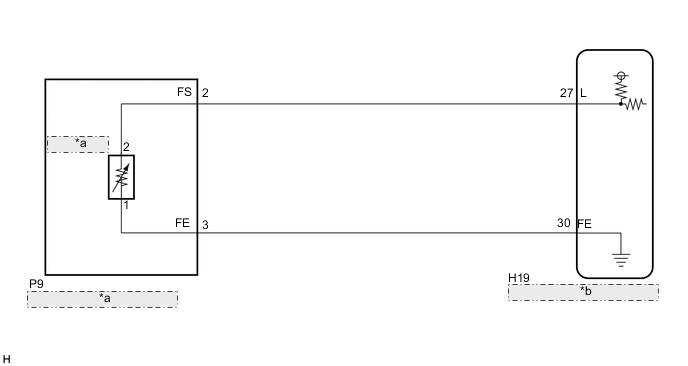
| *a | Fuel Sender Gauge Assembly |
| *b | Combination Meter Assembly |
PROCEDURE
-
PERFORM ACTIVE TEST USING INTELLIGENT TESTER (FUEL METER OPERATION)
-
Connect the intelligent tester to the DLC3.
-
Turn the power switch on (IG).
-
Turn the intelligent tester on.
-
Enter following menus: Body / Combination Meter / Active Test.
-
Check the operation by referring to the table below.
Combination Meter Tester Display Test Part Control Range Diagnostic Note Fuel Meter Operation Fuel receiver gauge Empty, 1/2, Full - OK Fuel receiver gauge indication is normal.
NG 
REPLACE COMBINATION METER ASSEMBLY Click here
OK 
-
-
READ VALUE USING INTELLIGENT TESTER (FUEL INPUT)
-
Connect the intelligent tester to the DLC3.
-
Turn the power switch on (IG).
-
Turn the intelligent tester on.
-
Enter following menus: Body / Combination Meter / Data List.
-
Check the values by referring to the table below.
Combination Meter Tester Display Measurement Item/Range Normal Condition Diagnostic Note Fuel Input*1 Fuel input signal/Min.: 0, Max.: 127.5 Fuel indicates F: 39.6 Unit: Liter Fuel indicates 3/4: 31.0 Fuel indicates 1/2: 22.8 Fuel indicates 1/4: 14.3 Fuel indicates E: 5.1 Fuel Input*2 Fuel input signal/Min.: 0, Max.: 127.5 10th segment comes on: 39.6 to 45 Unit: Liter 9th segment comes on: 35.7 to 39.6 8th segment comes on: 31.8 to 35.7 7th segment comes on: 27.9 to 31.8 6th segment comes on: 24.0 to 27.9 5th segment comes on: 20.1 to 24.0 4th segment comes on: 16.2 to 20.1 3rd segment comes on: 12.3 to 16.2 2nd segment comes on: 8.4 to 12.3 1st segment comes on: 4.5 to 8.4
-
*1: for Multi-information Display (Monochrome Type)
-
*2: for Multi-information Display (Color Type)
OK Fuel level signal displayed on the intelligent tester is almost the same as fuel receiver gauge indication. -
NG
REPLACE COMBINATION METER ASSEMBLY Click here
OK
-
-
CHECK HARNESS AND CONNECTOR (COMBINATION METER ASSEMBLY - FUEL SENDER GAUGE ASSEMBLY)
-
Disconnect the H19 combination meter assembly connector.
-
Disconnect the P9 fuel sender gauge assembly connector.
-
Measure the resistance according to the value(s) in the table below.
Standard Resistance Tester Connection Condition Specified Condition H19-27 (L) - P9-2 (FS) Always Below 1 Ω H19-30 (FE) - P9-3 (FE) Always Below 1 Ω H19-27 (L) - Body ground Always 10 kΩ or higher H19-30 (FE) - Body ground Always 10 kΩ or higher
NG
REPAIR OR REPLACE HARNESS OR CONNECTOR
OK
-
-
INSPECT FUEL SENDER GAUGE ASSEMBLY
-
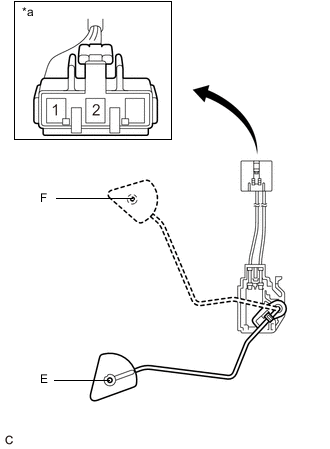
Text in Illustration *a Front view of wire harness connector
(to Fuel Sender Gauge Assembly)
Remove the fuel sender gauge assembly (See page for 2ZR-FXE, Click here for 5ZR-FXE).
-
Check that the float moves smoothly between F and E.
-
Check if the fuel sender gauge arm is deformed.
-
Measure the resistance according to the value(s) in the table below.
Standard Resistance Tester Connection Condition Specified Condition 1 - 2 Float level is F (upper) 13.5 to 16.5 Ω 1 - 2 Float level is between F (upper) and E (lower) 13.5 to 414.5 Ω (Gradually changes) 1 - 2 Float level is E (lower) 405.5 to 414.5 Ω Result Result Proceed to OK A NG (for 2ZR-FXE) B NG (for 5ZR-FXE) C
A
REPLACE COMBINATION METER ASSEMBLY Click here
B
REPLACE FUEL SENDER GAUGE ASSEMBLY Click here
C
REPLACE FUEL SENDER GAUGE ASSEMBLY Click here
-