METER / GAUGE SYSTEM, Diagnostic DTC:B1500
| DTC Code | DTC Name |
|---|---|
| B1500 | Fuel Sender Open Detected |
DESCRIPTION
This DTC is stored when the combination meter assembly detects a fuel sender gauge malfunction via a direct line.
| DTC No. | DTC Detection Condition | Trouble Area |
|---|---|---|
| B1500 | When IG voltage is 9.5 V or more and the following condition is detected:
|
|
WIRING DIAGRAM
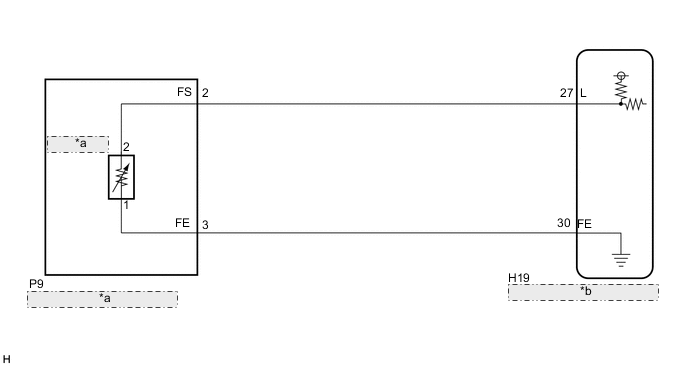
| *a | Fuel Sender Gauge Assembly |
| *b | Combination Meter Assembly |
PROCEDURE
-
READ VALUE USING INTELLIGENT TESTER (FUEL INPUT)
-
Connect the intelligent tester to the DLC3.
-
Turn the power switch on (IG).
-
Turn the intelligent tester on.
-
Enter the following menus: Body / Combination Meter / Data List.
-
Check the values by referring to the table below.
Combination Meter Tester Display Measurement Item/Range Normal Condition Diagnostic Note Fuel Input*1 Fuel input signal/Min.: 0, Max.: 127.5 Fuel indicates F: 39.6 Unit: Liter Fuel indicates 3/4: 31.0 Fuel indicates 1/2: 22.8 Fuel indicates 1/4: 14.3 Fuel indicates E: 5.1 Fuel Input*2 Fuel input signal/Min.: 0, Max.: 127.5 10th segment comes on: 39.6 to 45 Unit: Liter 9th segment comes on: 35.7 to 39.6 8th segment comes on: 31.8 to 35.7 7th segment comes on: 27.9 to 31.8 6th segment comes on: 24.0 to 27.9 5th segment comes on: 20.1 to 24.0 4th segment comes on: 16.2 to 20.1 3rd segment comes on: 12.3 to 16.2 2nd segment comes on: 8.4 to 12.3 1st segment comes on: 4.5 to 8.4
-
*1: for Multi-information Display (Monochrome Type)
-
*2: for Multi-information Display (Color Type)
Result Result Proceed to Fuel level data can be displayed on the intelligent tester and DTC B1500 is output. A Fuel level data cannot be displayed on the intelligent tester. B -
A 
REPLACE COMBINATION METER ASSEMBLY Click here
B 
-
-
INSPECT FUEL SENDER GAUGE ASSEMBLY
-
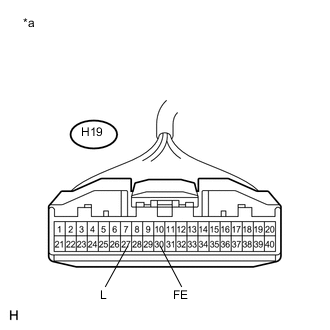
Text in Illustration *a Front view of wire harness connector
(to Combination Meter Assembly)
Disconnect the H19 combination meter assembly connector.
-
Measure the resistance according to the value(s) in the table below.
Standard Resistance Tester Connection Condition Specified Condition H19-27 (L) - H19-30 (FE) Always 13.5 to 414.5 Ω
OK
REPLACE COMBINATION METER ASSEMBLY Click here
NG
-
-
CHECK HARNESS AND CONNECTOR (COMBINATION METER ASSEMBLY - FUEL SENDER GAUGE ASSEMBLY)
-
Disconnect the P9 fuel sender gauge assembly connector.
-
Measure the resistance according to the value(s) in the table below.
Standard Resistance Tester Connection Condition Specified Condition H19-27 (L) - P9-2 (FS) Always Below 1 Ω H19-27 (L) - Body ground Always 10 kΩ or higher H19-30 (FE) - P9-3 (FE) Always Below 1 Ω H19-30 (FE) - Body ground Always 10 kΩ or higher
NG
REPAIR OR REPLACE HARNESS OR CONNECTOR
OK
-
-
INSPECT FUEL SENDER GAUGE ASSEMBLY
-
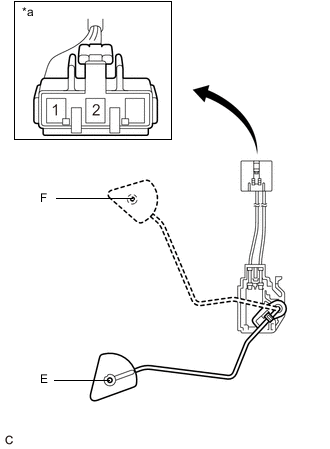
Text in Illustration *a Front view of wire harness connector
(to Fuel Sender Gauge Assembly)
Remove the fuel sender gauge assembly (See page for 2ZR-FXE, Click here for 5ZR-FXE).
-
Check that the float moves smoothly between E and F.
-
Measure the resistance according to the value(s) in the table below.
Standard Resistance Tester Connection Condition Specified Condition 1 - 2 Float level is F (upper) 13.5 to 16.5 Ω 1 - 2 Float level is between F (upper) and E (lower) 13.5 to 414.5 Ω (Gradually changes) 1 - 2 Float level is E (lower) 405.5 to 414.5 Ω Result Result Proceed to OK A NG (for 2ZR-FXE) B NG (for 5ZR-FXE) C
A
REPLACE COMBINATION METER ASSEMBLY Click here
B
REPLACE FUEL SENDER GAUGE ASSEMBLY Click here
C
REPLACE FUEL SENDER GAUGE ASSEMBLY Click here
-