REAR DOOR LOCK INSTALLATION
PROCEDURE
-
INSTALL REAR DOOR LOCK ASSEMBLY (w/o Double Locking System)
Note
-
When reusing the removed rear door lock assembly, replace the door lock wiring harness seal on the connector with a new one.
-
Do not allow grease or dust to contact the door lock wiring harness seal surface of the connector.
-
Reusing the door lock wiring harness seal or using a damaged door lock wiring harness seal may cause water intrusion. This may result in a malfunction of the rear door lock assembly.
-
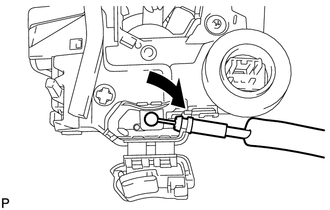
Install the rear door inside locking cable assembly.
-
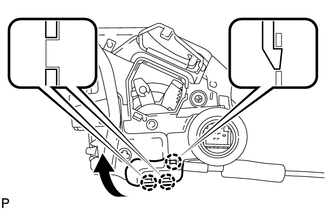
Engage the 3 claws.
-
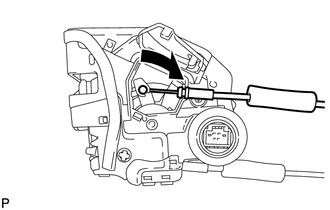
Install the rear door lock remote control cable assembly.
-
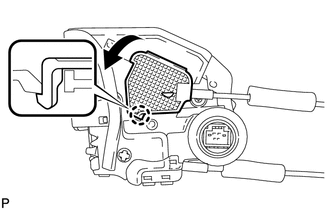
Engage the claw.
-
Apply MP grease to the sliding parts of the rear door lock assembly.
-
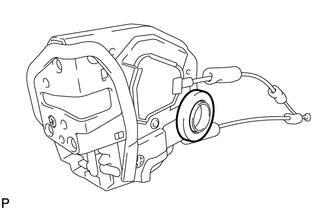
Install a new door lock wiring harness seal to the rear door lock assembly.
-
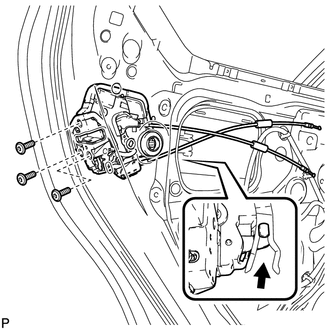
Insert the rear door lock assembly to the rear door outside handle release plate, and set it to the rear door panel.
-
Make sure that the rear door outside handle frame release plate is securely connected to the rear door lock assembly.
-
Using a T30 "TORX" socket wrench, install the rear door lock assembly with the 3 screws.
- Torque:
- 5.0 N*m { 51 kgf*cm, 44 in.*lbf }
-
-
INSTALL REAR DOOR LOCK ASSEMBLY (w/ Double Locking System)
Note
-
When reusing the removed rear door lock assembly, replace the door lock wiring harness seal on the connector with a new one.
-
Do not allow grease or dust to contact the door lock wiring harness seal surface of the connector.
-
Reusing the door lock wiring harness seal or using a damaged door lock wiring harness seal may cause water intrusion. This may result in a malfunction of the rear door lock assembly.
-
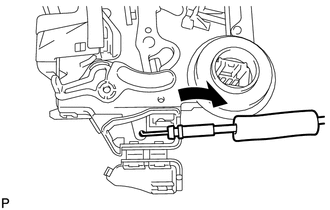
Install the rear door inside locking cable assembly.
-
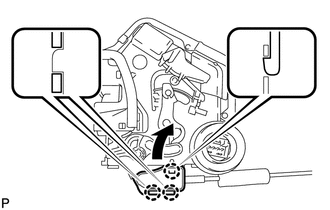
Engage the 3 claws.
-
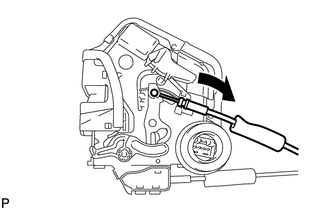
Install the rear door lock remote control cable assembly.
-
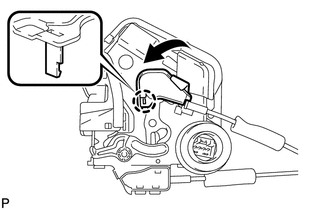
Engage the claw.
-
Apply MP grease to the sliding parts of the rear door lock assembly.
-
Install a new door lock wiring harness seal to the rear door lock assembly.
-
Insert the rear door lock assembly to the rear door outside handle release plate, and set it to the rear door panel.
-
Make sure that the rear door outside handle frame release plate is securely connected to the rear door lock assembly.
-
Using a T30 "TORX" socket wrench, install the rear door lock assembly with the 3 screws.
- Torque:
- 5.0 N*m { 51 kgf*cm, 44 in.*lbf }
-
-
INSTALL REAR DOOR GLASS SUB-ASSEMBLY
-
INSTALL REAR DOOR QUARTER WINDOW GLASS
-
INSTALL REAR DOOR WINDOW DIVISION BAR SUB-ASSEMBLY
-
INSTALL NO. 1 REAR DOOR VENT SEAL
-
INSTALL REAR DOOR GLASS RUN
-
INSTALL REAR DOOR WEATHERSTRIP
-
INSTALL REAR DOOR CHECK ASSEMBLY
-
INSTALL REAR DOOR SERVICE HOLE COVER
-
INSTALL REAR DOOR TRIM BRACKET
-
INSTALL REAR DOOR INNER GLASS WEATHERSTRIP
-
INSTALL REAR DOOR TRIM BOARD SUB-ASSEMBLY
-
INSTALL REAR DOOR ARMREST COVER
-
INSTALL REAR POWER WINDOW REGULATOR SWITCH ASSEMBLY WITH REAR DOOR ARMREST BASE PANEL
-
INSTALL REAR DOOR REAR FRAME BRACKET
-
INSTALL REAR DOOR INSIDE HANDLE BEZEL PLUG
-
CONNECT CABLE TO NEGATIVE BATTERY TERMINAL
Note
When disconnecting the cable, some systems need to be initialized after the cable is reconnected Click here.
-
INSTALL REAR FLOOR BOARD UPPER NO. 3 PLATE
-
INSTALL DECK FLOOR BOX RH
-
INSTALL REAR NO. 3 FLOOR BOARD
-
INSTALL REAR DECK FLOOR BOX
-
INSTALL REAR NO. 2 FLOOR BOARD
-
INITIALIZE POWER WINDOW CONTROL SYSTEM