ULTRASONIC SENSOR(for Rear Side) INSTALLATION
PROCEDURE
-
INSTALL NO. 1 ULTRASONIC SENSOR RETAINER
Tech Tips
-
Perform this step only when necessary.
-
If a No. 1 ultrasonic sensor retainer has been removed, replace it with a new one.
-
Use the same procedure for all No. 1 ultrasonic sensor retainers.
-
Clean the rear bumper assembly surface.
-
Remove any remaining double-sided tape from the rear bumper assembly.
-
Wipe off any tape adhesive residue with cleaner.
-
-
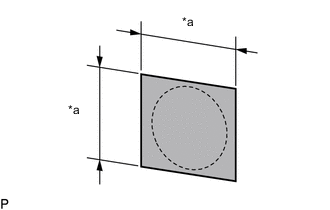
Text in Illustration *a 16 mm (0.630 in.) Cover the sensor installation hole with a 16 mm (0.630 in.) square piece of tape.
Tech Tips
The illustration is for the LH side. The orientation for the RH side is the opposite of the LH side.
-
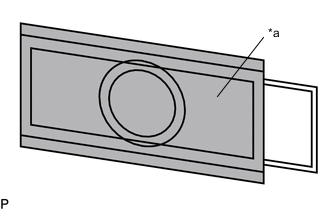
Text in Illustration *a Primer Using a brush or felt, apply primer or equivalent to the No. 1 ultrasonic sensor retainer installation area.
Note
-
Use a clean brush or felt.
-
Do not touch the rear bumper assembly until the primer has dried.
Tech Tips
The illustration is for the LH side. The orientation for the RH side is the opposite of the LH side.
-
-
Confirm that the primer has completely dried by touching the rear bumper assembly. Then remove the tape.
-
Peel off the release paper from a new No. 1 ultrasonic sensor retainer.
-
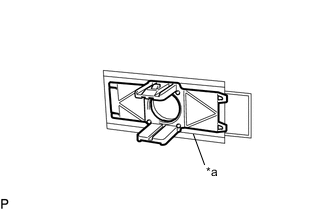
Text in Illustration *a Scribed Line Align the No. 1 ultrasonic sensor retainer with the scribed line on the rear bumper assembly and install it as shown in the illustration.
Note
-
Ensure that the No. 1 ultrasonic sensor retainer is inside the scribed line.
-
The double-sided tape of a No. 1 ultrasonic sensor retainer will deteriorate if it is detached. Make sure to replace the No. 1 ultrasonic sensor retainer with a new one when reattachment is necessary.
Tech Tips
-
The illustration is for the LH side. The orientation for the RH side is the opposite of the LH side.
-
Press the No. 1 ultrasonic sensor retainer with a force of 30 N (3.0 kgf) for 3 seconds and install the No. 1 ultrasonic sensor retainer firmly so that there is no clearance between the No. 1 ultrasonic sensor retainer and rear bumper assembly.
-
-
-
INSTALL NO. 1 ULTRASONIC SENSOR
-
INSTALL ULTRASONIC SENSOR CLIP (for Corner Sensor)
Tech Tips
Use the same procedure for all ultrasonic sensor clips.
-
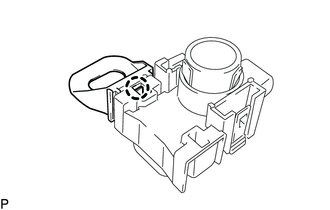
Engage the claw to install the ultrasonic sensor clip to the No. 1 ultrasonic sensor.
Tech Tips
This illustration is for the LH side. The orientation for the RH side is the opposite of the LH side.
-
-
INSTALL ULTRASONIC SENSOR CLIP (for Back Sensor)
Tech Tips
Use the same procedure for all ultrasonic sensor clips.
-
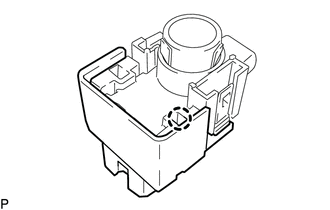
Engage the claw to install the ultrasonic sensor clip to the No. 1 ultrasonic sensor.
Tech Tips
This illustration is for the LH side. The orientation for the RH side is the opposite of the LH side.
-
-
INSTALL ULTRASONIC SENSOR WITH CLIP
Tech Tips
Use the same procedure for all ultrasonic sensor with clips.
-
Engage the 2 claws to install the ultrasonic sensor with clip to the No. 1 ultrasonic sensor retainer.
-
Engage the clamp and connect the connector.
-
-
INSTALL REAR BUMPER ASSEMBLY