DYNAMIC RADAR CRUISE CONTROL SYSTEM ROAD TEST
-
PROBLEM SYMPTOM CONFIRMATION
Tech Tips
The dynamic radar cruise control system has two cruise control modes: constant speed control mode and vehicle-to-vehicle distance control mode.
-
Vehicle-to-vehicle distance control mode is always selected when starting up the dynamic radar cruise control system.
-
Operation of constant speed control mode is the same as that for a conventional cruise control system.
-
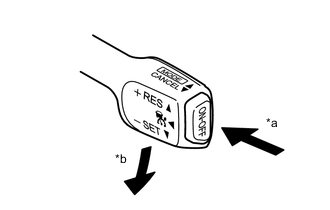
Text in Illustration *a ON/OFF *b -/SET Inspect the SET function.
-
Turn the cruise control switch (ON-OFF button) on.
-
Check that the cruise control indicator light illuminates on the combination meter assembly.
-
Drive at a speed between 50 km/h (30 mph) and 170 km/h (105 mph).
-
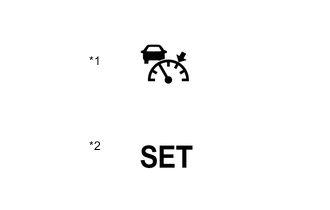
Text in Illustration *1 Cruise Control Indicator Light
(Vehicle-to-vehicle distance control mode)
*2 Cruise Control SET Indication Push the cruise control switch to -/SET.
-
Check that cruise control SET indication and the cruise control set speed are displayed on the multi-information display.
-
After releasing the switch, check that the vehicle cruises at the set speed.
-
-
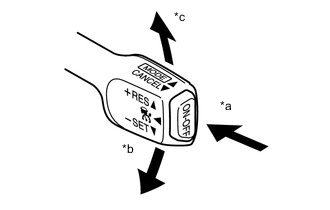
Text in Illustration *a ON/OFF *b -/SET *c +/RES Inspect the + (ACCEL) function.
-
Turn the cruise control switch (ON-OFF button) on.
-
Drive at a speed between approximately 50 km/h (30 mph) and 170 km/h (105 mph).
-
Push the cruise control switch to -/SET.
-
Check that vehicle speed increases while the cruise control switch is pushed to +/RES, and that the vehicle cruises at the newly set speed when the switch is released.
-
Push the cruise control switch to +/RES and then release it immediately. Check that the vehicle speed increases* (tap-up control).
Tech Tips
*: Constant speed control mode: increases by approximately 1.6 km/h (1 mph); vehicle-to-vehicle distance control mode: increases by approximately 1 km/h (1 mph) or 5 km/h (5 mph).
-
-
Text in Illustration *a ON/OFF *b -/SET Inspect the - (COAST) function.
-
Turn the cruise control switch (ON-OFF button) on.
-
Drive at a speed between approximately 50 km/h (30 mph) and 170 km/h (105 mph).
-
Push the cruise control switch to -/SET.
-
Check that vehicle speed decreases while the cruise control switch is pushed to -/SET, and the vehicle cruises at the newly set speed when the switch is released.
-
Push the cruise control switch to -/SET, and then release it immediately. Check that the vehicle speed decreases* (tap-down control).
Tech Tips
*: Constant speed control mode: decreases by approximately 1.6 km/h (1 mph); vehicle-to-vehicle distance control mode: decreases by approximately 1 km/h (1 mph) or 5 km/h (5 mph).
-
-
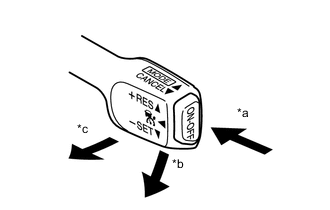
Text in Illustration *a ON/OFF *b -/SET *c CANCEL Inspect the CANCEL function.
-
Turn the cruise control switch (ON-OFF button) on.
-
Drive at a speed between approximately 50 km/h (30 mph) and 170 km/h (105 mph).
-
Push the cruise control switch to -/SET.
-
When performing any one of the following, check that the cruise control system is canceled and that the normal driving mode is reset.
-
Depressing the brake pedal
-
Moving the shift lever from D to any other position
-
Pulling the cruise control switch to CANCEL
-
Turning the cruise control switch off (the stored vehicle speed in the driving support ECU is not maintained)
-
-
-
Text in Illustration *a ON/OFF *b -/SET *c +/RES Inspect the RES (RESUME) function.
-
Turn the cruise control switch (ON-OFF button) on.
-
Drive at a speed between approximately 50 km/h (30 mph) and 170 km/h (105 mph).
-
Push the cruise control switch to -/SET.
-
Cancel the cruise control system by performing any of the above operations (other than turning the cruise control switch off).
-
After pushing the cruise control switch to +/RES at a driving speed of more than approximately 40 km/h (25 mph), check that the vehicle resumes the speed set prior to the cancellation and that "SET" is also displayed on the multi-information display.
Tech Tips
The stored vehicle speed is retained even if vehicle speed drops below approximately 40 km/h (25 mph) once. The previously stored vehicle speed can be resumed by pushing the cruise control switch to +/RES when the vehicle speed has returns to approximately 40 km/h (25 mph) or more.
-
-