HYBRID CONTROL SYSTEM, Diagnostic DTC:P0A94-127
| DTC Code | DTC Name |
|---|---|
| P0A94-127 | DC / DC Converter Performance |
DESCRIPTION
For a description of the boost converter Click here.
If a malfunction occurs in the boost converter, the MG ECU detects it and transmits this information to the power management control ECU (HV CPU).
| DTC No. | INF Code | DTC Detection Condition | Trouble Area |
|---|---|---|---|
| P0A94 | 127 | Boost converter overvoltage signal detection (overvoltage due to system malfunction) |
|
WIRING DIAGRAM
Refer to the wiring diagram for DTC P0A1A-200 Click here.
Refer to the wiring diagram for DTC P324E-788 Click here.
Refer to the wiring diagram for DTC U0110-159 Click here.
CAUTION / NOTICE / HINT
CAUTION:
-
Before inspecting the high-voltage system or disconnecting the low voltage connector of the inverter with converter assembly, take safety precautions such as wearing insulated gloves and removing the service plug grip to prevent electrical shocks. After removing the service plug grip, put it in your pocket to prevent other technicians from accidentally reconnecting it while you are working on the high-voltage system.
-
After removing the service plug grip, wait for at least 10 minutes before touching any of the high-voltage connectors or terminals. After waiting for 10 minutes, check the voltage at the terminals in the inspection point in the inverter with converter assembly. The voltage should be 0 V before beginning work Click here.
Tech Tips
Waiting for at least 10 minutes is required to discharge the high-voltage capacitor inside the inverter with converter assembly.
Note
After turning the power switch off, waiting time may be required before disconnecting the cable from the negative (-) auxiliary battery terminal. Therefore, make sure to read the disconnecting the cable from the negative (-) auxiliary battery terminal notices before proceeding with work Click here.
PROCEDURE
-
CHECK DTC OUTPUT (HYBRID CONTROL)
-
Connect the intelligent tester to the DLC3.
-
Turn the power switch on (IG).
-
Enter the following menus: Powertrain / Hybrid Control / DTC.
-
Check if DTCs are output.
Result Result Proceed to DTC P0A94-127 only is output. A Any of the following DTCs are also output. B DTC No. Relevant Diagnosis P0A1A (all INF codes)*1 Generator Control Module P0A1B (all INF codes)*1 Drive Motor "A" Control Module P0A1D (all INF codes)*1 Hybrid Powertrain Control Module P0A3F-243 Drive Motor "A" Position Sensor Circuit P0A40-500 Drive Motor "A" Position Sensor Circuit Range / Performance P0A41-245 Drive Motor "A" Position Sensor Circuit Low P0A4B-253 Generator Position Sensor Circuit P0A4C-513 Generator Position Sensor Circuit Range / Performance P0A4D-255 Generator Position Sensor Circuit Low P0A60 (all INF codes)*1 Drive Motor "A" Phase V Current P0A63 (all INF codes)*1 Drive Motor "A" Phase W Current P0A72 (all INF codes)*1 Generator Phase V Current P0A75 (all INF codes)*1 Generator Phase W Current P0A78-113, 128, 266, 267, 279, 284, 286, 287, 306, 503, 504, 505, 506, 586, 806, 807, 808 Drive Motor "A" Inverter Performance P0A7A-122, 130, 322, 324, 325, 344, 517, 518, 809, 810, 811 Generator Inverter Performance P0A90-509 Drive Motor "A" Performance P0A92-521 Hybrid Generator Performance P0A94-172, 442, 547, 548, 549, 553, 554, 555, 556, 557, 564, 585, 587, 589, 590 DC / DC Converter Performance P0AA6-526 Hybrid Battery Voltage System Isolation Fault P0ADB-227 Hybrid Battery Positive Contactor Control Circuit Low P0ADC-226 Hybrid Battery Positive Contactor Control Circuit High P0ADF-229 Hybrid Battery Negative Contactor Control Circuit Low P0AE0-228 Hybrid Battery Negative Contactor Control Circuit High P0C76-523 Hybrid Battery System Discharge Time Too Long P3004-803 Power Cable Malfunction Tech Tips
-
*1: If any INF codes are output for this DTC, refer to the corresponding diagnostic procedure.
-
P0A94-127 may be set due to a malfunction which also causes DTCs in the preceding table to be set. In this case, first troubleshoot the output DTCs in the preceding table. Then, perform a test to attempt to reproduce the problems, and check that no DTCs are output.
-
-
Turn the power switch off.
B 
GO TO DTC CHART (HYBRID CONTROL SYSTEM) Click here
A 
-
-
CHECK CONNECTOR CONNECTION CONDITION (INVERTER WITH CONVERTER ASSEMBLY CONNECTOR)
CAUTION:
Be sure to wear insulated gloves.
-
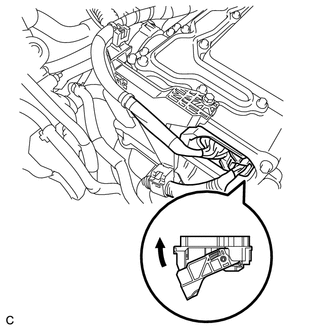
Check that the service plug grip is not installed.
Note
After removing the service plug grip, do not turn the power switch on (READY), unless instructed by the repair manual because this may cause a malfunction.
Note
Before disconnecting the connector, confirm that it is properly connected by checking that the locking claws are engaged and that the connector does not pull out.
-
Check the connection of the low voltage connector of the inverter with converter assembly.
OK The connector is connected securely and there are no contact problems. Tech Tips
When connecting the connector, insert it with the locking lever in the raised position. Rotate the lever downward and make sure that the connector is pulled into its socket. When the locking lever is in its fully closed position, a click will be heard as its locking claws engage. After the click is heard, pull up on the connector to confirm that it is properly connected.
NG
CONNECT SECURELY
OK
-
-
CHECK HARNESS AND CONNECTOR (INVERTER WITH CONVERTER ASSEMBLY - GENERATOR RESOLVER)
CAUTION:
Be sure to wear insulated gloves.
-
Disconnect the low voltage connector D28 from the inverter with converter assembly.
-
Turn the power switch on (IG).
-
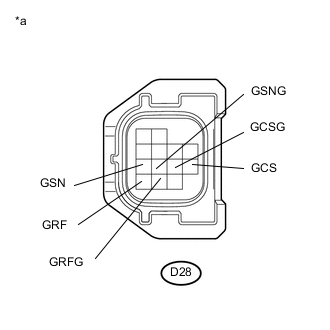
Text in Illustration *a Front view of wire harness connector
(to Inverter with Converter Assembly)
Measure the voltage according to the value(s) in the table below.
Standard Voltage Tester Connection Switch Condition Specified Condition D28-11 (GRF) - Body ground Power switch on (IG) Below 1 V D28-12 (GRFG) - Body ground Power switch on (IG) Below 1 V D28-7 (GSN) - Body ground Power switch on (IG) Below 1 V D28-8 (GSNG) - Body ground Power switch on (IG) Below 1 V D28-10 (GCS) - Body ground Power switch on (IG) Below 1 V D28-9 (GCSG) - Body ground Power switch on (IG) Below 1 V Note
Turning the power switch on (IG) with the low voltage connector of the inverter with converter assembly disconnected causes other DTCs to be stored. Clear the DTCs after performing this inspection.
-
Turn the power switch off.
-
Connect the low voltage connector from the inverter with converter assembly.
NG
REPAIR OR REPLACE HARNESS OR CONNECTOR
OK
-
-
CHECK GENERATOR RESOLVER
-
Disconnect the low voltage connector D28 from the inverter with converter assembly.
-
Text in Illustration *a Front view of wire harness connector
(to Inverter with Converter Assembly)
Measure the resistance according to the value(s) in the table below.
Standard Resistance (Check for Open) Tester Connection Switch Condition Specified Condition D28-11 (GRF) - D28-12 (GRFG) Power switch off 7.1 to 21.6 Ω D28-7 (GSN) - D28-8 (GSNG) Power switch off 13.7 to 34.5 Ω D28-10 (GCS) - D28-9 (GCSG) Power switch off 12.8 to 32.4 Ω Standard Resistance (Check for Short) Tester Connection Switch Condition Specified Condition D28-11 (GRF) or D28-12 (GRFG) - Body ground and other terminals Power switch off 1 MΩ or higher D28-7 (GSN) or D28-8 (GSNG) - Body ground and other terminals Power switch off 1 MΩ or higher D28-10 (GCS) or D28-9 (GCSG) - Body ground and other terminals Power switch off 1 MΩ or higher -
Connect the inverter with converter assembly connector.
NG 
CHECK CONNECTOR CONNECTION CONDITION (GENERATOR RESOLVER CONNECTOR) Click here
OK
-
-
CHECK HARNESS AND CONNECTOR (INVERTER WITH CONVERTER ASSEMBLY - MOTOR RESOLVER)
CAUTION:
Be sure to wear insulated gloves.
-
Disconnect the low voltage connector D28 from the inverter with converter assembly.
-
Turn the power switch on (IG).
-
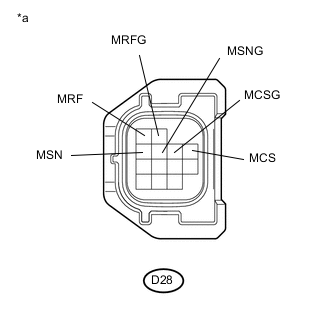
Text in Illustration *a Front view of wire harness connector
(to Inverter with Converter Assembly)
Measure the voltage according to the value(s) in the table below.
Standard Voltage Tester Connection Switch Condition Specified Condition D28-1 (MRF) - Body ground Power switch on (IG) Below 1 V D28-2 (MRFG) - Body ground Power switch on (IG) Below 1 V D28-3 (MSN) - Body ground Power switch on (IG) Below 1 V D28-4 (MSNG) - Body ground Power switch on (IG) Below 1 V D28-6 (MCS) - Body ground Power switch on (IG) Below 1 V D28-5 (MCSG) - Body ground Power switch on (IG) Below 1 V Note
Turning the power switch on (IG) with the low voltage connector of the inverter with converter assembly disconnected causes other DTCs to be stored. Clear the DTCs after performing this inspection.
-
Turn the power switch off.
-
Connect the inverter with converter assembly connector.
NG
REPAIR OR REPLACE HARNESS OR CONNECTOR
OK
-
-
CHECK MOTOR RESOLVER
-
Disconnect the low voltage connector D28 from the inverter with converter assembly.
-
Text in Illustration *a Front view of wire harness connector
(to Inverter with Converter Assembly)
Measure the resistance according to the value(s) in the table below.
Standard Resistance (Check for Open) Tester Connection Switch Condition Specified Condition D28-1 (MRF) - D28-2 (MRFG) Power switch off 7.1 to 21.6 Ω D28-3 (MSN) - D28-4 (MSNG) Power switch off 13.7 to 34.5 Ω D28-6 (MCS) - D28-5 (MCSG) Power switch off 12.8 to 32.4 Ω Standard Resistance (Check for Short) Tester Connection Switch Condition Specified Condition D28-1 (MRF) or D28-2 (MRFG) - Body ground and other terminals Power switch off 1 MΩ or higher D28-3 (MSN) or D28-4 (MSNG) - Body ground and other terminals Power switch off 1 MΩ or higher D28-6 (MCS) or D28-5 (MCSG) - Body ground and other terminals Power switch off 1 MΩ or higher -
Connect the inverter with converter assembly connector.
NG
CHECK CONNECTOR CONNECTION CONDITION (MOTOR RESOLVER CONNECTOR) Click here
OK
-
-
CHECK INVERTER WITH CONVERTER ASSEMBLY (GENERATOR CABLE CONNECTION CONDITION)
CAUTION:
Be sure to wear insulated gloves.
-
Check that the service plug grip is not installed.
Note
After removing the service plug grip, do not turn the power switch on (READY), unless instructed by the repair manual because this may cause a malfunction.
-
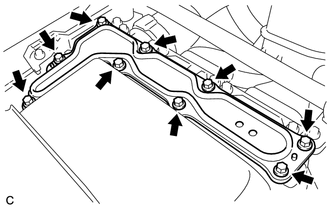
Remove the inverter cover from the inverter with converter assembly.
-
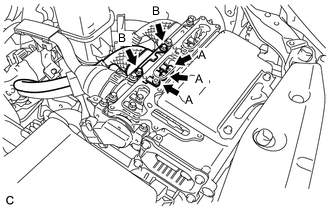
Check that the bolts for the generator cable are tightened to the specified torque, the generator cable is connected securely, and there are no contact problems.
Specified Condition Bolt A T=8.0 N*m {82 kgf*cm, 71 in.*lbf} Bolt B T=9.2 N*m {94 kgf*cm, 81 in.*lbf} Note
-
Make sure that the tightening torque of the bolt A is between 6.4 and 9.6 N*m (65 and 98 kgf*cm, 57 and 85 in.*lbf).
-
Make sure that the tightening torque of the bolt B is between 6.4 and 12 N*m (65 and 122 kgf*cm, 57 and 106 in.*lbf).
-
-
Disconnect the generator cable from the inverter with converter assembly.
-
Check for arc marks at the bolts for the generator cable.
Result Result Proceed to The terminals are connected securely and there are no contact problems. There are no arc marks. A The terminals are not connected securely and there is a contact problem. There are arc marks. B The terminals are not connected securely and there is a contact problem. There are no arc marks. C The terminals are connected securely and there are no contact problems. There are arc marks. B -
Connect the generator cable to the inverter with converter assembly.
-
Install the inverter cover.
B
REPLACE MALFUNCTIONING PARTS
C
CONNECT SECURELY
A
-
-
CHECK INVERTER WITH CONVERTER ASSEMBLY (MOTOR CABLE CONNECTION CONDITION)
CAUTION:
Be sure to wear insulated gloves.
-
Check that the service plug grip is not installed.
Note
After removing the service plug grip, do not turn the power switch on (READY), unless instructed by the repair manual because this may cause a malfunction.
-
Remove the inverter cover from the inverter with converter assembly.
-
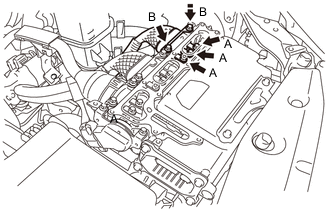
Check that the bolts for the motor cable are tightened to the specified torque, the motor cable is connected securely, and there are no contact problems.
Specified Condition Bolt A T=8.0 N*m {82 kgf*cm, 71 in.*lbf} Bolt B T=9.2 N*m {94 kgf*cm, 81 in.*lbf} Note
-
Make sure that the tightening torque of the bolt A is between 6.4 and 9.6 N*m (65 and 98 kgf*cm, 57 and 85 in.*lbf).
-
Make sure that the tightening torque of the bolt B is between 6.4 and 12 N*m (65 and 122 kgf*cm, 57 and 106 in.*lbf).
-
-
Disconnect the motor cable from the inverter with converter assembly.
-
Check for arc marks at the bolts for the motor cable.
Result Result Proceed to The terminals are connected securely and there are no contact problems. There are no arc marks. A The terminals are not connected securely and there is a contact problem. There are arc marks. B The terminals are not connected securely and there is a contact problem. There are no arc marks. C The terminals are connected securely and there are no contact problems. There are arc marks. B -
Connect the motor cable to the inverter with converter assembly.
-
Install the inverter cover.
B
REPLACE MALFUNCTIONING PARTS
C
CONNECT SECURELY
A
-
-
CHECK HYBRID VEHICLE TRANSAXLE ASSEMBLY (MG1)
CAUTION:
Be sure to wear insulated gloves.
-
Check that the service plug grip is not installed.
Note
After removing the service plug grip, do not turn the power switch on (READY), unless instructed by the repair manual because this may cause a malfunction.
-
Remove the inverter cover from the inverter with converter assembly.
-
Disconnect the generator cable and motor cable from the inverter with converter assembly.
-
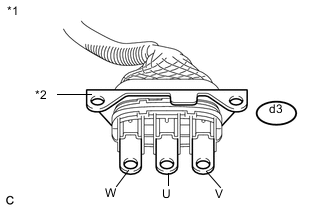
Text in Illustration *1 Generator Cable *2 Shield Ground Check MG1 for an interphase short using a milliohmmeter.
-
Using a milliohmmeter, measure the resistance according to the value(s) in the table below.
Tech Tips
If the MG1 temperature is high, the resistance will vary greatly from the specification. Therefore, measure the resistance at least 8 hours after the vehicle is stopped.
Standard Resistance Tester Connection Switch Condition Specified Condition d3-1 (W) - d3-2 (U) Power switch off 89.5 to 98.9 mΩ d3-2 (U) - d3-3 (V) Power switch off 89.5 to 98.9 mΩ d3-3 (V) - d3-1 (W) Power switch off 89.5 to 98.9 mΩ Tech Tips
To correct the variation of the measured resistance due to temperature, use the following formula to calculate the resistance at 20°C (68°F).
-
R20 = Rt / {1 + 0.00393 X (T - 20)}
The calculation is based on the following:
-
R20: Resistance at 20°C (68°F) (mΩ)
-
Rt: Measured resistance (mΩ)
-
T: Temperature when the resistance is measured (°C)
-
-
-
Using a megohmmeter set to 500 V, measure the resistance according to the value(s) in the table below.
Note
Be sure to set the megohmmeter to 500 V when performing this test. Using a setting higher than 500 V can result in damage to the component being inspected.
Standard Resistance Tester Connection Switch Condition Specified Condition d3-1 (W) - Body ground and shield ground Power switch off 100 MΩ or higher d3-2 (U) - Body ground and shield ground Power switch off 100 MΩ or higher d3-3 (V) - Body ground and shield ground Power switch off 100 MΩ or higher -
Connect the generator cable and motor cable.
-
Install the inverter cover.
NG
CHECK HYBRID VEHICLE TRANSAXLE ASSEMBLY (GENERATOR CABLE CONNECTION CONDITION) Click here
OK
-
-
CHECK HYBRID VEHICLE TRANSAXLE ASSEMBLY (MG2)
CAUTION:
Be sure to wear insulated gloves.
-
Check that the service plug grip is not installed.
Note
After removing the service plug grip, do not turn the power switch on (READY), unless instructed by the repair manual because this may cause a malfunction.
-
Remove the inverter cover from the inverter with converter assembly.
-
Disconnect the generator cable and motor cable from the inverter with converter assembly.
-
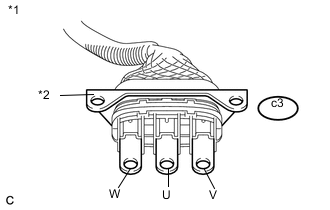
Text in Illustration *1 Motor Cable *2 Shield Ground Check MG2 for an interphase short using a milliohmmeter.
-
Using a milliohmmeter, measure the resistance according to the value(s) in the table below.
Tech Tips
If the MG2 temperature is high, the resistance will vary greatly from the specification. Therefore, measure the resistance at least 8 hours after the vehicle is stopped.
Standard Resistance Tester Connection Switch Condition Specified Condition c3-1 (W) - c3-2 (U) Power switch off 152.6 to 169.0 mΩ c3-2 (U) - c3-3 (V) Power switch off 157.6 to 174.0 mΩ c3-3 (V) - c3-1 (W) Power switch off 151.6 to 168.0 mΩ Tech Tips
To correct the variation of the measured resistance due to temperature, use the following formula to calculate the resistance at 20°C (68°F).
-
R20 = Rt / {1 + 0.00393 X (T - 20)}
The calculation is based on the following:
-
R20: Resistance at 20°C (68°F) (mΩ)
-
Rt: Measured resistance (mΩ)
-
T: Temperature when the resistance is measured (°C)
-
-
-
Using a megohmmeter set to 500 V, measure the resistance according to the value(s) in the table below.
Note
Be sure to set the megohmmeter to 500 V when performing this test. Using a setting higher than 500 V can result in damage to the component being inspected.
Standard Resistance Tester Connection Switch Condition Specified Condition c3-1 (W) - Body ground and shield ground Power switch off 100 MΩ or higher c3-2 (U) - Body ground and shield ground Power switch off 100 MΩ or higher c3-3 (V) - Body ground and shield ground Power switch off 100 MΩ or higher -
Connect the generator cable and motor cable.
-
Install the inverter cover.
NG
CHECK HYBRID VEHICLE TRANSAXLE ASSEMBLY (MOTOR CABLE CONNECTION CONDITION) Click here
OK
-
-
CHECK INVERTER WITH CONVERTER ASSEMBLY (HIGH VOLTAGE CONNECTOR CONNECTION CONDITION)
CAUTION:
Be sure to wear insulated gloves.
-
Check that the service plug grip is not installed.
Note
After removing the service plug grip, do not turn the power switch on (READY), unless instructed by the repair manual because this may cause a malfunction.
-
Remove the inverter cover from the inverter with converter assembly.
-
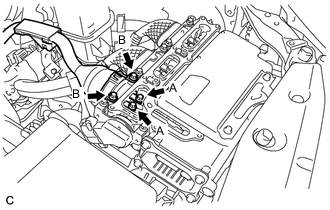
Check that the bolts for the frame wire are tightened to the specified torque, the frame wire is connected securely, and there are no contact problems.
Specified Condition Bolt A T=8.0 N*m {82 kgf*cm, 71 in.*lbf} Bolt B T=9.2 N*m {94 kgf*cm, 81 ft.*lbf} Note
-
Make sure that the tightening torque of the bolt A is between 6.4 and 9.6 N*m (65 and 98 kgf*cm, 57 and 85 in.*lbf).
-
Make sure that the tightening torque of the bolt B is between 6.4 and 12 N*m (65 and 122 kgf*cm, 57 and 106 in.*lbf).
-
-
Disconnect the frame wire from the inverter with converter assembly.
-
Check for arc marks at the bolts for the frame wire.
Result Result Proceed to The terminals are connected securely and there are no contact problems. There are no arc marks. A The terminals are not connected securely and there is a contact problem. There are arc marks. B The terminals are not connected securely and there is a contact problem. There are no arc marks. C The terminals are connected securely and there are no contact problems. There are arc marks. B -
Connect the frame wire to the inverter with converter assembly.
-
Install the inverter cover.
B
REPLACE MALFUNCTIONING PARTS
C
CONNECT SECURELY
A
-
-
CHECK SERVICE PLUG GRIP (CONNECTION CONDITION)
CAUTION:
Be sure to wear insulated gloves.
-
Visually check the connection of the service plug grip to the HV battery. Remove the service plug grip and check for contamination.
OK Dirt or foreign matter has not entered the connection, and there is no evidence of contamination.
NG
REPLACE SERVICE PLUG GRIP Click here
OK
-
-
CHECK SERVICE PLUG GRIP
-
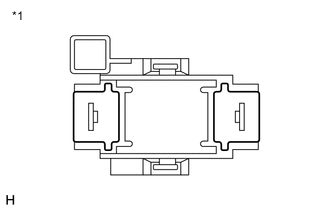
Text in Illustration *1 Service Plug Grip Measure the resistance according to the value(s) in the table below.
Standard Resistance Tester Connection Condition Specified Condition Service plug grip terminals Always Below 1 Ω
NG
REPLACE SERVICE PLUG GRIP Click here
OK
-
-
CHECK FRAME WIRE
CAUTION:
Be sure to wear insulated gloves.
-
Check that the service plug grip is not installed.
Note
After removing the service plug grip, do not turn the power switch on (READY), unless instructed by the repair manual because this may cause a malfunction.
-
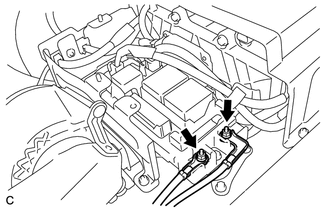
Disconnect the frame wire from the hybrid battery junction block assembly.
-
Remove the inverter cover from the inverter with converter assembly.
-
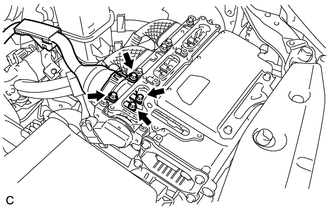
Disconnect the frame wire from the inverter with converter assembly.
-
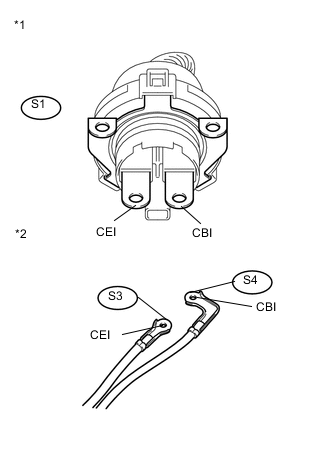
Text in Illustration *1 Frame Wire (Inverter with Converter Assembly Side) *2 Frame Wire (Hybrid Battery Junction Block Assembly Side) Measure the resistance according to the value(s) in the table below.
Standard Resistance Tester Connection Switch Condition Specified Condition S1-2 (CBI) - S4-1 (CBI) (Positive terminal) Power switch off Below 1 Ω S1-1 (CEI) - S3-1 (CEI) (Negative terminal) Power switch off Below 1 Ω -
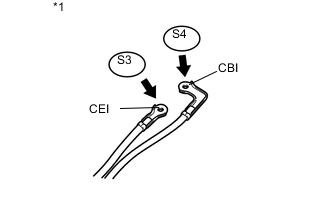
Text in Illustration *1 Frame Wire (Hybrid Battery Junction Block Assembly Side) Using a megohmmeter set to 500 V, measure the resistance according to the value(s) in the table below.
Note
Be sure to set the megohmmeter to 500 V when performing this test. Using a setting higher than 500 V can result in damage to the component being inspected.
Standard Resistance Tester Connection Switch Condition Specified Condition S4-1 (CBI) - Body ground and shielded ground Power switch off 10 MΩ or higher S3-1 (CEI) - Body ground and shielded ground Power switch off 10 MΩor higher S4-1 (CBI) - S3-1 (CEI) Power switch off 10 MΩ or higher -
Connect the frame wire to the hybrid battery junction block assembly.
-
Connect the frame wire to the inverter with converter assembly.
-
Install the inverter cover.
NG
REPLACE FRAME WIRE Click here
OK
-
-
INSPECT HYBRID BATTERY JUNCTION BLOCK ASSEMBLY (SMRB)
CAUTION:
Be sure to wear insulated gloves.
-
Check that the service plug grip is not installed.
Note
After removing the service plug grip, do not turn the power switch on (READY), unless instructed by the repair manual because this may cause a malfunction.
-
Remove the hybrid battery junction block assembly.
-
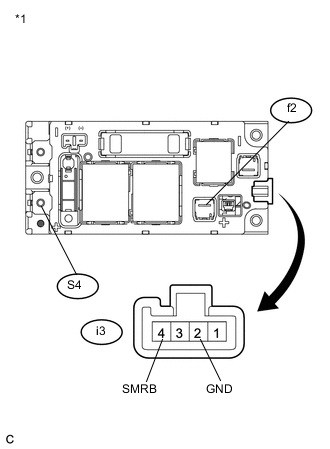
Text in Illustration *1 Hybrid Battery Junction Block Assembly Measure the resistance according to the value(s) in the table below.
Standard Resistance Tester Connection Condition Specified Condition f2-1 (+) - S4-1 (CBI) Auxiliary battery voltage is not applied between terminals i3-4 (SMRB) and i3-2 (GND) 10 kΩ or higher f2-1 (+) - S4-1 (CBI) Auxiliary battery voltage is applied between terminals i3-4 (SMRB) and i3-2 (GND) Below 1 Ω -
Measure the resistance according to the value(s) in the table below.
Standard Resistance Tester Connection Condition Specified Condition i3-4 (SMRB) - i3-2 (GND) -40 to 80°C (-40 to 176°F) 19.0 to 35.5 Ω -
Install the hybrid battery junction block assembly.
NG
REPLACE HYBRID BATTERY JUNCTION BLOCK ASSEMBLY Click here
OK
-
-
INSPECT HYBRID BATTERY JUNCTION BLOCK ASSEMBLY (SMRG)
CAUTION:
Be sure to wear insulated gloves.
-
Check that the service plug grip is not installed.
Note
After removing the service plug grip, do not turn the power switch on (READY), unless instructed by the repair manual because this may cause a malfunction.
-
Remove the hybrid battery junction block assembly.
-
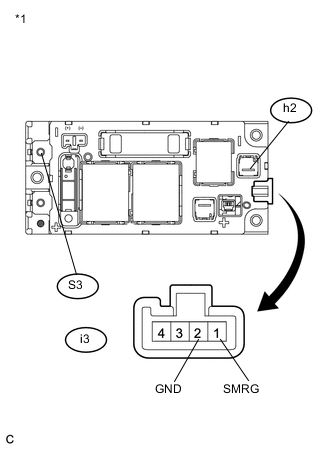
Text in Illustration *1 Hybrid Battery Junction Block Assembly Measure the resistance according to the value(s) in the table below.
Standard Resistance Tester Connection Condition Specified Condition h2-1 (-) - S3-1 (CEI) Auxiliary battery voltage is not applied between terminals i3-1 (SMRG) and i3-2 (GND) 10 kΩ or higher h2-1 (-) - S3-1 (CEI) Auxiliary battery voltage is applied between terminals i3-1 (SMRG) and i3-2 (GND) Below 1 Ω -
Measure the resistance according to the value(s) in the table below.
Standard Resistance Tester Connection Condition Specified Condition i3-1 (SMRG) - i3-2 (GND) -40 to 80°C (-40 to 176°F) 19.0 to 35.5 Ω -
Install the hybrid battery junction block assembly.
NG
REPLACE HYBRID BATTERY JUNCTION BLOCK ASSEMBLY Click here
OK
-
-
CHECK FUSE (PCU)
-
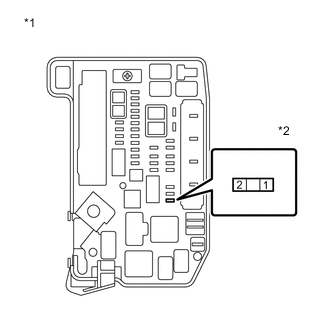
Text in Illustration *1 Engine Room Junction Block Assembly *2 PCU Fuse Remove the PCU fuse from the engine room junction block assembly.
-
Measure the resistance according to the value(s) in the table below.
Standard Resistance Tester Connection Condition Specified Condition PCU fuse terminals Always Below 1 Ω -
Install the PCU fuse.
NG
CHECK HARNESS AND CONNECTOR (INVERTER WITH CONVERTER ASSEMBLY - PCU FUSE) Click here
OK
-
-
CHECK HARNESS AND CONNECTOR (INVERTER WITH CONVERTER ASSEMBLY POWER SOURCE CIRCUIT)
CAUTION:
Be sure to wear insulated gloves.
-
Check that the service plug grip is not installed.
Note
After removing the service plug grip, do not turn the power switch on (READY), unless instructed by the repair manual because this may cause a malfunction.
-
Disconnect connector A62 from the inverter with converter assembly.
-
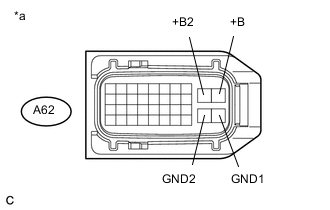
Text in Illustration *a Front view of wire harness connector
(to Inverter with Converter Assembly)
Measure the resistance according to the value(s) in the table below.
Standard Resistance Tester Connection Switch Condition Specified Condition A62-28 (GND1) - Body ground Power switch off Below 1 Ω A62-27 (GND2) - Body ground Power switch off Below 1 Ω -
Turn the power switch on (IG).
-
Measure the voltage according to the value(s) in the table below.
Standard Voltage Tester Connection Switch Condition Specified Condition A62-10 (+B) - Body ground Power switch on (IG) 11 to 14 V A62-9 (+B2) - Body ground Power switch on (IG) 11 to 14 V -
Turn the power switch off.
-
Connect the inverter with converter assembly connector.
NG
REPAIR OR REPLACE POWER SOURCE CIRCUIT
OK
-
-
CHECK HARNESS AND CONNECTOR (POWER MANAGEMENT CONTROL ECU - INVERTER WITH CONVERTER)
CAUTION:
Be sure to wear insulated gloves.
-
Check that the service plug grip is not installed.
Note
After removing the service plug grip, do not turn the power switch on (READY), unless instructed by the repair manual because this may cause a malfunction.
-
Disconnect connector A62 from the inverter with converter assembly.
-
Disconnect connector A20 from the power management control ECU.
-
Measure the resistance according to the value(s) in the table below.
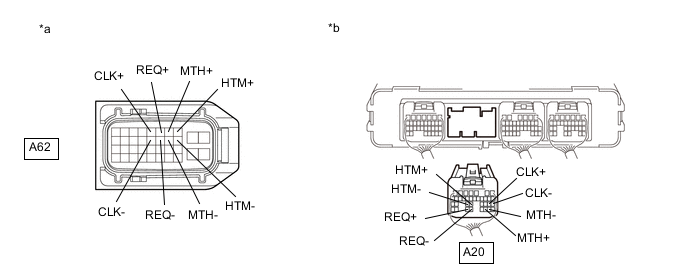
Standard Resistance (Check for Open) Tester Connection Switch Condition Specified Condition A62-8 (HTM+) - A20-24 (HTM+) Power switch off Below 1 Ω A62-18 (HTM-) - A20-25 (HTM-) Power switch off Below 1 Ω A62-7 (MTH+) - A20-30 (MTH+) Power switch off Below 1 Ω A62-17 (MTH-) - A20-29 (MTH-) Power switch off Below 1 Ω A62-6 (REQ+) - A20-33 (REQ+) Power switch off Below 1 Ω A62-16 (REQ-) - A20-32 (REQ-) Power switch off Below 1 Ω A62-5 (CLK+) - A20-21 (CLK+) Power switch off Below 1 Ω A62-15 (CLK-) - A20-20 (CLK-) Power switch off Below 1 Ω Standard Resistance (Check for Short) Tester Connection Switch Condition Specified Condition A62-8 (HTM+) or A20-24 (HTM+) - Body ground and other terminals Power switch off 10 kΩ or higher A62-18 (HTM-) or A20-25 (HTM-) - Body ground and other terminals Power switch off 10 kΩ or higher A62-7 (MTH+) or A20-30 (MTH+) - Body ground and other terminals Power switch off 10 kΩ or higher A62-17 (MTH-) or A20-29 (MTH-) - Body ground and other terminals Power switch off 10 kΩ or higher A62-6 (REQ+) or A20-33 (REQ+) - Body ground and other terminals Power switch off 10 kΩ or higher A62-16 (REQ-) or A20-32 (REQ-) - Body ground and other terminals Power switch off 10 kΩ or higher A62-5 (CLK+) or A20-21 (CLK+) - Body ground and other terminals Power switch off 10 kΩ or higher A62-15 (CLK-) or A20-20 (CLK-) - Body ground and other terminals Power switch off 10 kΩ or higher Text in Illustration *a Front view of wire harness connector
(to Inverter with Converter Assembly)
*b Rear view of wire harness connector
(to Power Management Control ECU)
-
Turn the power switch on (IG).
-
Measure the voltage according to the value(s) in the table below.
Standard Voltage Tester Connection Switch Condition Specified Condition A62-8 (HTM+) or A20-24 (HTM+) - Body ground Power switch on (IG) Below 1 V A62-18 (HTM-) or A20-25 (HTM-) - Body ground Power switch on (IG) Below 1 V A62-7 (MTH+) or A20-30 (MTH+) - Body ground Power switch on (IG) Below 1 V A62-17 (MTH-) or A20-29 (MTH-) - Body ground Power switch on (IG) Below 1 V A62-6 (REQ+) or A20-33 (REQ+) - Body ground Power switch on (IG) Below 1 V A62-16 (REQ-) or A20-32 (REQ-) - Body ground Power switch on (IG) Below 1 V A62-5 (CLK+) or A20-21 (CLK+) - Body ground Power switch on (IG) Below 1 V A62-15 (CLK-) or A20-20 (CLK-) - Body ground Power switch on (IG) Below 1 V Note
Turning the power switch on (IG) with the power management control ECU and inverter with converter assembly connector disconnected causes other DTCs to be stored. Clear the DTCs after performing this inspection.
-
Turn the power switch off.
-
Connect the power management control ECU connector.
-
Connect the inverter with converter assembly connector.
NG
REPAIR OR REPLACE HARNESS OR CONNECTOR
OK
-
-
CHECK POWER MANAGEMENT CONTROL ECU
-
Disconnect connector A20 from the power management control ECU.
-
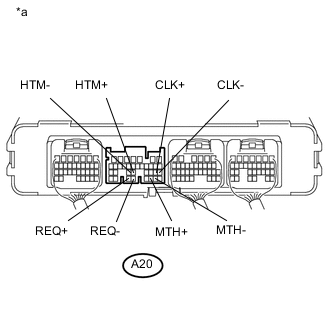
Text in Illustration *a Component without harness connected
(Power Management Control ECU)
Measure the resistance according to the value(s) in the table below.
Standard Resistance Tester Connection Switch Condition Specified Condition A20-24 (HTM+) - A20-25 (HTM-) Power switch off 80 to 170 Ω A20-30 (MTH+) - A20-29 (MTH-) Power switch off 80 to 170 Ω A20-33 (REQ+) - A20-32 (REQ-) Power switch off 80 to 170 Ω A20-21 (CLK+) - A20-20 (CLK-) Power switch off 80 to 170 Ω -
Connect the power management control ECU connector.
NG
REPLACE POWER MANAGEMENT CONTROL ECU Click here
OK
-
-
CHECK CONNECTOR CONNECTION CONDITION (GENERATOR RESOLVER CONNECTOR)
-
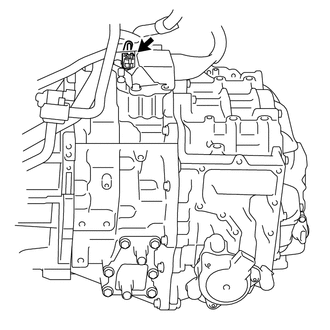
Check the connection of the generator resolver connector.
OK The connector is connected securely and there are no contact problems.
NG
CONNECT SECURELY
OK
-
-
CHECK CONNECTOR CONNECTION CONDITION (MOTOR RESOLVER CONNECTOR)
-
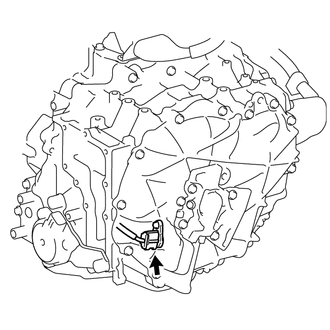
Check the connection of the motor resolver connector.
OK The connector is connected securely and there are no contact problems.
OK
REFER TO REPLACE INVERTER WITH CONVERTER ASSEMBLY PARTS Click here
NG
CONNECT SECURELY
-
-
CHECK CONNECTOR CONNECTION CONDITION (GENERATOR RESOLVER CONNECTOR)
-
Check the connection of the generator resolver connector.
OK The connector is connected securely and there are no contact problems.
NG
CONNECT SECURELY
OK
-
-
INSPECT HYBRID VEHICLE TRANSAXLE ASSEMBLY (GENERATOR RESOLVER)
-
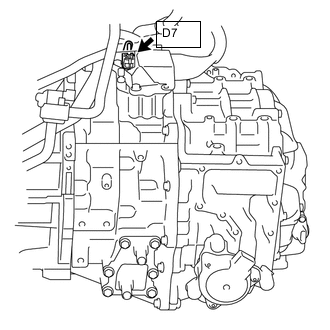
Disconnect the D7 generator resolver connector.
-
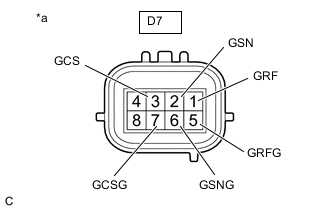
*a Component without harness connected
(Generator Resolver (Hybrid Vehicle Transaxle Assembly))
Measure the resistance according to the value(s) in the table below.
Standard Resistance (Check for Open) Tester Connection Switch Condition Specified Condition D7-1(GRF) - D7-5(GRFG) IG OFF 9.5 to 15.5 Ω D7-2(GSN) - D7-6(GSNG) IG OFF 15.0 to 27.0 Ω D7-3(GCS) - D7-7(GCSG) IG OFF 14.0 to 26.0 Ω Standard Resistance (Check for Short) Tester Connection Switch Condition Specified Condition D7-1 (GRF) - Body ground and other terminals (except D7-5 (GRFG)) Power switch off 1 MΩ or higher D7-5 (GRFG) - Body ground and other terminals (except D7-1 (GRF)) Power switch off 1 MΩ or higher D7-2 (GSN) - Body ground and other terminals (except D7-6 (GSNG)) Power switch off 1 MΩ or higher D7-6 (GSNG) - Body ground and other terminals (except D7-2 (GSN)) Power switch off 1 MΩ or higher D7-3 (GCS) - Body ground and other terminals (except D7-7 (GCSG)) Power switch off 1 MΩ or higher D7-7 (GCSG) - Body ground and other terminals (except D7-3 (GCS)) Power switch off 1 MΩ or higher Tech Tips
The generator resolver is not available separately. If it requires replacement, replace the hybrid vehicle transaxle assembly.
-
Connect the D7 generator resolver connector.
OK
REPAIR OR REPLACE HARNESS OR CONNECTOR
NG
REPLACE HYBRID VEHICLE TRANSAXLE ASSEMBLY Click here
-
-
CHECK CONNECTOR CONNECTION CONDITION (MOTOR RESOLVER CONNECTOR)
-
Check the connection of the motor resolver connector.
OK The connector is connected securely and there are no contact problems.
NG
CONNECT SECURELY
OK
-
-
INSPECT HYBRID VEHICLE TRANSAXLE ASSEMBLY (MOTOR RESOLVER)
-
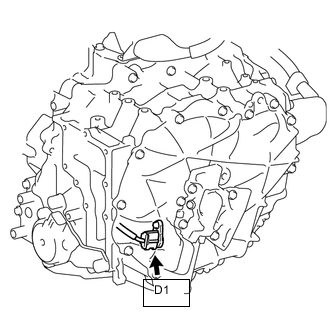
Disconnect the D1 motor resolver connector.
-
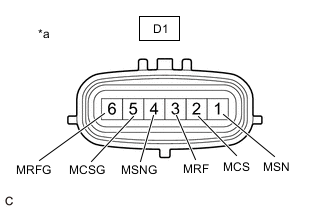
*a Component without harness connected
(Motor Resolver (Hybrid Vehicle Transaxle Assembly))
Measure the resistance according to the value(s) in the table below.
Standard Resistance (Check for Open) Tester Connection Condition Specified Condition D1-3 (MRF) - D1-6 (MRFG) Power switch off 9.5 to 15.5 Ω D1-1 (MSN) - D1-4 (MSNG) Power switch off 15.0 to 27.0 Ω D1-2 (MCS) - D1-5 (MCSG) Power switch off 14.0 to 26.0 Ω Standard Resistance (Check for Short) Tester Connection Condition Specified Condition D1-3 (MRF) - Body ground and other terminals (except D1-6 (MRFG)) Power switch off 1 MΩ or higher D1-6 (MRFG) - Body ground and other terminals (except D1-3 (MRF)) Power switch off 1 MΩ or higher D1-1 (MSN) - Body ground and other terminals (except D1-4 (MSNG)) Power switch off 1 MΩ or higher D1-4 (MSNG) - Body ground and other terminals (except D1-1 (MSN)) Power switch off 1 MΩ or higher D1-2 (MCS) - Body ground and other terminals (except D1-5 (MCSG)) Power switch off 1 MΩ or higher D1-5 (MCSG) - Body ground and other terminals (except D1-2 (MCS)) Power switch off 1 MΩ or higher Tech Tips
The motor resolver is not available separately. If it requires replacement, replace the hybrid vehicle transaxle assembly.
-
Connect the D1 motor resolver connector.
OK
REPAIR OR REPLACE HARNESS OR CONNECTOR
NG
REPLACE HYBRID VEHICLE TRANSAXLE ASSEMBLY Click here
-
-
CHECK HYBRID VEHICLE TRANSAXLE ASSEMBLY (GENERATOR CABLE CONNECTION CONDITION)
CAUTION:
Be sure to wear insulated gloves.
-
Check that the service plug grip is not installed.
Note
After removing the service plug grip, do not turn the power switch on (READY), unless instructed by the repair manual because this may cause a malfunction.
-
Remove the inverter with converter assembly.
-
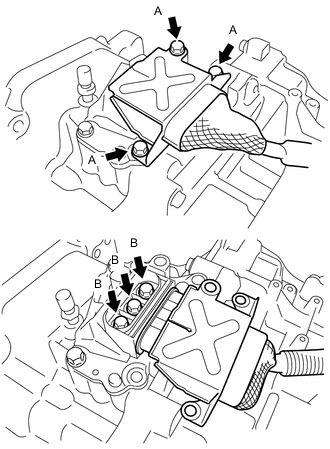
Check that the bolts for the generator cable are tightened to the specified torque, the generator cable is connected securely, and there are no contact problems.
Specified Condition Bolt A T=20 N*m {204 kgf*cm, 15 ft.*lbf} Bolt B T=10 N*m {102 kgf*cm, 7 ft.*lbf} Note
-
Make sure that the tightening torque of the bolt A is between 16 and 24 N*m (163 and 245 kgf*cm, 12 and 18 ft.*lbf).
-
Make sure that the tightening torque of the bolt B is between 8 and 12 N*m (82 and 122 kgf*cm, 71 and 106 in.*lbf).
-
-
Disconnect the generator cable from the hybrid transaxle assembly.
-
Check for arc marks at the bolts for the generator cable.
Result Result Proceed to The terminals are connected securely and there are no contact problems. There are no arc marks. A The terminals are not connected securely and there is a contact problem. There are arc marks. B The terminals are not connected securely and there is a contact problem. There are no arc marks. C The terminals are connected securely and there are no contact problems. There are arc marks. B -
Connect the generator cable to the hybrid transaxle assembly.
-
Install the inverter with converter assembly.
B
REPLACE MALFUNCTIONING PARTS
C
CONNECT SECURELY
A
-
-
CHECK GENERATOR CABLE
CAUTION:
Be sure to wear insulated gloves.
-
Check that the service plug grip is not installed.
Note
After removing the service plug grip, do not turn the power switch on (READY), unless instructed by the repair manual because this may cause a malfunction.
-
Remove the generator cable.
-
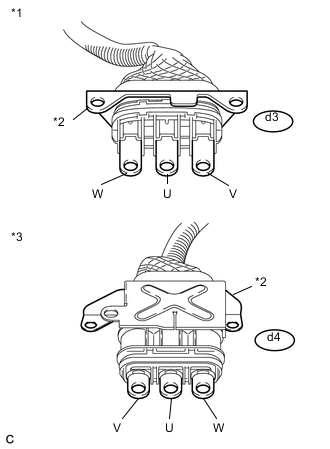
Text in Illustration *1 Generator Cable
(Inverter with Converter Assembly Side)
*2 Shielded Ground *3 Generator Cable
(Hybrid Vehicle Transaxle Assembly Side)
Using a megohmmeter set to 500 V, measure the resistance according to the value(s) in the table below.
Note
Be sure to set the megohmmeter to 500 V when performing this test. Using a setting higher than 500 V can result in damage to the component being inspected.
Standard Resistance Tester Connection Switch Condition Specified Condition d3-1 (W) - Body ground and shield ground Power switch off 100 MΩ or higher d3-2 (U) - Body ground and shield ground Power switch off 100 MΩ or higher d3-3 (V) - Body ground and shield ground Power switch off 100 MΩ or higher Note
Wrap the terminal of the three-phase AC cable with insulating tape to prevent them from coming into contact with body ground
-
Measure the resistance according to the value(s) in the table below.
Standard Resistance Tester Connection Switch Condition Specified Condition d3-1 (W) - d4-3 (W) Power switch off Below 1 Ω d3-2 (U) - d4-2 (U) Power switch off Below 1 Ω d3-3 (V) - d4-1 (V) Power switch off Below 1 Ω d3-1 (W) - d4-2 (U) Power switch off 100 MΩ or higher d3-2 (U) - d4-1 (V) Power switch off 100 MΩ or higher d3-3 (V) - d4-3 (W) Power switch off 100 MΩ or higher -
Install the generator cable.
OK
REPLACE HYBRID VEHICLE TRANSAXLE ASSEMBLY Click here
NG
REPLACE GENERATOR CABLE Click here
-
-
CHECK HYBRID VEHICLE TRANSAXLE ASSEMBLY (MOTOR CABLE CONNECTION CONDITION)
CAUTION:
Be sure to wear insulated gloves.
-
Check that the service plug grip is not installed.
Note
After removing the service plug grip, do not turn the power switch on (READY), unless instructed by the repair manual because this may cause a malfunction.
-
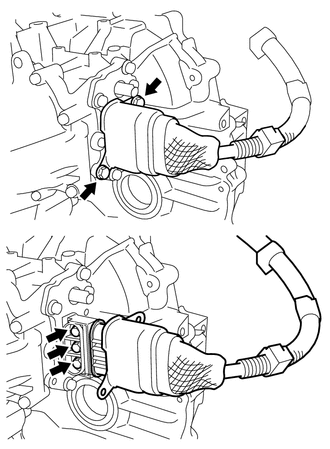
Check that the bolts for the motor cable are tightened to the specified torque, the motor cable is connected securely, and there are no contact problems.
Specified Condition T=10 N*m {102 kgf*cm, 7 ft.*lbf} Note
Make sure that the tightening torque of the bolts is between 8 and 12 N*m (82 and 122 kgf*cm, 71 and 106 in.*lbf).
-
Disconnect the motor cable from the hybrid transaxle assembly.
-
Check for arc marks at the bolts for the motor cable.
Result Result Proceed to The terminals are connected securely and there are no contact problems. There are no arc marks. A The terminals are not connected securely and there is a contact problem. There are arc marks. B The terminals are not connected securely and there is a contact problem. There are no arc marks. C The terminals are connected securely and there are no contact problems. There are arc marks. B -
Connect the motor cable to the hybrid transaxle assembly.
B
REPLACE MALFUNCTIONING PARTS
C
CONNECT SECURELY
A
-
-
CHECK MOTOR CABLE
CAUTION:
Be sure to wear insulated gloves.
-
Check that the service plug grip is not installed.
Note
After removing the service plug grip, do not turn the power switch on (READY), unless instructed by the repair manual because this may cause a malfunction.
-
Remove the motor cable.
-
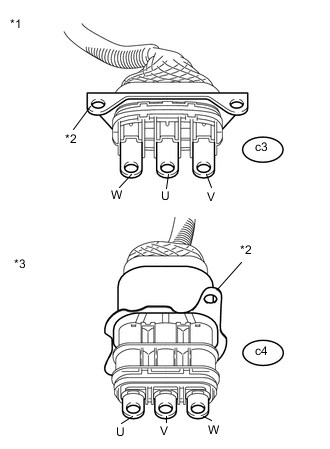
Text in Illustration *1 Motor Cable
(Inverter with Converter Assembly Side)
*2 Shielded Ground *3 Motor Cable
(Hybrid Vehicle Transaxle Assembly Side)
Using a megohmmeter set to 500 V, measure the resistance according to the value(s) in the table below.
Note
Be sure to set the megohmmeter to 500 V when performing this test. Using a setting higher than 500 V can result in damage to the component being inspected.
Standard Resistance Tester Connection Switch Condition Specified Condition c3-1 (W) - Body ground and shield ground Power switch off 100 MΩ or higher c3-2 (U) - Body ground and shield ground Power switch off 100 MΩ or higher c3-3 (V) - Body ground and shield ground Power switch off 100 MΩ or higher Note
Wrap the terminal of the three-phase AC cable with insulating tape to prevent them from coming into contact with body ground
-
Measure the resistance according to the value(s) in the table below.
Standard Resistance Tester Connection Switch Condition Specified Condition c3-1 (W) - c4-1 (W) Power switch off Below 1 Ω c3-2 (U) - c4-3 (U) Power switch off Below 1 Ω c3-3 (V) - c4-2 (V) Power switch off Below 1 Ω c3-1 (W) - c4-3 (U) Power switch off 100 MΩ or higher c3-2 (U) - c4-2 (V) Power switch off 100 MΩ or higher c3-3 (V) - c4-1 (W) Power switch off 100 MΩ or higher -
Install the motor cable.
OK
REPLACE HYBRID VEHICLE TRANSAXLE ASSEMBLY Click here
NG
REPLACE MOTOR CABLE Click here
-
-
CHECK HARNESS AND CONNECTOR (INVERTER WITH CONVERTER ASSEMBLY - PCU FUSE)
CAUTION:
Be sure to wear insulated gloves.
-
Check that the service plug grip is not installed.
Note
After removing the service plug grip, do not turn the power switch on (READY), unless instructed by the repair manual because this may cause a malfunction.
-
Disconnect connector A62 from the inverter with converter assembly.
-
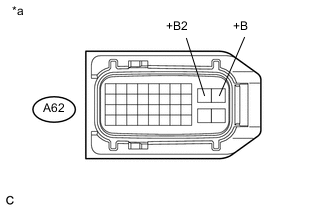
Text in Illustration *a Front view of wire harness connector
(to Inverter with Converter Assembly)
Measure the resistance according to the value(s) in the table below.
Standard Resistance Tester Connection Switch Condition Specified Condition A62-10 (+B) - Body ground Power switch off 10 kΩ or higher A62-9 (+B2) - Body ground Power switch off 10 kΩ or higher -
Connect the inverter with converter assembly connector.
NG
REPAIR OR REPLACE HARNESS OR CONNECTOR Click here
OK
-
-
REFER TO REPLACE INVERTER WITH CONVERTER ASSEMBLY PARTS
NEXT
REPLACE FUSE (PCU)
-
REPAIR OR REPLACE HARNESS OR CONNECTOR
NEXT
REPLACE FUSE (PCU)