NAVIGATION ANTENNA REMOVAL
PROCEDURE
-
REMOVE UPPER INSTRUMENT PANEL ASSEMBLY
-
REMOVE NO. 1 HEATER TO REGISTER DUCT SUB-ASSEMBLY
-
REMOVE NO. 3 HEATER TO REGISTER DUCT SUB-ASSEMBLY
-
REMOVE DEFROSTER NOZZLE ASSEMBLY
-
REMOVE NAVIGATION ANTENNA ASSEMBLY (for RHD with 7 Inch Display)
-
Remove the 3 screws.
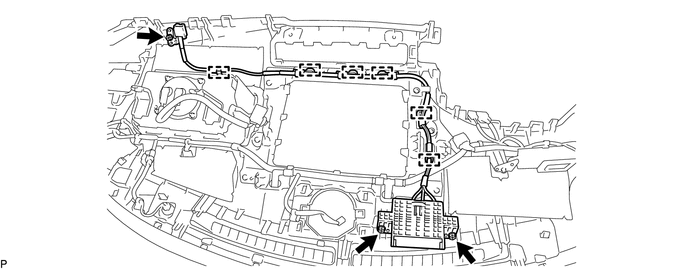
-
Disengage the 6 clamps and remove the navigation antenna assembly.
-
-
REMOVE NAVIGATION ANTENNA ASSEMBLY WITH BRACKET (except RHD with 7 Inch Display)
-
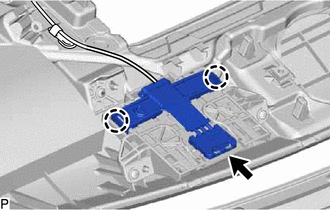
Disconnect the connector.
-
Disengage the 2 claws.
-
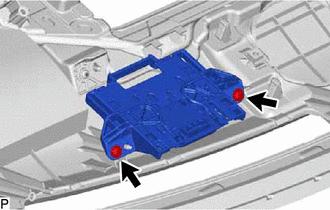
Remove the 2 screws and navigation antenna assembly with bracket.
-
-
REMOVE NAVIGATION ANTENNA ASSEMBLY (except RHD with 7 Inch Display)
-
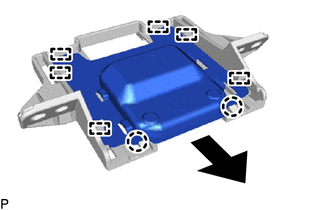
Disengage the 2 claws and 6 guides to remove the navigation antenna assembly as shown in the illustration.
-
-
REMOVE NAVIGATION ANTENNA BRACKET (except RHD with 7 Inch Display)