MULTI-DISPLAY INSTALLATION
PROCEDURE
-
INSTALL MULTI-DISPLAY (for 7 Inch Display)
-
Connect each connector.
-
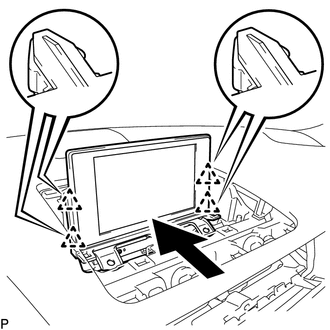
Engage the 4 clips as shown in the illustration.
-
Install the multi-display with the 2 bolts.
-
-
INSTALL MULTI-DISPLAY ASSEMBLY (for 10.3 Inch Display)
-
Connect each connector.
-
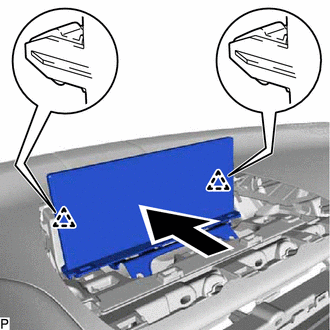
Engage the 2 clips as shown in the illustration.
-
Install the multi-display assembly with the 2 bolts.
-
-
INSTALL INSTRUMENT CLUSTER FINISH PANEL SUB-ASSEMBLY (for 7 Inch Display)
-
INSTALL INSTRUMENT CLUSTER FINISH PANEL SUB-ASSEMBLY (for 10.3 Inch Display)
-
INSTALL CENTER INSTRUMENT PANEL REGISTER ASSEMBLY