NAVIGATION SYSTEM Vehicle Speed Signal Circuit between Stereo Component Amplifier and Combination Meter
DESCRIPTION
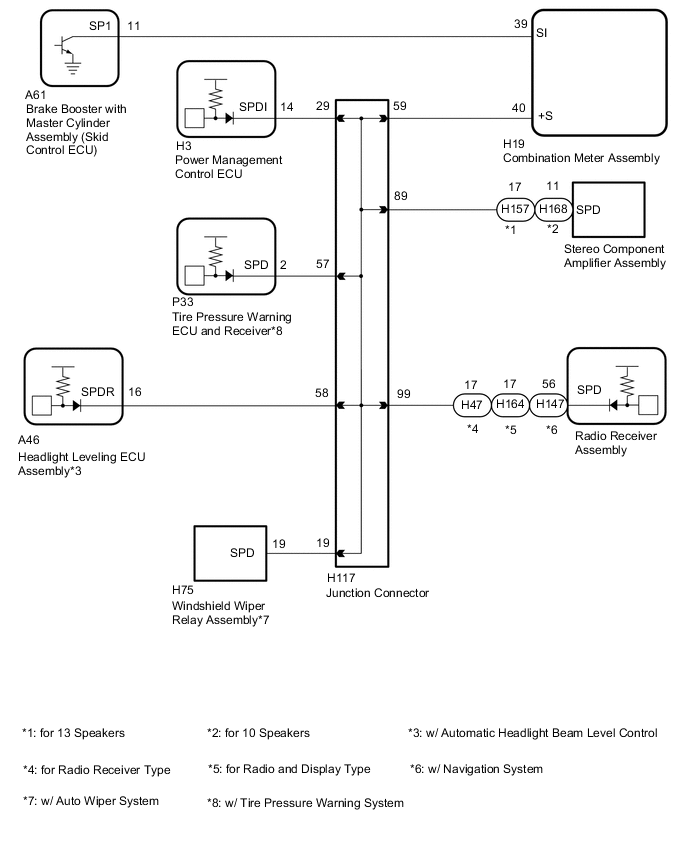
The stereo component amplifier assembly receives a vehicle speed signal from the combination meter assembly to control the ASL function.
Tech Tips
-
A voltage of 12 V or 5 V is output from each ECU and then input to the combination meter assembly. The signal is changed to a pulse signal at the transistor in the combination meter assembly. Each ECU controls its respective systems based on this pulse signal.
-
If a short occurs in any of the ECUs or in the wire harness connected to an ECU, all systems in the diagram below will not operate normally.
WIRING DIAGRAM
PROCEDURE
-
INSPECT COMBINATION METER ASSEMBLY (OUTPUT WAVEFORM)
-
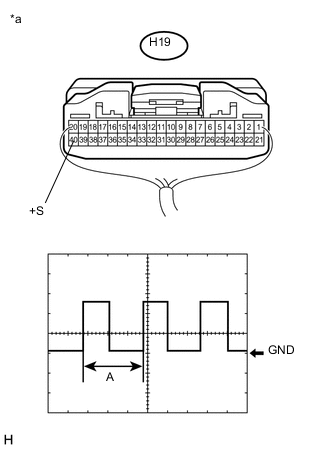
Text in Illustration *a Component with harness connected
(Combination Meter Assembly)
Check the output waveform.
-
Remove the combination meter assembly with the connector(s) still connected.
-
Connect an oscilloscope to terminal H19-40 (+S) and body ground.
-
Turn the power switch on (IG).
-
Turn a wheel slowly.
-
Check the signal waveform according to the condition(s) in the table below.
Item Condition Measurement terminal H19-40 (+S) - Body ground Tool setting 5 V/DIV., 20 ms./DIV. Vehicle condition Wheel being rotated OK The waveform is similar to that shown in the illustration. Tech Tips
When the system is functioning normally, one wheel revolution generates 4 pulses. As the vehicle speed increases, the width indicated by (A) in the illustration narrows.
-
NG 
GO TO METER / GAUGE SYSTEM Click here
OK 
-
-
INSPECT STEREO COMPONENT AMPLIFIER ASSEMBLY (INPUT WAVEFORM)
-
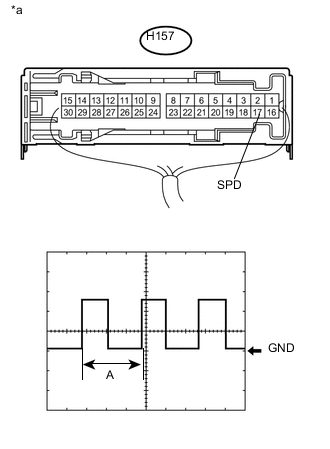
Text in Illustration *a Component with harness connected
(Stereo Component Amplifier Assembly)
Check the input waveform.
-
Remove the stereo component amplifier assembly with the connector(s) still connected.
-
Connect an oscilloscope to terminal H157-17 (SPD) and body ground.
-
Turn the power switch on (IG).
-
Turn a wheel slowly.
-
Check the signal waveform according to the condition(s) in the table below.
Item Condition Measurement terminal H157-17 (SPD) - Body ground Tool setting 5 V/DIV., 20 ms./DIV. Vehicle condition Wheel being rotated OK The waveform is similar to that shown in the illustration. Tech Tips
When the system is functioning normally, one wheel revolution generates 4 pulses. As the vehicle speed increases, the width indicated by (A) in the illustration narrows.
-
OK
PROCEED TO NEXT SUSPECTED AREA SHOWN IN PROBLEM SYMPTOMS TABLE Click here
NG
-
-
CHECK HARNESS AND CONNECTOR (STEREO COMPONENT AMPLIFIER ASSEMBLY - JUNCTION CONNECTOR)
-
Disconnect the H157 stereo component amplifier assembly connector.
-
Disconnect the H117 junction connector.
-
Measure the resistance according to the value(s) in the table below.
Standard Resistance Tester Connection Condition Specified Condition H157-17 (SPD) - H117-89 Always Below 1 Ω
NG
REPAIR OR REPLACE HARNESS OR CONNECTOR
OK
-
-
CHECK HARNESS AND CONNECTOR (COMBINATION METER ASSEMBLY - JUNCTION CONNECTOR)
-
Disconnect the H19 combination meter assembly connector.
-
Disconnect the H117 junction connector.
-
Measure the resistance according to the value(s) in the table below.
Standard Resistance Tester Connection Condition Specified Condition H19-40 (+S) - H117-59 Always Below 1 Ω
OK
REPLACE JUNCTION CONNECTOR
NG
REPAIR OR REPLACE HARNESS OR CONNECTOR
-