SLIDING ROOF SYSTEM Sliding Roof Control Switch Circuit
DESCRIPTION
The sliding roof drive gear (sliding roof ECU) receives slide switch and tilt switch signals and drives its built-in motor.
WIRING DIAGRAM
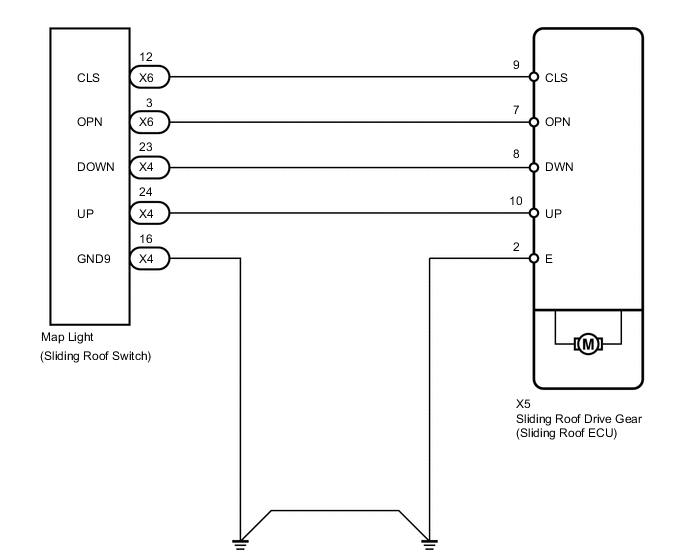
PROCEDURE
-
PERFORM ACTIVE TEST USING INTELLIGENT TESTER (SLIDING ROOF OPERATION)
-
Select the Active Test, use the intelligent tester to generate a control command, and then check that the sliding roof slides open / close and tilts up / down.
-
Intelligent tester
Sliding Roof Tester Display Test Part Control Range Slide Roof Operate sliding roof SLIDE CLOSE/TILT UP CLOS/UP: Sliding roof SLIDE CLOSE or TILT UP operation occurs
OFF: Sliding roof is not operating
Slide Roof Operate sliding roof SLIDE OPEN/TILT DOWN OPEN/DWN: Sliding roof SLIDE OPEN or TILT DOWN operation occurs
OFF: Sliding roof is not operating
OK Sliding roof operates normally.
-
NG 
REPLACE SLIDING ROOF DRIVE GEAR SUB-ASSEMBLY Click here
OK 
-
-
READ VALUE USING INTELLIGENT TESTER (HALL IC)
-
Use the Data List to check if the hall ICs are functioning properly.
-
Intelligent tester
Sliding Roof Item Measurement Item/Range Normal Condition Diagnostic Note Hall IC1 Status Hall IC1 status/NORMAL or LOCK NORMAL: Hall IC1 is normal.
LOCK: Hall IC1 is abnormal.
- Hall IC1 Pulse Hall IC1 signal/LO or HI LO: Hall IC1 output Lo.
HI: Hall IC1 output Hi.
- Hall IC2 Status Hall IC2 status/NORMAL or LOCK NORMAL: Hall IC2 is normal.
LOCK: Hall IC2 is abnormal.
- Hall IC2 Pulse Hall IC2 signal/LO or HI LO: Hall IC2 output Lo.
HI: Hall IC2 output Hi.
- OK Tester displays other than LOCK.
-
NG
REPLACE SLIDING ROOF DRIVE GEAR SUB-ASSEMBLY Click here
OK
-
-
READ VALUE USING INTELLIGENT TESTER (SLIDING ROOF SWITCH)
-
Use the Data List to check if the sliding roof switch is functioning properly.
-
Intelligent tester
Sliding Roof Item Measurement Item/Range Normal Condition Diagnostic Note Open Switch Sliding roof switch open signal/ON or OFF ON: OPEN switch is pressed
OFF: OPEN switch is not pressed
- Close Switch Sliding roof switch close signal/ON or OFF ON: CLOSE switch is pressed
OFF: CLOSE switch is not pressed
- Up Switch Sliding roof switch tilt up signal/ON or OFF ON: UP switch is pressed
OFF: UP switch is not pressed
- Down Switch Sliding roof switch tilt down signal/ON or OFF ON: DOWN switch is pressed
OFF: DOWN switch is not pressed
- OK When the switch is operating, the intelligent tester should display as shown in the table.
-
OK
REPLACE SLIDING ROOF DRIVE GEAR SUB-ASSEMBLY Click here
NG
-
-
INSPECT MAP LIGHT ASSEMBLY (SLIDING ROOF SWITCH)
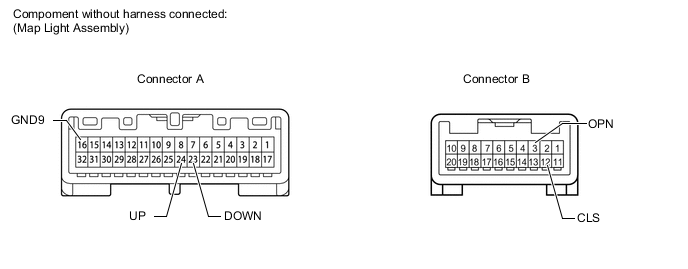
-
Remove the map light for standard body (see page ) or long body Click here.
-
Measure the resistance according to the value(s) in the table below.
Standard resistance Tester Connection Switch Condition Specified Condition A-24 (UP) - A-16 (GND9) TILT UP Below 1 Ω A-24 (UP) - A-16 (GND9) Off 10 kΩ or higher A-23 (DOWN) - A-16 (GND9) TILT DOWN Below 1 Ω A-23 (DOWN) - A-16 (GND9) Off 10 kΩ or higher B-3 (OPN) - A-16 (GND9) SLIDE OPEN Below 1 Ω B-3 (OPN) - A-16 (GND9) Off 10 kΩ or higher B-12 (CLS) - A-16 (GND9) SLIDE CLOSE Below 1 Ω B-12 (CLS) - A-16 (GND9) Off 10 kΩ or higher Result Result Proceed to OK A NG (for Standard Body) B NG (for Long Body) C
B
REPLACE MAP LIGHT ASSEMBLY (SLIDING ROOF SWITCH) Click here
C
REPLACE MAP LIGHT ASSEMBLY Click here
A
-
-
CHECK HARNESS AND CONNECTOR (MAP LIGHT - SLIDING ROOF DRIVE GEAR AND BODY GROUND)
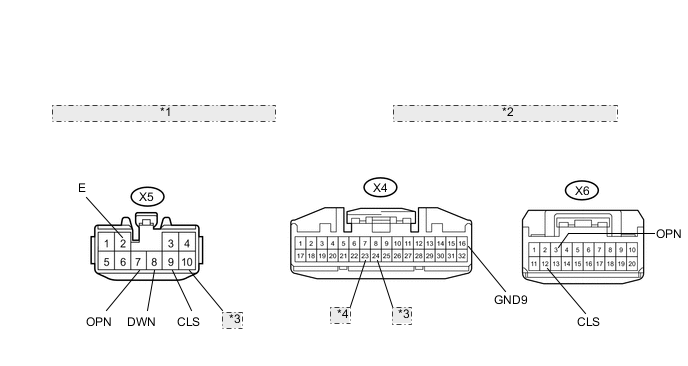
*1 Front view of wire harness connector: (to Sliding Roof Drive Gear) *2 Front view of wire harness connector: (to Map Light) *3 UP *4 DOWN
-
Disconnect the X5 drive gear connector.
-
Disconnect the X4 and X6 map light connectors.
-
Measure the resistance according to the value(s) in the table below.
Standard resistance Tester Connection Condition Specified Condition X5-10 (UP) - X4-24 (UP) Always Below 1 Ω X5-8 (DWN) - X4-23 (DOWN) Always Below 1 Ω X5-7 (OPN) - X6-3 (OPN) Always Below 1 Ω X5-9 (CLS) - X6-12 (CLS) Always Below 1 Ω X4-16 (GND9) - Body ground Always Below 1 Ω X5-2 (E) - Body ground Always Below 1 Ω X5-10 (UP) or X4-24 (UP) - Body ground Always 10 kΩ or higher X5-8 (DWN) or X4-23 (DOWN) - Body ground Always 10 kΩ or higher X5-7 (OPN) or X6-3 (OPN) - Body ground Always 10 kΩ or higher X5-9 (CLS) or X6-12 (CLS) - Body ground Always 10 kΩ or higher
OK
REPLACE SLIDING ROOF DRIVE GEAR SUB-ASSEMBLY Click here
NG
REPAIR OR REPLACE HARNESS OR CONNECTOR
-