INSTRUMENT PANEL SAFETY PAD DISASSEMBLY
CAUTION / NOTICE / HINT
Tech Tips
-
Use the same procedure for RHD and LHD vehicles.
-
The procedure listed below is for LHD vehicles.
PROCEDURE
-
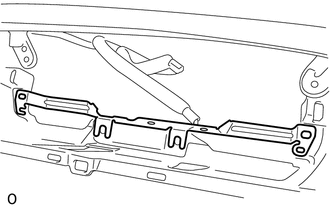
REMOVE NO. 1 COMBINATION METER BRACKET
-
Remove the No. 1 combination meter bracket.
-
-
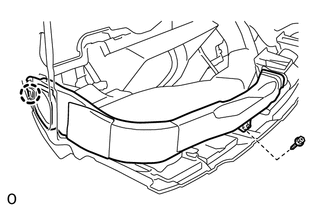
REMOVE NO. 1 SIDE DEFROSTER NOZZLE DUCT
-
Remove the screw.
-
Detach the claw and remove the No. 1 side defroster nozzle duct.
-
-
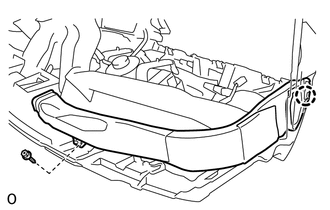
REMOVE NO. 2 SIDE DEFROSTER NOZZLE DUCT
-
Remove the screw.
-
Detach the claw and remove the No. 2 side defroster nozzle duct.
-
-
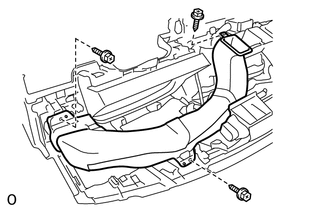
REMOVE NO. 1 HEATER TO REGISTER DUCT
-
Remove the 3 screws and No. 1 heater to register duct.
-
-
REMOVE NO. 3 HEATER TO REGISTER DUCT
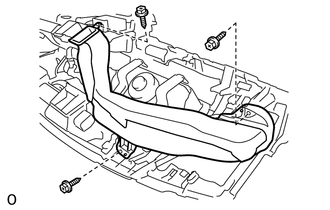
-
Remove the 3 screws and No. 3 heater to register duct.
-
-
REMOVE DEFROSTER NOZZLE ASSEMBLY
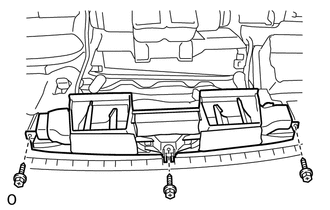
-
Remove the 3 screws and defroster nozzle assembly.
-
-
REMOVE NO. 2 HEATER TO REGISTER DUCT
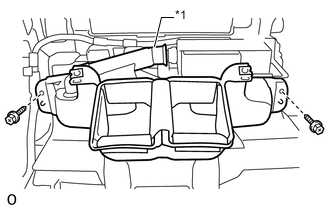
Text in Illustration *1 Hose
-
Disconnect the hose from the ion generator sub-assembly.
-
Remove the 2 screws and No. 2 heater to register duct.
-
-
REMOVE ION GENERATOR SUB-ASSEMBLY
-
REMOVE NO. 2 INSTRUMENT PANEL WIRE
-
REMOVE FRONT PASSENGER AIRBAG ASSEMBLY
-
REMOVE NAVIGATION ANTENNA ASSEMBLY
-
REMOVE AUTOMATIC LIGHT CONTROL SENSOR
-
Disconnect the connector.
-
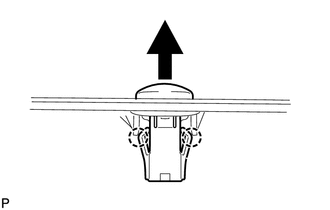
Detach the 2 claws and remove the automatic light control sensor.
-
-
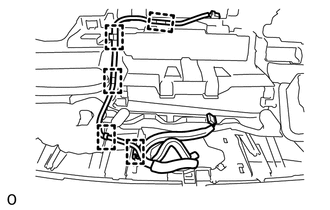
REMOVE NO. 2 INSTRUMENT PANEL WIRE
-
Detach the 5 wire harness clamps and remove the No. 2 instrument panel wire.
-
-
REMOVE NO. 1 INSTRUMENT PANEL PIN
Tech Tips
Use the same procedure to remove the No. 1 instrument panel pin on the other side.
-
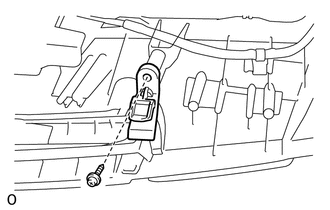
Remove the screw and No. 1 instrument panel pin.
-
-
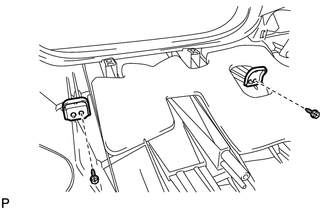
REMOVE NO. 1 METER HOOD RETAINER
-
Remove the 2 screws and 2 No. 1 meter hood retainers.
-
-
REMOVE NO. 1 INSTRUMENT PANEL REGISTER ASSEMBLY
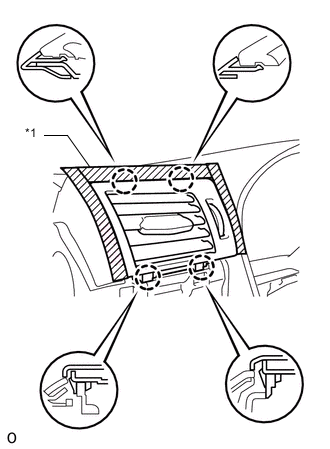
Text in Illustration *1 Protective Tape
-
Apply protective tape as shown in the illustration.
-
Detach the 4 claws and remove the No. 1 instrument panel register assembly.
-
-
REMOVE NO. 2 INSTRUMENT PANEL REGISTER ASSEMBLY
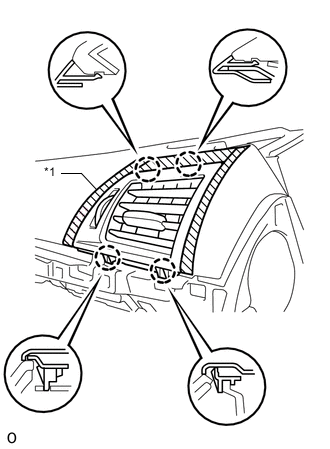
Text in Illustration *1 Protective Tape
-
Apply protective tape as shown in the illustration.
-
Detach the 4 claws and remove the No. 2 instrument panel register assembly.
-