POWER WINDOW CONTROL SYSTEM Key-off Operation Function Operates even if Operating Conditions are not Satisfied
DESCRIPTION
-
When the front doors are closed, each power window regulator motor can control its power window operation for approximately 45 seconds after the engine switch on (IG) to off by receiving operation permission signals from the main body ECU.
-
However, when approximately 45 seconds have elapsed, or the driver side door or front passenger side door is opened within approximately 45 seconds of the engine switch off, the power window regulator motor stops operating.
-
During the AUTO function operation, when 45 seconds have passed and key-off operation is prohibited, the window operation stops immediately.
-
The front passenger side power window and the rear power windows cannot be operated when the window lock switch is pressed.
WIRING DIAGRAM
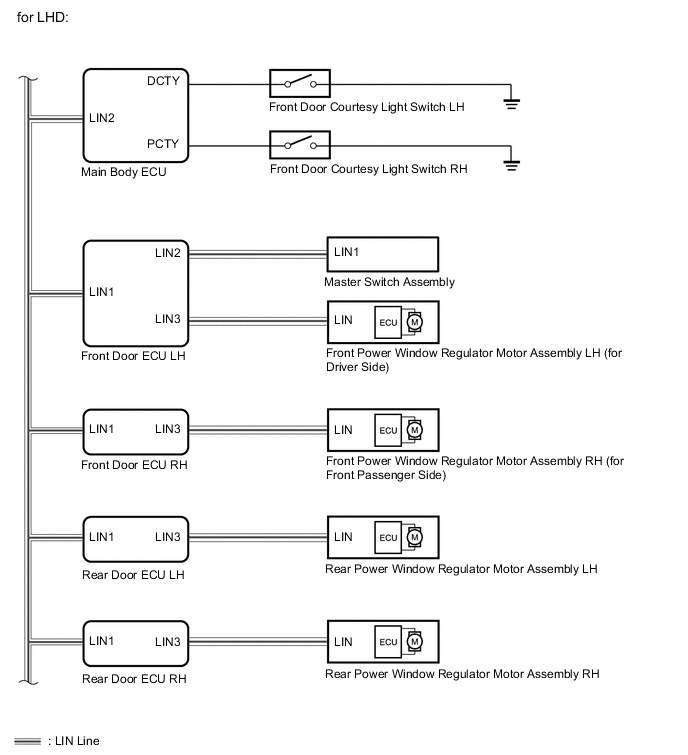
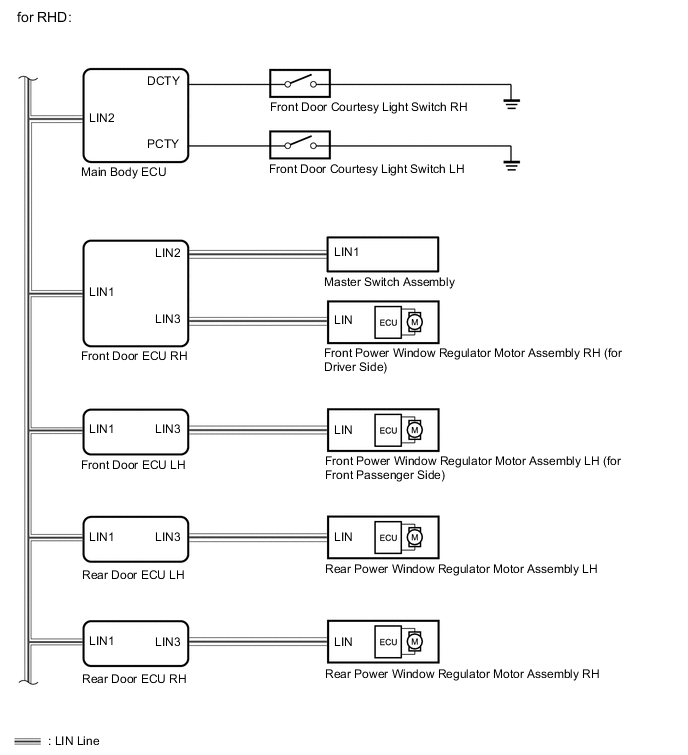
PROCEDURE
-
CHECK LIN COMMUNICATION SYSTEM
-
Check for LIN communication system DTCs related to the power window control system.
Result: Result Proceed to DTC is output A DTC is not output B
A 
GO TO LIN COMMUNICATION SYSTEM Click here
B 
-
-
CHECK POWER WINDOW OPERATION FUNCTION AFTER ENGINE SWITCH OFF
-
Check the power window operation function after the engine switch is turned off.
Result: Result Proceed to Driver side door or front passenger side door is opened within 45 seconds but power window can still operate A 45 seconds pass and the power windows can still operate B
B
REPLACE MAIN BODY ECU (DRIVER SIDE JUNCTION BLOCK)
A
-
-
READ VALUE USING INTELLIGENT TESTER (DOOR COURTESY SWITCH)
-
Connect the intelligent tester to the DLC3.
-
Turn the engine switch on (IG).
-
Turn ON the intelligent tester.
-
Enter the following menus.
-
Select: Body / Main Body / Data List /
-
-
According to the display on tester, read the "Data List".
Main Body: Tester Display Measurement Item/Range Normal Condition Diagnostic Note D Door Courtesy SW Driver side door courtesy switch signal / ON or OFF ON: Driver door open
OFF: Driver door closed
- P Door Courtesy SW Front passenger side door courtesy switch signal / ON or OFF ON: Front passenger door open
OFF: Front passenger door closed
- OK Tester display changes normally when door courtesy switch is operated.
OK
REPLACE MAIN BODY ECU (DRIVER SIDE JUNCTION BLOCK)
NG
-
-
CHECK FRONT DOOR COURTESY LIGHT SWITCH ASSEMBLY
-
Open the driver side door and check that the map light illuminates.
OK Map light illuminates. -
Open the front passenger side door and check that the map light illuminates.
OK Map light illuminates.
OK
REPLACE MAIN BODY ECU (DRIVER SIDE JUNCTION BLOCK)
NG
REPLACE FRONT DOOR COURTESY LIGHT SWITCH ASSEMBLY Click here
-