POWER OUTLET SOCKET(for Console Box Rear Side) REMOVAL
PROCEDURE
-
REMOVE REAR CONSOLE END PANEL SUB-ASSEMBLY (w/o Rear Seat Entertainment System)
-
REMOVE UPPER NO. 1 CONSOLE PANEL GARNISH (w/ Disc Player)
-
REMOVE REAR NO. 1 CONSOLE END PANEL GARNISH (w/ Disc Player)
-
REMOVE REAR NO. 2 CONSOLE END PANEL GARNISH (w/ Disc Player)
-
REMOVE REAR CONSOLE END PANEL SUB-ASSEMBLY (w/ Disc Player)
-
REMOVE REAR CONSOLE END PANEL (w/ Disc Player)
-
REMOVE REAR NO. 2 CONSOLE END PANEL SUB-ASSEMBLY (w/o Rear Seat Entertainment System)
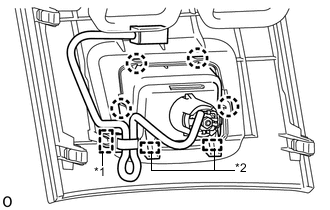
Text in Illustration *1 Wire Harness Clamp *2 Hook
-
When replacing the rear No. 2 console end panel sub-assembly:
-
Detach the wire harness clamp.
-
Detach the 4 claws and 2 hooks and remove the rear No. 2 console end panel sub-assembly.
-
-
-
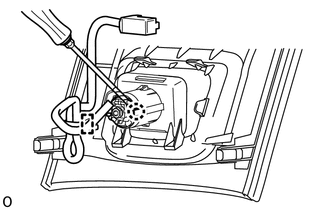
REMOVE POWER OUTLET SOCKET ASSEMBLY
-
w/o Rear Seat Entertainment System:
-
Detach the wire harness clamp.
-
Using a screwdriver, detach the claw and remove the power outlet socket assembly.
-
-
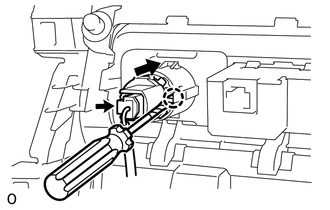
w/ Disc Player:
-
Disconnect the connector and remove the wire harness from the power outlet socket assembly.
-
Using a screwdriver, detach the claw and remove the power outlet socket assembly.
-
-
-
REMOVE NO. 2 POWER OUTLET SOCKET COVER
-
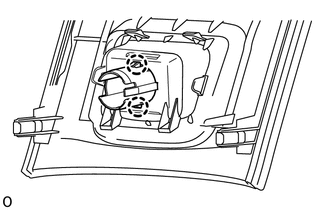
w/o Rear Seat Entertainment System:
Detach the 2 claws and remove the No. 2 power outlet socket cover from the rear console end panel sub-assembly.
-
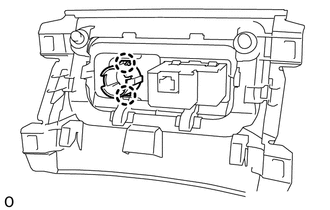
w/ Disc Player:
Detach the 2 claws and remove the No. 2 power outlet socket cover from the rear console end panel.
-