REAR SEAT ENTERTAINMENT SYSTEM Sound Signal Circuit between Video Terminal and Television Display
DESCRIPTION
This is the sound signal circuit between the video terminal and television display assembly.
WIRING DIAGRAM
-
for Roof
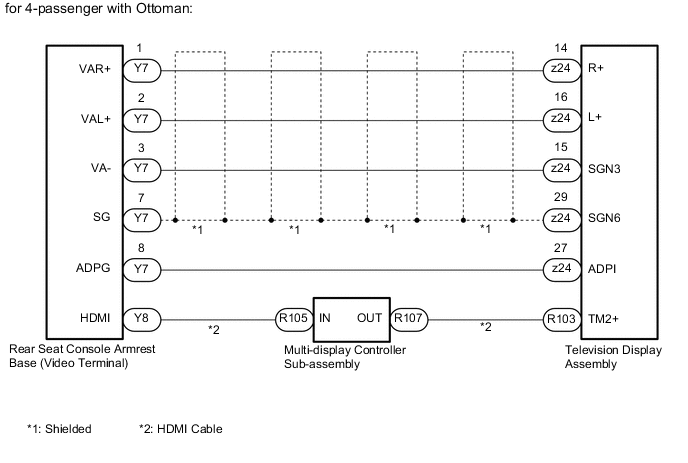
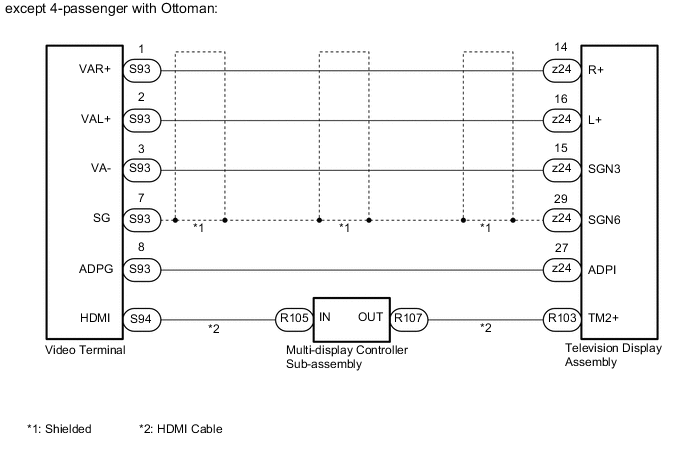
-
for Center Console Side:
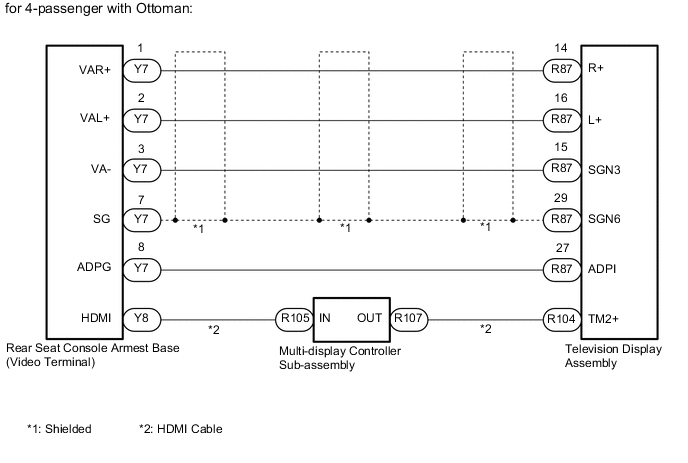
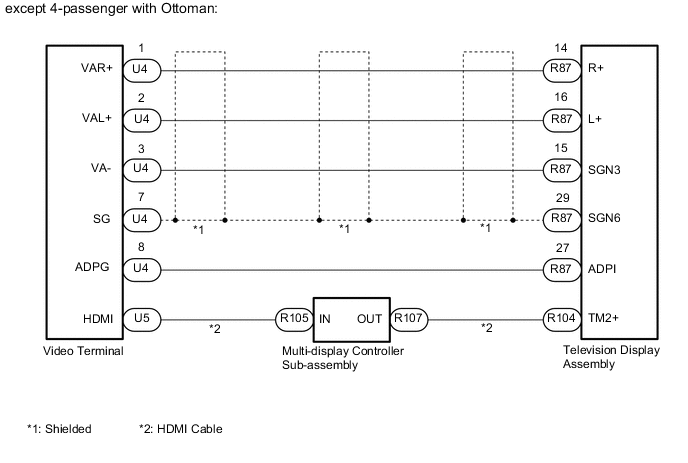
PROCEDURE
-
CHECK HARNESS AND CONNECTOR (TELEVISION DISPLAY ASSEMBLY - VIDEO TERMINAL)
-
*1: for 4-passenger with Ottoman
-
*2: except 4-passenger with Ottoman
-
for Roof:
-
Disconnect the z24 television display assembly connector.
-
Disconnect the Y7*1 or S93*2 rear console armrest base (video terminal) connector.
-
Measure the resistance according to the value(s) in the table below.
Standard Resistance for 4-passenger with Ottoman Tester Connection Condition Specified Condition z24-14 (R+) - Y7-1 (VAR+) Always Below 1 Ω z24-16 (L+) - Y7-2 (VAL+) Always Below 1 Ω z24-15 (SGN3) - Y7-3 (VA-) Always Below 1 Ω z24-13 (SGN6) - Y7-7 (SG) Always Below 1 Ω z24-29 (ADPI) - Y7-8 (ADPG) Always Below 1 Ω z24-14 (R+) or Y7-1 (VAR+) - Body ground Always 10 kΩ or higher z24-16 (L+) or Y7-2 (VAL+) - Body ground Always 10 kΩ or higher z24-15 (SGN3) or Y7-3 (VA-) - Body ground Always 10 kΩ or higher z24-13 (SGN6) or Y7-7 (SG) - Body ground Always 10 kΩ or higher z24-29 (ADPI) or Y7-8 (ADPG) - Body ground Always 10 kΩ or higher except 4-passenger with Ottoman Tester Connection Condition Specified Condition z24-14 (R+) - S93-1 (VAR+) Always Below 1 Ω z24-16 (L+) - S93-2 (VAL+) Always Below 1 Ω z24-15 (SGN3) - S93-3 (VA-) Always Below 1 Ω z24-13 (SGN6) - S93-7 (SG) Always Below 1 Ω z24-29 (ADPI) - S93-8 (ADPG) Always Below 1 Ω z24-14 (R+) or S93-1 (VAR+) - Body ground Always 10 kΩ or higher z24-16 (L+) or S93-2 (VAL+) - Body ground Always 10 kΩ or higher z24-15 (SGN3) or S93-3 (VA-) - Body ground Always 10 kΩ or higher z24-13 (SGN6) or S93-7 (SG) - Body ground Always 10 kΩ or higher z24-29 (ADPI) or S93-8 (ADPG) - Body ground Always 10 kΩ or higher
-
-
for Center Console Side:
-
Disconnect the R87 television display assembly connector.
-
Disconnect the Y7*1 or U4*2 rear console armrest base (video terminal) connector.
-
Measure the resistance according to the value(s) in the table below.
Standard Resistance for 4-passenger with Ottoman Tester Connection Condition Specified Condition R87-14 (R+) - Y7-1 (VAR+) Always Below 1 Ω R87-16 (L+) - Y7-2 (VAL+) Always Below 1 Ω R87-15 (SGN3) - Y7-3 (VA-) Always Below 1 Ω R87-13 (SGN6) - Y7-7 (SG) Always Below 1 Ω R87-29 (ADPI) - Y7-8 (ADPG) Always Below 1 Ω R87-14 (R+) or Y7-1 (VAR+) - Body ground Always 10 kΩ or higher R87-16 (L+) or Y7-2 (VAL+) - Body ground Always 10 kΩ or higher R87-15 (SGN3) or Y7-3 (VA-) - Body ground Always 10 kΩ or higher R87-13 (SGN6) or Y7-7 (SG) - Body ground Always 10 kΩ or higher R87-29 (ADPI) or Y7-8 (ADPG) - Body ground Always 10 kΩ or higher except 4-passenger with Ottoman Tester Connection Condition Specified Condition R87-14 (R+) - U4-1 (VAR+) Always Below 1 Ω R87-16 (L+) - U4-2 (VAL+) Always Below 1 Ω R87-15 (SGN3) - U4-3 (VA-) Always Below 1 Ω R87-13 (SGN6) - U4-7 (SG) Always Below 1 Ω R87-29 (ADPI) - U4-8 (ADPG) Always Below 1 Ω R87-14 (R+) or U4-1 (VAR+) - Body ground Always 10 kΩ or higher R87-16 (L+) or U4-2 (VAL+) - Body ground Always 10 kΩ or higher R87-15 (SGN3) or U4-3 (VA-) - Body ground Always 10 kΩ or higher R87-13 (SGN6) or U4-7 (SG) - Body ground Always 10 kΩ or higher R87-29 (ADPI) or U4-8 (ADPG) - Body ground Always 10 kΩ or higher
-
NG 
REPAIR OR REPLACE HARNESS OR CONNECTOR
OK 
-
-
CHECK HARNESS AND CONNECTOR (HDMI CABLE)
-
Replace the harness and connector (HDMI cable) with a new or known good one.
-
Check if the same problem occurs again.
OK Same problem does not occur.
OK
END (HDMI CABLE IS DEFECTIVE)
NG
-
-
CHECK MULTI-DISPLAY CONTROLLER SUB-ASSEMBLY
-
Replace the multi-display controller sub-assembly with a new or known good one Click here.
-
Check if the same problem occurs again.
OK Same problem does not occur.
OK
END (MULTI-DISPLAY CONTROLLER SUB-ASSEMBLY IS DEFECTIVE)
NG
PROCEED TO NEXT SUSPECTED AREA SHOWN IN PROBLEM SYMPTOMS TABLE Click here
-