VARIABLE GEAR RATIO STEERING SYSTEM DTC CHECK / CLEAR

-
CHECK DTC (Using Intelligent Tester)
-
Connect the intelligent tester to the DLC3.
-
Turn the engine switch on (IG).
-
Turn the tester on.
-
Enter the following menus:
Select: Chassis / VGRS / DTC /
-
Read the DTCs.
-
-
CLEAR DTC (Using Intelligent Tester)
-
Connect the intelligent tester to the DLC3.
-
Turn the engine switch on (IG).
-
Turn the tester on.
-
Enter the following menus:
Select: Chassis / VGRS / DTC /
-
Erase the DTCs.
-
-
CHECK DTC (Using SST Check Wire)
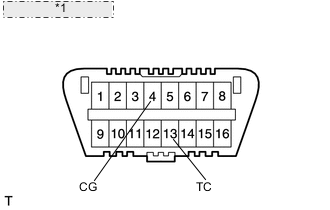
*1 Front view of DLC3: Tech Tips
The master warning light comes on in diagnostic mode.
-
Using SST check wire, connect terminals 13 (TC) and 4 (CG) of the DLC3.
- SST
- 09843-18040
-
Turn the engine switch on (IG).
-
"DIAG VGRS" is displayed on the multi-information display and the system starts searching for a malfunction.
-
If the system is normal, "DIAG VGRS OK" is displayed.
-
If the system has a malfunction, "DIAG VGRS xx" is displayed. ("xx" is a 2-digit DTC.)
-
-
CLEAR DTC (Using SST Check Wire)
*1 Front view of DLC3:
-
Turn the engine switch on (IG).
-
Using SST check wire, connect and disconnect terminals 13 (TC) and 4 (CG) of the DLC3 4 times within 8 seconds.
- SST
- 09843-18040
-
Disconnect SST check wire from the DLC3.
Note
The stored yaw rate sensor value will be cleared by the above operation.
Obtain the yaw rate sensor zero point Click here.
-
Turn the engine switch off.
Tech Tips
If the problem still exists, DTCs may not be cleared.
-
Obtain the yaw rate sensor zero point Click here.
-