TIRE PRESSURE WARNING SYSTEM, Diagnostic DTC:C2126/26
| DTC Code | DTC Name |
|---|---|
| C2126/26 | Transmitter ID not Received in Main Mode |
DESCRIPTION
After all IDs are registered, DTC C2126/26 is stored in the tire pressure warning ECU and receiver and the tire pressure warning light blinks for 1 minute and then illuminates.
When the tire pressure warning ECU and receiver successfully receives radio waves from all the transmitters whose IDs are stored in the ECU, DTC C2126/26 is cleared and the tire pressure warning light goes off.
| DTC No. | DTC Detection Condition | Trouble Area |
|---|---|---|
| C2126/26 | After ID registration is completed, ECU does not receive radio waves from transmitters whose IDs are stored in ECU. |
|
Note
w/ ID Switching Function:
(Main) is displayed on the DTC screen for the DTCs even when the 2nd set of tires is selected.
Tech Tips
The purpose of this DTC is to help prevent delivering a vehicle that has incorrectly registered IDs. After all IDs are registered, DTC C2126/26 is detected and the tire pressure warning light blinks for 1 minute and then illuminates. If the tire pressure warning light does not turn off after a little while, IDs may be incorrectly registered.
WIRING DIAGRAM
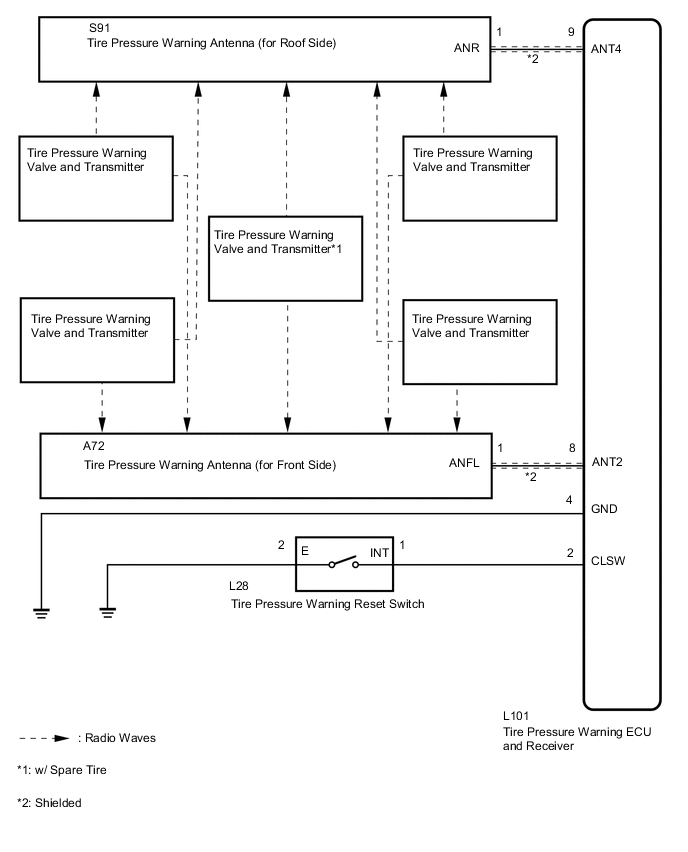
CAUTION / NOTICE / HINT
Note
-
When replacing the tire pressure warning ECU and receiver, read the transmitter IDs stored in the old ECU using the GTS and write them down before removal.
-
It is necessary to perform initialization (See page ) after registration Click here of the transmitter IDs into the tire pressure warning ECU and receiver if the ECU and/or one of the valve and transmitters has been replaced.
PROCEDURE
-
CHECK TEST MODE DTC (C2195/95)
-
Turn the engine switch off.
-
Connect the GTS to the DLC3.
-
Turn the engine switch on (IG).
-
Turn the GTS on.
-
Enter the following menus: Chassis / Tire Pressure Monitor / Utility / Signal Check.
-
Perform the test mode inspection Click here.
Result Result Proceed to DTC C2195/95 is cleared A DTC C2195/95 is not cleared B
B 
GO TO DTC C2195/95 Click here
A 
-
-
IDENTIFY TRANSMITTER NOT RECEIVED
-
Set the tire pressure to the specified value Click here.
-
Turn the engine switch off.
-
Connect the GTS to the DLC3.
-
Turn the engine switch on (IG).
-
Turn the GTS on.
-
Enter the following menus: Chassis / Tire Pressure Monitor / Data List.
-
Check the values by referring to the table below.
Tire Pressure Monitor Tester Display Measurement Item/Range Normal Condition Diagnostic Note ID 1 Tire Inflation Pressure ID1 tire inflation pressure/
min.: Absolute pressure / 0 kPa (0 kgf/cm2, 0 psi), Relative pressure / 0 kPa (0 kgf/cm2, 0 psi)
max.: Absolute pressure / 488.72 kPa (4.9 kgf/cm2, 70 psi), Relative pressure / 388.72 kPa (3.9 kgf/cm2, 56 psi)
Actual tire inflation pressure If N/A is displayed, data has not been received.*1 ID 2 Tire Inflation Pressure ID2 tire inflation pressure/
min.: Absolute pressure / 0 kPa (0 kgf/cm2, 0 psi), Relative pressure / 0 kPa (0 kgf/cm2, 0 psi)
max.: Absolute pressure / 488.72 kPa (4.9 kgf/cm2, 70 psi), Relative pressure / 388.72 kPa (3.9 kgf/cm2, 56 psi)
Actual tire inflation pressure If N/A is displayed, data has not been received.*1 ID 3 Tire Inflation Pressure ID3 tire inflation pressure/
min.: Absolute pressure / 0 kPa (0 kgf/cm2, 0 psi), Relative pressure / 0 kPa (0 kgf/cm2, 0 psi)
max.: Absolute pressure / 488.72 kPa (4.9 kgf/cm2, 70 psi), Relative pressure / 388.72 kPa (3.9 kgf/cm2, 56 psi)
Actual tire inflation pressure If N/A is displayed, data has not been received.*1 ID 4 Tire Inflation Pressure ID4 tire inflation pressure/
min.: Absolute pressure / 0 kPa (0 kgf/cm2, 0 psi), Relative pressure / 0 kPa (0 kgf/cm2, 0 psi)
max.: Absolute pressure / 488.72 kPa (4.9 kgf/cm2, 70 psi), Relative pressure / 388.72 kPa (3.9 kgf/cm2, 56 psi)
Actual tire inflation pressure If N/A is displayed, data has not been received.*1 ID 5 Tire Inflation Pressure ID5 tire inflation pressure/
min.: Absolute pressure / 0 kPa (0 kgf/cm2, 0 psi), Relative pressure / 0 kPa (0 kgf/cm2, 0 psi)
max.: Absolute pressure / 488.72 kPa (4.9 kgf/cm2, 70 psi), Relative pressure / 388.72 kPa (3.9 kgf/cm2, 56 psi)
Actual tire inflation pressure*2 If N/A is displayed, data has not been received.*1, *2 Tech Tips
-
*1: It may take a few minutes until the values are displayed.
-
*2: w/ Spare Tire
-
-
Rapidly reduce the tire pressure for each wheel at least 40 kPa (0.4 kgf/cm2, 5.8 psi) within 30 seconds.
-
Check the Data List.
Note
-
It may take a few minutes to display the updated tire pressure data.
-
When the "ID Tire Inflation Pressure" data has not changed, reset the tire pressure to the appropriate specified value and rotate the tire 90 to 270 degrees. Then rapidly release the tire pressure and recheck the data.
-
Record the "ID Tire Inflation Pressure" data transmitter ID that corresponds to each tire.
-
-
After confirming that the "ID Tire Inflation Pressure" data for one tire has changed, repeat this procedure one by one. Identify the transmitter not received.
Result Condition Proceed to One or more of transmitters abnormal A All normal B
B 
PERFORM INITIALIZATION Click here
A
-
-
CHECK TRANSMITTER ID
-
Turn the engine switch off.
-
Connect the GTS to the DLC3.
-
Turn the engine switch on (IG).
-
Turn the GTS on.
-
Enter the following menus: Chassis / Tire Pressure Monitor / Data List.
-
Check the values by referring to the table below.
Tire Pressure Monitor Tester Display Measurement Item/Range Normal Condition Diagnostic Note Registered ID 1 code Registered ID1 code/
min.: 0, max.: FFFFFFF*1
ID No. registered for transmitter ID1 displayed - Registered ID 2 code Registered ID2 code/
min.: 0, max.: FFFFFFF*1
ID No. registered for transmitter ID2 displayed - Registered ID 3 code Registered ID3 code/
min.: 0, max.: FFFFFFF*1
ID No. registered for transmitter ID3 displayed - Registered ID 4 code Registered ID4 code/
min.: 0, max.: FFFFFFF*1
ID No. registered for transmitter ID4 displayed - Registered ID 5 code Registered ID5 code/
min.: 0, max.: FFFFFFF*1
ID No. registered for transmitter ID5 displayed*2 - Tech Tips
-
*1: Displayed only when the ID No. is not registered.
-
*2: w/ Spare Tire
-
-
Check the ID number on the identified transmitter by removing it from the tire and wheel.
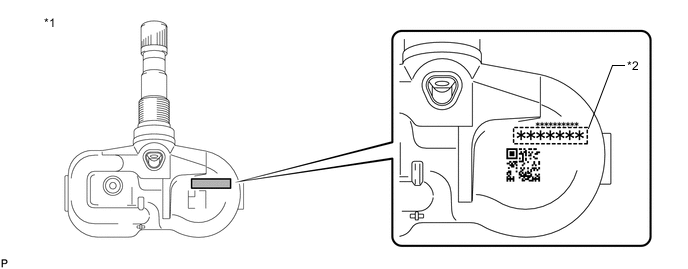
Text in Illustration *1 Tire Pressure Warning Valve and Transmitter *2 Transmitter ID (7-digit number) -
Confirm that the ID number on the transmitter and recorded transmitter ID match.
Result Result Proceed to Match A Do not match B
B
REGISTRATION OF TRANSMITTER ID Click here
A
-
-
REPLACE TIRE PRESSURE WARNING VALVE AND TRANSMITTER
-
Replace the tire pressure warning valve and transmitter Click here.
NEXT
-
-
REGISTRATION OF TRANSMITTER ID
-
Perform registration Click here.
NEXT
-
-
PERFORM INITIALIZATION
-
Perform initialization Click here.
NEXT
-
-
CONFIRM TIRE INFLATION PRESSURE (DATA LIST)
-
Turn the engine switch off.
-
Connect the GTS to the DLC3.
-
Turn the engine switch on (IG).
-
Turn the GTS on.
-
Enter the following menus: Chassis / Tire Pressure Monitor / Data List.
-
Check the values by referring to the table below.
Tire Pressure Monitor Tester Display Measurement Item/Range Normal Condition Diagnostic Note ID 1 Tire Inflation Pressure ID1 tire inflation pressure/
min.: Absolute pressure / 0 kPa (0 kgf/cm2, 0 psi), Relative pressure / 0 kPa (0 kgf/cm2, 0 psi)
max.: Absolute pressure / 488.72 kPa (4.9 kgf/cm2, 70 psi), Relative pressure / 388.72 kPa (3.9 kgf/cm2, 56 psi)
Actual tire inflation pressure If N/A is displayed, data has not been received.*1 ID 2 Tire Inflation Pressure ID2 tire inflation pressure/
min.: Absolute pressure / 0 kPa (0 kgf/cm2, 0 psi), Relative pressure / 0 kPa (0 kgf/cm2, 0 psi)
max.: Absolute pressure / 488.72 kPa (4.9 kgf/cm2, 70 psi), Relative pressure / 388.72 kPa (3.9 kgf/cm2, 56 psi)
Actual tire inflation pressure If N/A is displayed, data has not been received.*1 ID 3 Tire Inflation Pressure ID3 tire inflation pressure/
min.: Absolute pressure / 0 kPa (0 kgf/cm2, 0 psi), Relative pressure / 0 kPa (0 kgf/cm2, 0 psi)
max.: Absolute pressure / 488.72 kPa (4.9 kgf/cm2, 70 psi), Relative pressure / 388.72 kPa (3.9 kgf/cm2, 56 psi)
Actual tire inflation pressure If N/A is displayed, data has not been received.*1 ID 4 Tire Inflation Pressure ID4 tire inflation pressure/
min.: Absolute pressure / 0 kPa (0 kgf/cm2, 0 psi), Relative pressure / 0 kPa (0 kgf/cm2, 0 psi)
max.: Absolute pressure / 488.72 kPa (4.9 kgf/cm2, 70 psi), Relative pressure / 388.72 kPa (3.9 kgf/cm2, 56 psi)
Actual tire inflation pressure If N/A is displayed, data has not been received.*1 ID 5 Tire Inflation Pressure ID5 tire inflation pressure/
min.: Absolute pressure / 0 kPa (0 kgf/cm2, 0 psi), Relative pressure / 0 kPa (0 kgf/cm2, 0 psi)
max.: Absolute pressure / 488.72 kPa (4.9 kgf/cm2, 70 psi), Relative pressure / 388.72 kPa (3.9 kgf/cm2, 56 psi)
Actual tire inflation pressure*2 If N/A is displayed, data has not been received.*1, *2 Tech Tips
-
*1: It may take a few minutes until the values are displayed.
-
*2: w/ Spare Tire
-
When no "ID Tire Inflation Pressure" data has changed, reset the tire pressure to the appropriate specified value and rotate the tire 90 to 270 degrees. Then rapidly release the tire pressure and recheck the data.
Result Result Proceed to Tire pressure values are not displayed. A All tire pressure readings are equal to specified values. B
-
A
REPLACE TIRE PRESSURE WARNING ECU AND RECEIVER Click here
B
END
-