DYNAMIC RADAR CRUISE CONTROL SYSTEM ROAD TEST
Tech Tips
The dynamic radar cruise control system has 2 cruise control modes: the constant speed control mode and vehicle-to-vehicle distance control mode.
-
The vehicle-to-vehicle distance control mode is always selected when starting up the dynamic radar cruise control system.
-
Operation of the constant speed control mode is the same as the cruise control system.
-
INSPECT SET SWITCH
-
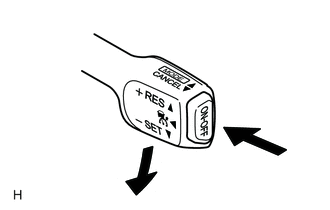
Push the cruise control switch ON.
-
Constant speed control mode:
Drive the vehicle at a desired speed (between 40 km/h and 200 km/h [25 mph and 125 mph]).
-
Vehicle-to-vehicle distance control mode:
Drive the vehicle at a desired speed (between 40 km/h and 135 km/h [25 mph and 85 mph]).
-
Press the cruise control switch to SET/COAST.
-
Check that the vehicle cruises at the desired speed.
-
-
INSPECT "+" SWITCH
-
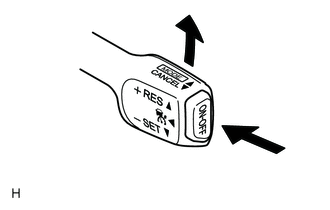
Push the cruise control switch ON.
-
Constant speed control mode:
Drive the vehicle at a desired speed (between 40 km/h and 200 km/h [25 mph and 125 mph]).
-
Vehicle-to-vehicle distance control mode:
Drive the vehicle at a desired speed (between 50 km/h and 170 km/h [31 mph and 106 mph]).
-
Press the cruise control switch to SET/COAST.
-
Check that vehicle speed increases while the cruise control switch is pushed to RES/ACC, and that the vehicle cruises at the set speed when the released.
-
Vehicle-to-vehicle distance control mode:
Momentarily press the control switch to SET/COAST, and then immediately release it. Check that the vehicle speed decreases by about 1 km/h or 1 mph (Tap-up function).
-
Constant speed control mode:
Momentarily press the control switch to SET/COAST, and then immediately release it. Check that the vehicle speed decreases by about 1.6 km/h (1 mph) (Tap-up function).
-
-
INSPECT "-" SWITCH
-
Push the cruise control switch ON.
-
Constant speed control mode:
Drive the vehicle at a desired speed (between 40 km/h and 200 km/h [25 mph and 125 mph]).
-
Vehicle-to-vehicle distance control mode:
Drive the vehicle at a desired speed (between 50 km/h and 170 km/h [31 mph and 106 mph]).
-
Press the cruise control switch to SET/COAST.
-
Check that vehicle speed decreases while the cruise control switch is pressed to SET/COAST, and the vehicle cruises at the set speed when the released.
-
Vehicle-to-vehicle distance control mode:
Momentarily press the control switch to SET/COAST, and then immediately release it. Check that the vehicle speed decreases by about 1 km/h or 1 mph (Tap-down function).
-
Constant speed control mode:
Momentarily press the control switch to SET/COAST, and then immediately release it. Check that the vehicle speed decreases by about 1.6 km/h (1 mph) (Tap-down function).
-
-
INSPECT CANCEL SWITCH
-
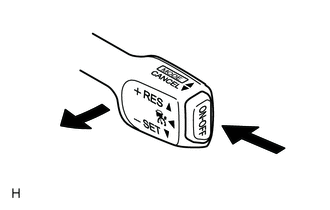
Push the cruise control switch ON.
-
Constant speed control mode:
Drive the vehicle at a desired speed (between 40 km/h and 200 km/h [25 mph and 125 mph]).
-
Vehicle-to-vehicle distance control mode:
Drive the vehicle at a desired speed (between 50 km/h and 170 km/h [31 mph and 106 mph]).
-
Press the cruise control switch to SET/COAST.
-
When operating one of the following, check that the cruise control system is canceled.
-
When the brake pedal is depressed in a situation other than while vehicle speed is 0 km/h (0 mph) with brake pedal depressed*
-
When the electric parking brake is operating*
-
Depressing the brake pedal
-
Moving the shift lever to any position except D or S (8th, 7th, 6th, 5th or 4th gear)
-
w/ Shift Paddle Switch:
The transmission is changed from 4th gear to 3rd, 2nd or 1st gear with the shift paddle switch while the shift lever is in D or M.
-
When vehicle stability control is operating
-
Pulling the cruise control switch to CANCEL
-
Pushing the cruise control switch OFF
Tech Tips
*: Vehicle-to-vehicle distance control mode (w/ Full-speed Following Function)
-
-
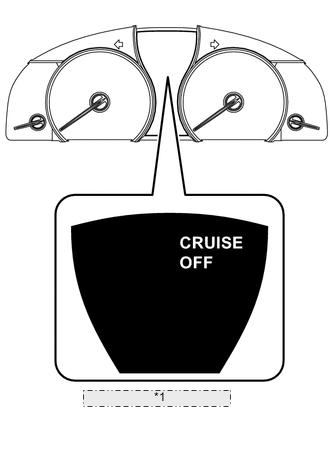
*1 Multi-information Display When the system is canceled by turning the cruise control switch OFF, check that the multi-information display of the No. 1 meter ECU sub-assembly displays "CRUISE OFF".
-
-
INSPECT RES (RESUME) SWITCH
-
Push the cruise control switch ON.
-
Constant speed control mode:
Drive the vehicle at a desired speed (between 40 km/h and 200 km/h [25 mph and 125 mph]).
-
Vehicle-to-vehicle distance control mode:
Drive the vehicle at a desired speed (between 50 km/h and 170 km/h [31 mph and 106 mph]).
-
Press the cruise control switch to SET/COAST.
-
Cancel the cruise control system by performing any of the operations below.
-
When the brake pedal is depressed in a situation other than while vehicle speed is 0 km/h (0 mph) with brake pedal depressed*
-
When the electric parking brake is operating*
-
Depressing the brake pedal
-
Moving the shift lever to any position except D or S (8th, 7th, 6th, 5th or 4th gear)
-
w/ Shift Paddle Switch:
The shift lever is moved from the D (4th gear) to D (3rd, 2nd, 1st gear) with the shift paddle switch.
-
When vehicle stability control is operating
-
Pulling the cruise control switch to CANCEL
Tech Tips
*: Vehicle-to-vehicle distance control mode (w/ Full-speed Following Function)
-
-
After the cruise control switch is pressed to RES/ACC at a driving speed of more than 40 km/h (25 mph), check that the vehicle restores the speed before the cancellation.
-
-
CHECK FULL-SPEED FOLLOWING FUNCTION
-
Drive the vehicle at a desired speed (between 40 km/h and 200 km/h [25 mph and 125 mph]).
-
Push the cruise control switch ON.
-
Press the cruise control switch to SET/COAST.
-
When a vehicle is detected ahead, check that the full-speed following function starts according to the set vehicle-to-vehicle distance.
Tech Tips
-
The system cannot detect a vehicle that has already stopped at the end of a traffic line, etc. As a result, the system cannot decelerate adequately.
-
Narrow objects, such as motorcycles, are difficult for the system to detect.
-
Vehicles that have a small rear area, such as a car carrier, truck, etc. are also difficult for the system to detect.
-
If the full-speed following function does not operate, The master warning light turns on and the multi-information display of the No. 1 meter ECU sub-assembly displays "Cruise Control System / Depress the brake pedal".
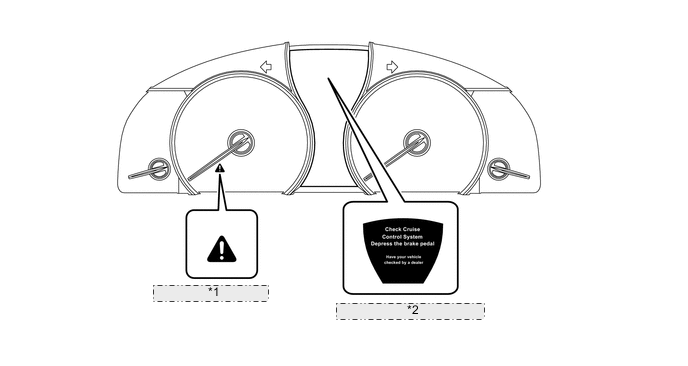
*1 Master Warning Light *2 Multi-information Display
-
-
When the vehicle ahead stops, check that the multi-information display of the No. 1 meter ECU sub-assembly is the same as the display when the vehicle ahead is driving, and while maintaining the vehicle-to-vehicle distance, check that the vehicle stops.
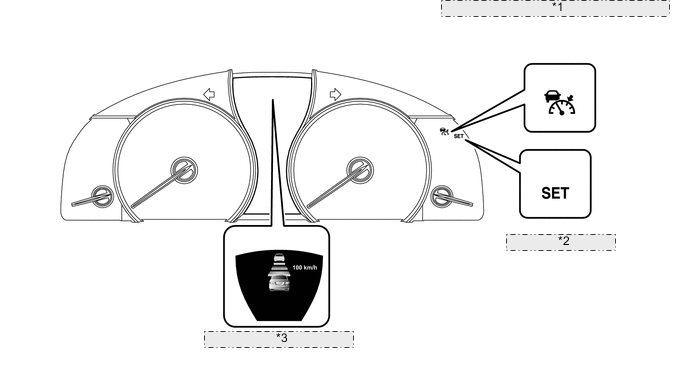
*1 Cruise Control Indicator Light (Vehicle-to-vehicle distance control mode) *2 SET Indicator Light *3 Multi-information Display -
When the vehicle ahead begins driving, check that the multi-information display of the No. 1 meter ECU sub-assembly displays "PRECEDING VEHICLE MOVEMENT / Operate cruise lever or accelerator pedal to resume".
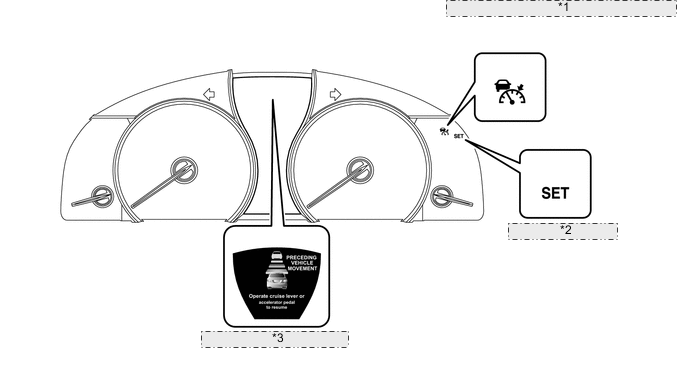
*1 Cruise Control Indicator Light (Vehicle-to-vehicle distance control mode) *2 SET Indicator Light *3 Multi-information Display -
Check that the vehicle following function control begins by pressing the control switch to SET/ COAST or by depressing the accelerator pedal.
-
Check that the following occurs when the followed object is no longer detected while the vehicle following function is operating at a vehicle speed of approximately 40 km/h (25 mph) or less: 1) The multi-information display of the No. 1 meter ECU sub-assembly displays "CRUISE NOT AVAILABLE", 2) the dynamic radar cruise control system is canceled, and 3) and normal driving returns.
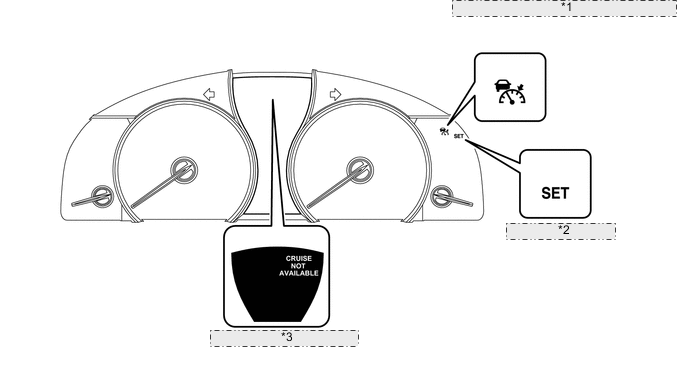
*1 Cruise Control Indicator Light (Vehicle-to-vehicle distance control mode) *2 SET Indicator Light *3 Multi-information Display
-