STEERING COLUMN ASSEMBLY INSTALLATION
-
INSTALL TURN SIGNAL SWITCH WITH SPIRAL CABLE ASSEMBLY
-
w/o Smart Entry and Start System
-
With the clamp loose, install the turn signal switch with spiral cable assembly to the steering column assembly.
-
Attach the claw of the turn signal switch with spiral cable assembly to the steering column assembly and secure the turn signal switch with spiral cable assembly with the clamp.
-
-
w/ Smart Entry and Start System
-
Attach the 3 claws and install the turn signal switch with spiral cable assembly to the steering column assembly.
-
-
-
INSTALL STEERING COLUMN UPPER COVER
-
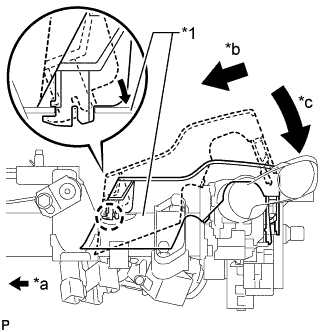
Text in Illustration *1 Column Tube *a Front of Vehicle *b Insert into the cutout of the column tube so that the claw of the steering column upper cover does not break *c Lower the backside of the steering column upper cover Install the steering column upper cover to the steering column assembly.
-
-
INSTALL STEERING COLUMN ASSEMBLY
-
Temporarily install the steering column assembly with the 3 bolts.
-
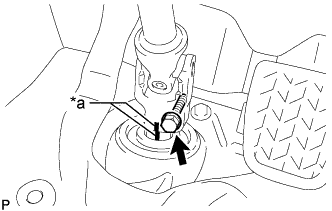
Text in Illustration *a Matchmark Align the matchmarks on the No. 2 steering intermediate shaft assembly and the steering intermediate shaft assembly.
-
Temporarily install the bolt.
-
Tighten the 3 bolts on the steering column assembly.
- Torque:
- 21 N*m { 214 kgf*cm, 16 ft.*lbf }
-
Tighten the bolt on the No.2 steering intermediate shaft assembly.
- Torque:
- 36 N*m { 367 kgf*cm, 27 ft.*lbf }
Note
Ensure that the steering column assembly is in the lowermost tilt position.
-
Connect the connectors and clamp the wire harness to the steering column assembly bracket.
-
-
INSTALL STEERING COLUMN HOLE COVER
-
Install the steering column hole cover with the 3 bolts.
- Torque:
- 8.0 N*m { 82 kgf*cm, 71 in.*lbf }
-
-
INSTALL INSTRUMENT PANEL FINISH LOWER PANEL
-
Connect the fuel lid lock control cable and bonnet (hood) control cable assembly to the instrument panel finish lower.
-
Attach the 4 clips to install the instrument panel finish panel lower.
-
Install the 2 clips.
-
-
PLACE FRONT WHEELS FACING STRAIGHT AHEAD
-
INSTALL STEERING COLUMN LOWER COVER
-
Engage the 4 claws to install the steering column lower cover to the steering column upper cover.
-
Using a "TORX" socket wrench (T25), tighten the 2 screws.
-
-
INSTALL NO. 2 STEERING COLUMN LOWER COVER
-
Install the 4 guide pins install the No. 2 steering column lower cover.
-
-
ADJUST SPIRAL CABLE SUB-ASSEMBLY
-
Check that the ignition switch is off.
-
Check that the cable is disconnected from the negative (-) battery terminal.
CAUTION:
Wait at least 90 seconds after disconnecting the cable from the negative (-) battery terminal to disable the SRS system.
-
Check that the spiral cable sub-assembly is center position.
OK The connector is at the top. The colored roller or the top of the flat cable U-turn can be checked from the check window. 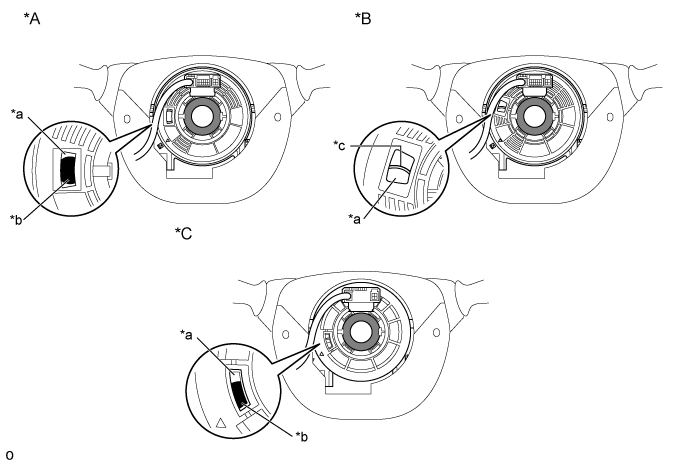
Text in Illustration *A Colored Roller (Visible Type), w/ Steering Pad Switch *B Flat Cable (Visible Type) *C Colored Roller (Visible Type), w/o Steering Pad Switch - - *a Check Window *b Colored Roller *c Top of Flat Cable U-turn - - -
If the spiral cable sub-assembly is not centered, center it.
Note
Failure to observe the following precautions may result in damage to the spiral cable sub-assembly.
-
When rotating the spiral cable sub-assembly, make sure to push on the interlock to release the interlock.
-
Do not turn the spiral cable sub-assembly using the airbag wire harness.
-
Do not forcibly rotate the part.
-
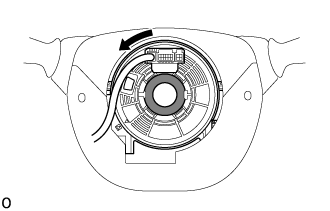
While pushing on the interlock indicated in the illustration. Make sure to rotate the spiral cable sub-assembly counterclockwise slowly by hand until it stops.
Note
Make sure to rotate the spiral cable sub-assembly counterclockwise. If rotated clockwise, it may be damaged or centering may no longer be possible.
Tech Tips
The interlock operates at the top and bottom of the connector.
Text in Illustration 
Interlock 
Counterclockwise -
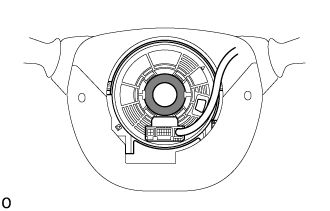
If the spiral cable sub-assembly stops rotating and the connector has moved past the bottom, return the connector to the bottom as shown in the illustration.
-
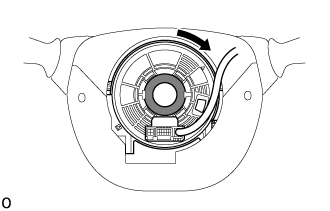
While pushing on the interlock, rotate the spiral cable sub-assembly clockwise approximately 2.5 times to move the connector from the bottom to the top.
Note
If the connector is rotated clockwise from the bottom 5 times or more, the spiral cable sub-assembly may be damaged.
Tech Tips
The interlock operates at the top and bottom of the connector.
Text in Illustration Interlock Counterclockwise -
Check that the spiral cable sub-assembly is center position.
OK The connector is at the top. The colored roller or the top of the flat cable U-turn can be checked from the check window.
Text in Illustration *A Colored Roller (Visible Type), w/ Steering Pad Switch *B Flat Cable (Visible Type) *C Colored Roller (Visible Type), w/o Steering Pad Switch - - *a Check Window *b Colored Roller *c Top of Flat Cable U-turn - - Note
If the spiral cable sub-assembly cannot be centered, it is possible that the spiral cable sub-assembly is broken. Replace the spiral cable sub-assembly with a new one.
-
-
-
INSTALL STEERING WHEEL ASSEMBLY
-
Align the matchmarks on the steering wheel assembly and the steering column assembly.
-
Install the steering wheel set nut.
- Torque:
- 50 N*m { 510 kgf*cm, 37 ft.*lbf }
-
Connect the connectors.
-
-
INSPECT STEERING WHEEL CENTER POINT
-
INSTALL STEERING PAD COVER LH (w/o Steering Wheel Ornament)
-
Install the 3 guide pins and screw, install the steering pad cover LH.
-
-
INSTALL STEERING PAD COVER RH (w/o Steering Wheel Ornament)
Tech Tips
Refer to the step "STEERING PAD COVER LH (w/o Steering Wheel Ornament)".
-
INSTALL STEERING PAD SWITCH LH (w/ Steering Pad Switch)
-
Attach the 2 pins and guide to install the steering pad switch LH.
-
Install the screw.
-
Connect each connector.
-
-
INSTALL NO. 2 STEERING WHEEL ORNAMENT (w/ Steering Wheel Ornament)
-
Install the 3 guide pins and screw, install the No. 2 steering wheel ornament.
-
-
INSTALL NO. 1 STEERING WHEEL ORNAMENT (w/ Steering Wheel Ornament)
Tech Tips
Refer to the step "INSTALL NO. 2 STEERING WHEEL ORNAMENT (w/ Steering Wheel Ornament)".
-
INSPECT STEERING PAD (w/ Airbag System)
-
With the steering pad installed on the vehicle, perform a visual check. If there are any defects as mentioned below, replace the steering pad with a new one:
Cuts, small cracks or marked discoloration on the steering pad top surface or in the grooved portion.
-
Make sure that the horn sounds.
Tech Tips
If the horn does not sound, inspect the horn system Click here.
-
-
INSTALL STEERING PAD (w/ Airbag System)
-
INSTALL STEERING PAD (w/o Airbag System)
-
Connect the horn connector.
-
Using a "TORX" socket wrench (T30), tighten the 2 screws.
- Torque:
- 1.5 N*m { 15 kgf*cm, 13 in.*lbf }
-
-
CONNECT CABLE TO NEGATIVE BATTERY TERMINAL
-
INSPECT SUPPLEMENTAL RESTRAINT SYSTEM WARNING LIGHT
-
PERFORM INITIALIZATION
Some systems need initialization when reconnecting battery cable Click here.