ROOF HEADLINING (for Semi-trim) REMOVAL
-
PRECAUTION
Note
After turning the ignition switch off, waiting time may be required before disconnecting the cable from the negative (-) battery terminal. Therefore, make sure to read the disconnecting the cable from the negative (- ) battery terminal notices before proceeding with work Click here.
-
DISCONNECT CABLE FROM NEGATIVE BATTERY TERMINAL
Note
When disconnecting the cable, some systems need to be initialized after the cable is reconnected Click here.
-
REMOVE FRONT DOOR SCUFF PLATE LH
-
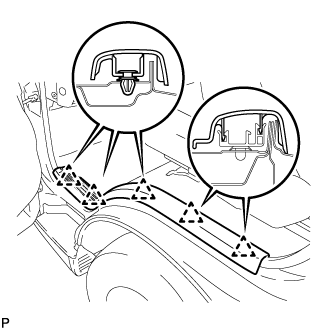
Detach the 5 clips and remove the front door scuff plate LH.
-
-
REMOVE FRONT DOOR SCUFF PLATE RH
-
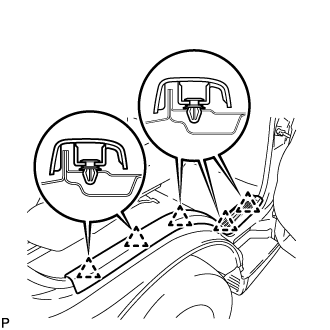
Detach the 5 clips and remove the front door scuff plate RH.
-
-
REMOVE FRONT DOOR OPENING TRIM LH
-
REMOVE FRONT DOOR OPENING TRIM RH
-
REMOVE SLIDE DOOR WEATHERSTRIP NO. 1 RH
-
REMOVE FRONT ASSIST GRIP PLUG NO. 1
-
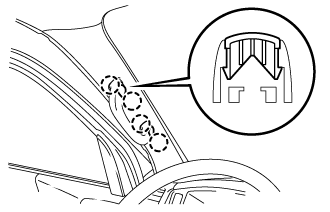
Using a screwdriver, detach the 4 claws and remove the 2 front assist grip plugs No. 1.
Tech Tips
-
Tape the screwdriver tip before use.
-
Use the same procedures described for the other side.
-
-
-
REMOVE ASSIST GRIP ASSEMBLY
-
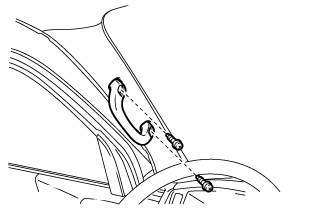
Remove the 2 screws and assist grip assembly.
Tech Tips
Use the same procedures described for the other side.
-
-
REMOVE ASSIST GRIP
-
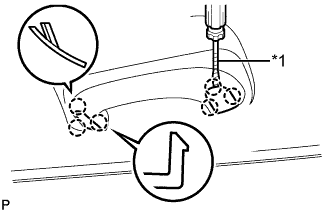
Text in Illustration *1 Protective Tape Using a screwdriver, detach the 6 claws and open the 2 assist grip covers.
Tech Tips
Tape the screwdriver tip before use.
-
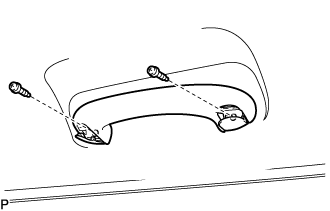
Remove the 2 screws and assist grip.
-
-
REMOVE FRONT PILLAR GARNISH LH (w/o Rear Air Conditioning System)
-
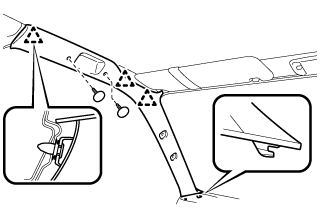
Remove the 2 clips.
-
Detach the 3 clips and remove the front pillar garnish LH.
-
-
REMOVE FRONT PILLAR GARNISH RH (w/o Rear Air Conditioning System)
-
Detach the 3 clips and remove the front pillar garnish RH.
-
-
REMOVE FRONT PILLAR GARNISH LH (w/ Rear Air Conditioning System)
-
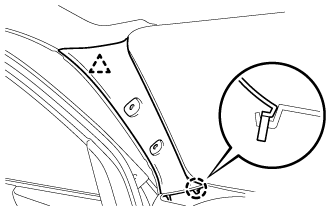
Detach the clip and claw and remove the front pillar garnish LH.
-
-
REMOVE FRONT PILLAR GARNISH RH (w/ Rear Air Conditioning System)
Tech Tips
Use the same procedures described for the LH side.
-
REMOVE ROOM LIGHT ASSEMBLY NO. 1
-
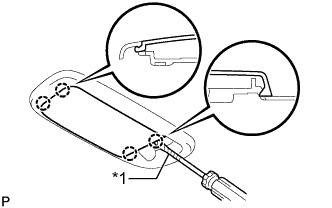
Text in Illustration *1 Protective Tape Using a screwdriver, detach the 4 claws and remove the light cover.
Tech Tips
Tape the screwdriver tip before use.
-
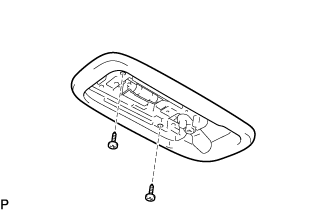
Remove the 2 screws and room light assembly No. 1.
-
Disconnect the connector.
-
-
DISCONNECT FRONT SEAT OUTER BELT ASSEMBLY RH (w/ Rear Air Conditioning System)
-
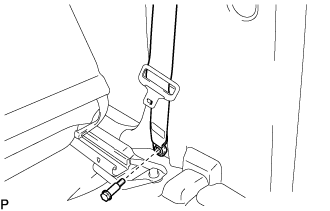
Remove the bolt and disconnect front seat outer belt assembly RH.
-
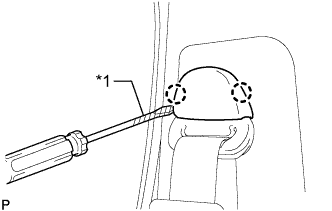
Text in Illustration *1 Protective Tape Using a screwdriver, detach the 2 claws and open the cover.
Tech Tips
Tape the screwdriver tip before use.
-
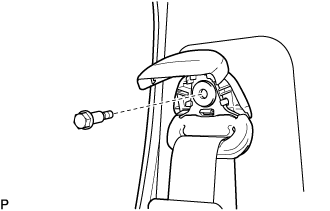
Remove the bolt and disconnect front seat outer belt assembly RH.
-
-
REMOVE SEPARATOR BAR BRACKET LOWER (w/ Rear Air Conditioning System)
-
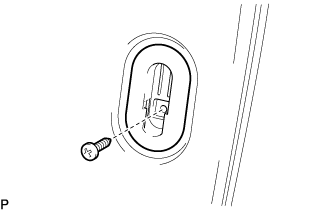
Remove the screw and separator bar bracket lower.
Tech Tips
Use the same procedure described for the other side.
-
-
REMOVE CENTER PILLAR GARNISH LOWER RH (w/ Rear Air Conditioning System)
-
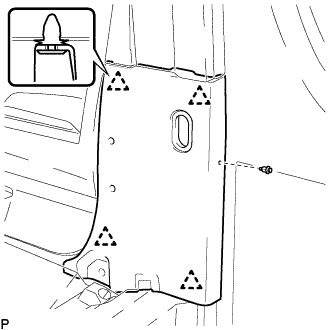
Remove the clip.
-
Using a screwdriver, detach the 4 clips and remove the center pillar garnish lower RH.
Tech Tips
Tape the screwdriver tip before use.
-
-
REMOVE CENTER PILLAR GARNISH COVER LOWER LH (w/ Rear Air Conditioning System)
-
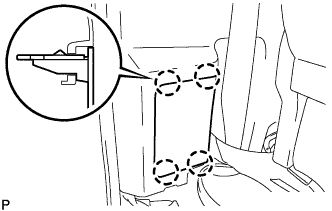
Using a screwdriver, detach the 4 claws and remove the center pillar garnish cover lower LH.
Tech Tips
Tape the screwdriver tip before use.
-
-
REMOVE SEAT ASSEMBLY LH (w/ Rear Air Conditioning System)
-
Disconnect connector.
-
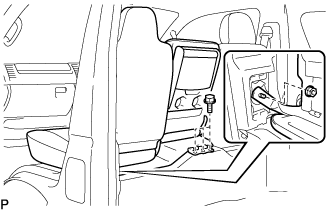
Remove the nut and 3 bolts.
-
Remove the seat assembly LH.
-
-
REMOVE SEAT BELT ANCHOR COVER (w/ Rear Air Conditioning System)
-
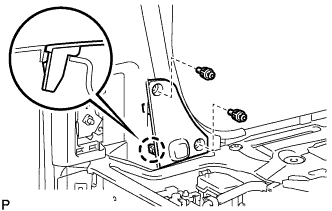
Remove the 2 clips.
-
Detach the claw and then remove the seat belt anchor cover.
-
-
DISCONNECT FRONT SEAT OUTER BELT ASSEMBLY LH (w/ Rear Air Conditioning System)
-
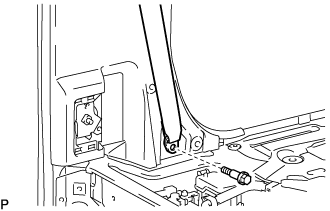
Remove the bolt and disconnect the front seat outer belt assembly LH.
-
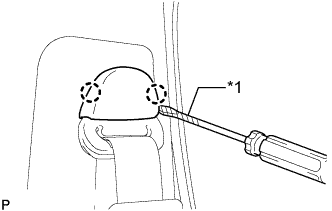
Text in Illustration *1 Protective Tape Using a screwdriver, detach the 2 claws and open the cover.
Tech Tips
Tape the screwdriver tip before use.
-
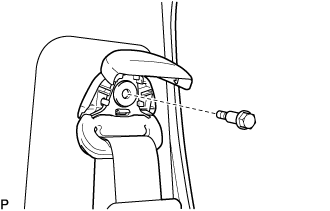
Remove the bolt and disconnect the front seat outer belt assembly LH.
-
-
REMOVE CENTER PILLAR GARNISH LOWER LH (w/ Rear Air Conditioning System)
-
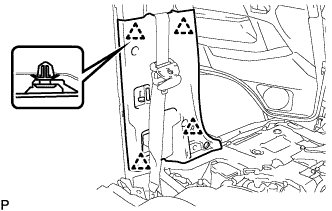
Using a screwdriver, detach the 4 clips and remove the center pillar garnish lower LH.
-
-
REMOVE CENTER PILLAR GARNISH RH (w/ Rear Air Conditioning System)
-
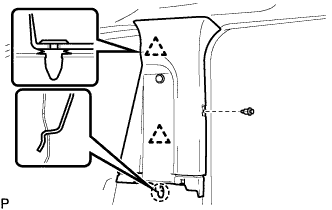
Remove the clip.
-
Using a screwdriver, detach the 2 clips and claw, and remove the center pillar garnish RH.
Tech Tips
Tape the screwdriver tip before use.
-
-
REMOVE ENGINE SERVICE HOLE COVER HOOK NO. 2 LH
-
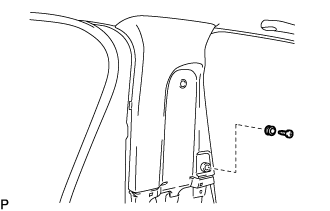
Remove the screw and the engine service hole cover hook No. 2 LH.
-
-
REMOVE CENTER PILLAR GARNISH LH (w/ Rear Air Conditioning System)
-
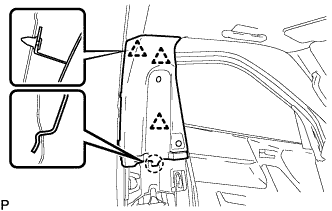
Using a screwdriver, detach the 3 clips and claw, and remove the center pillar garnish LH.
-
-
REMOVE ROOM LIGHT ASSEMBLY NO. 2
Tech Tips
Use the same procedure described for the other side.
-
Text in Illustration *1 Protective Tape Using a screwdriver, detach the 4 claws and remove the light cover.
Tech Tips
Tape the screwdriver tip before use.
-
Remove the 2 screws and room light assembly No. 2.
-
Disconnect the connector.
-
-
REMOVE ROOF HEADLINING MOULDING (for Standard Body)
-
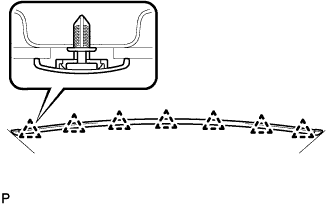
for Standard roof type:
Detach the 7 clips and remove the roof headlining moulding.
Tech Tips
-
Use the same procedures described for the other side.
-
If any clip remains on the body side, use a clip remover.
-
-
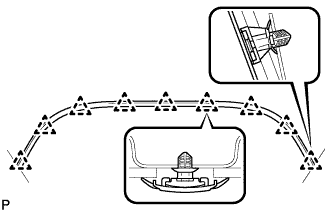
for High roof type:
Detach the 9 clips and remove the roof headlining moulding.
Tech Tips
-
Use the same procedures described for the other side.
-
If any clip remains on the body side, use a clip remover.
-
-
-
REMOVE ROOF HEADLINING MOULDING (for Wide Body)
-
w/o Rear Air Conditioning System:
Detach the 27 clips and remove the 3 roof headlining mouldings.
-
w/ Rear Air Conditioning System:
Detach the 18 clips and remove the 2 roof headlining mouldings.
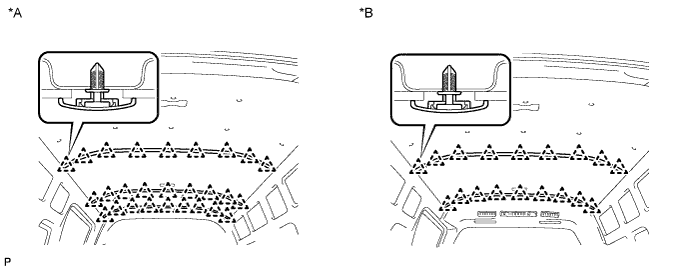
Text in Illustration *A w/o Rear Air Conditioning System *B w/ Rear Air Conditioning System Tech Tips
If any clip remains on the body side, use a clip remover.
-
-
REMOVE ROOF CLIP
-
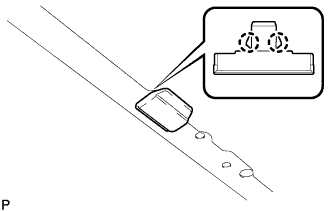
Using a screwdriver, detach the 2 claws and remove the roof clip.
Tech Tips
Tape the screwdriver tip before use.
-
-
REMOVE ROOF HEADLINING NO. 4
-
for Standard Body, High Roof, w/o Rear Air Conditioning System:
Remove the 13 clips and remove the roof headlining No. 4.
-
for Standard Body, High Roof, w/ Rear Air Conditioning System:
Remove the 13 clips and remove the roof headlining No. 4.
-
for Wide Body, w/o Rear Air Conditioning System:
Remove the 17 clips and remove the roof headlining No. 4.
-
for Wide Body, w/ Rear Air Conditioning System:
Remove the 17 clips and remove the roof headlining No. 4.
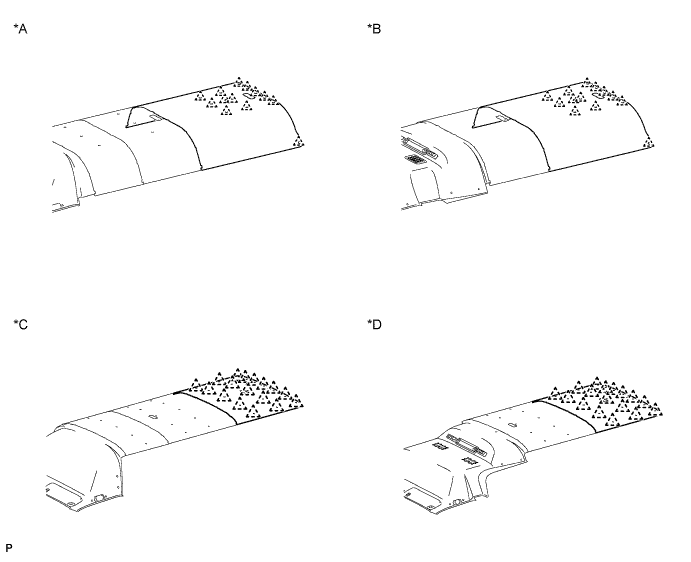
Text in Illustration *A for Standard Body, High Roof, w/o Rear Air Conditioning System *B for Standard Body, High Roof, w/ Rear Air Conditioning System *C for Wide Body, w/o Rear Air Conditioning System *D for Wide Body, w/ Rear Air Conditioning System
-
-
REMOVE ROOF HEADLINING NO. 3
-
for Standard Body, Standard Roof, w/o Rear Air Conditioning System:
Remove the 13 clips and remove the roof headlining No. 3.
-
for Standard Body, Standard Roof, w/ Rear Air Conditioning System:
Remove the 13 clips and remove the roof headlining No. 3.
-
for Standard Body, High Roof, w/o Rear Air Conditioning System:
Remove the 3 clips and remove the roof headlining No. 3.
-
for Standard Body, High Roof, w/ Rear Air Conditioning System:
Remove the 3 clips and remove the roof headlining No. 3.
-
for Wide Body, w/o Rear Air Conditioning System:
Remove the 10 clips and remove the roof headlining No. 3.
-
for Wide Body, w/ Rear Air Conditioning System:
Remove the 10 clips and remove the roof headlining No. 3.
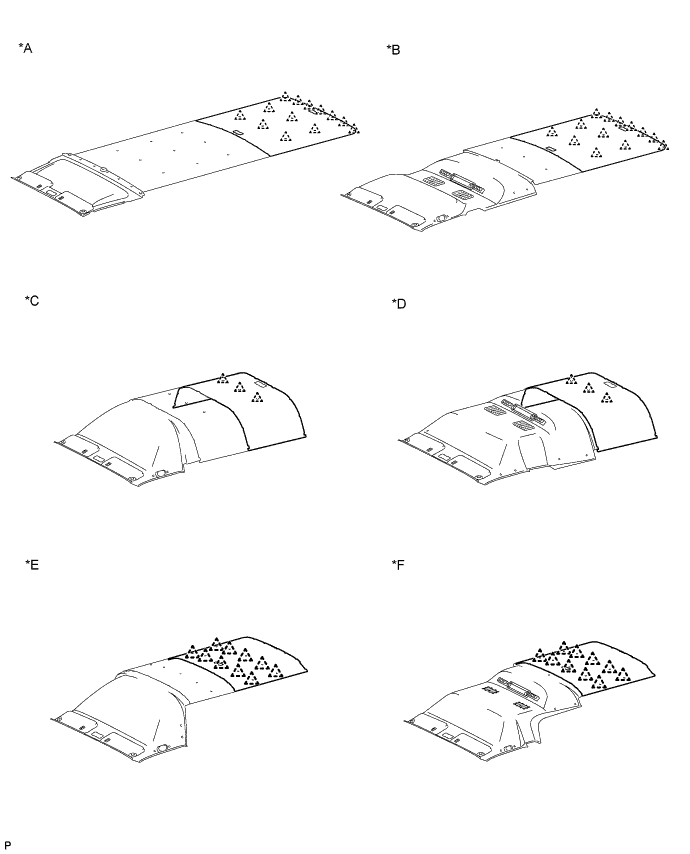
Text in Illustration *A for Standard Body, Standard Roof, w/o Rear Air Conditioning System *B for Standard Body, Standard Roof, w/ Rear Air Conditioning System *C for Standard Body, High Roof, w/o Rear Air Conditioning System *D for Standard Body, High Roof, w/ Rear Air Conditioning System *E for Wide Body, w/o Rear Air Conditioning System *F for Wide Body, w/ Rear Air Conditioning System
-
-
REMOVE ROOF HEADLINING NO. 2
-
for Standard Body, Standard Roof, w/o Rear Air Conditioning System:
Remove the 16 clips and remove the roof headlining No. 2.
-
for Standard Body, Standard Roof, w/ Rear Air Conditioning System:
Remove the 3 clips and remove the roof headlining No. 2.
-
for Standard Body, High Roof, w/o Rear Air Conditioning System:
Remove the 3 clips and remove the roof headlining No. 2.
-
for Wide Body, w/o Rear Air Conditioning System:
Remove the 5 clips and remove the roof headlining No. 2.
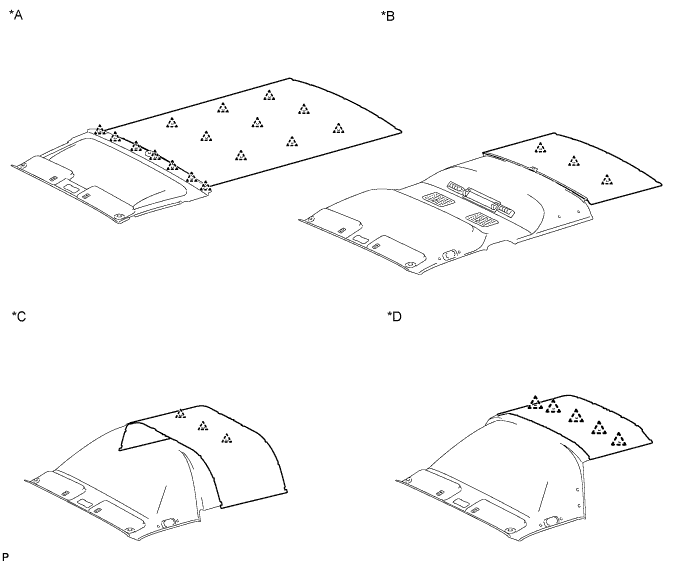
Text in Illustration *A for Standard Body, Standard Roof, w/o Rear Air Conditioning System *B for Standard Body, Standard Roof, w/ Rear Air Conditioning System *C for Standard Body, High Roof, w/o Rear Air Conditioning System *D for Wide Body, w/o Rear Air Conditioning System
-
-
REMOVE REAR COOLER CONTROL PANEL (w/ Rear Air Conditioning System)
-
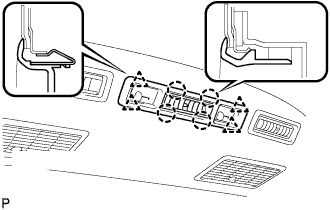
Release the 4 clips and 4 claws, and disconnect the rear cooler control panel.
-
Disconnect the connector and remove the rear cooler control panel.
-
-
REMOVE VISOR ASSEMBLY LH
-
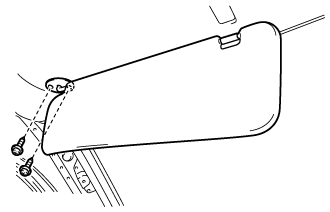
Remove the 2 screws and visor assembly LH.
-
-
REMOVE VISOR ASSEMBLY RH
Tech Tips
Use the same procedures described for the LH side.
-
REMOVE VISOR HOLDER
Tech Tips
Use the same procedures described for the other side.
-
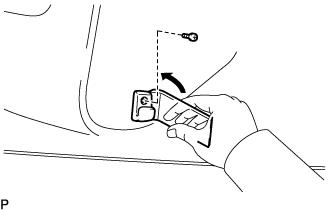
Remove the screw.
-
Using a moulding remover, detach the claw and remove the visor holder.
-
-
REMOVE ROOF HEADLINING NO. 1
-
w/ Rear Air Conditioning System:
Remove the 4 screws.
-
for Standard Body, Standard Roof, w/o Rear Air Conditioning System:
Detach the clip and remove the roof headlining No. 1.
-
for Standard Body, Standard Roof, w/ Rear Air Conditioning System:
-
for 4 Door:
Detach the 5 clips and remove the roof headlining No. 1.
-
for 5 Door:
Detach the 7 clips and remove the roof headlining No. 1.
-
-
for Standard Body, High Roof, w/o Rear Air Conditioning System:
Detach the 3 clips and remove the roof headlining No. 1.
-
for Standard Body, High Roof, w/ Rear Air Conditioning System:
Detach the 5 clips and remove the roof headlining No. 1.
-
for Wide Body, w/o Rear Air Conditioning System:
Detach the 7 clips and remove the roof headlining No. 1.
-
for Wide Body, w/ Rear Air Conditioning System:
Detach the 9 clips and remove the roof headlining No. 1.
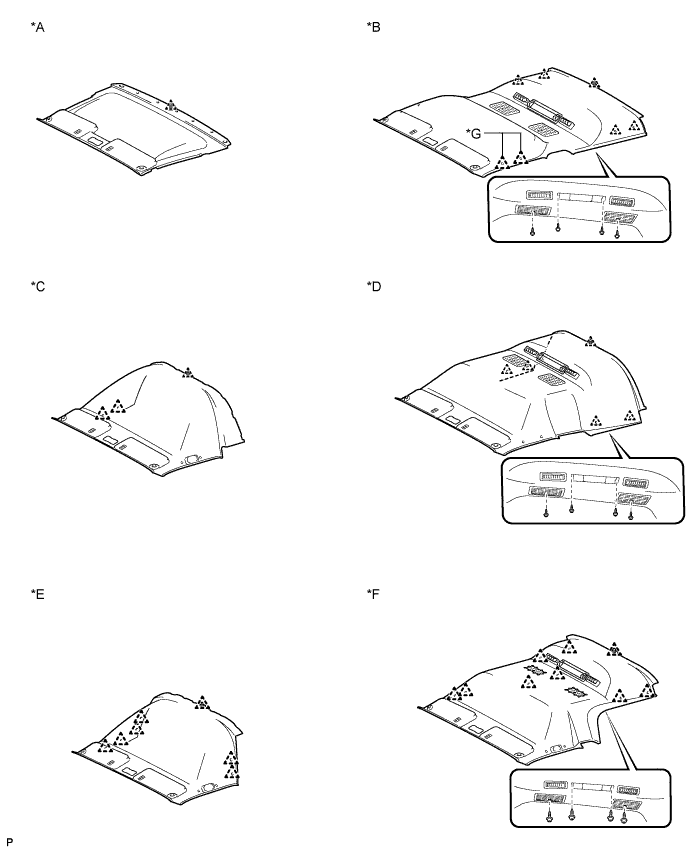
Text in Illustration *A for Standard Body, Standard Roof, w/o Rear Air Conditioning System *B for Standard Body, Standard Roof, w/ Rear Air Conditioning System *C for Standard Body, High Roof, w/o Rear Air Conditioning System *D for Standard Body, High Roof, w/ Rear Air Conditioning System *E for Wide Body, w/o Rear Air Conditioning System *F for Wide Body, w/ Rear Air Conditioning System *G for 5 Door - -
-