FRONT POWER SEAT CONTROL SYSTEM OPERATION CHECK
-
CHECK FRONT POWER SEAT FUNCTION
-
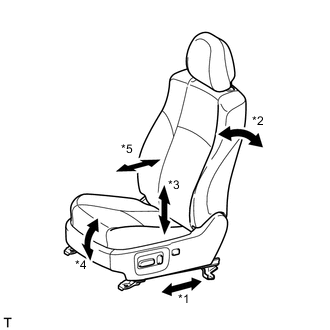
Function Name *1 Sliding function *2 Reclining function *3 Lifter function *4 Front vertical function *5 Lumbar support function Check the basic functions.
-
Operate the power seat switches and check to make sure each seat function works:
-
Sliding
-
Front vertical
-
Lifter
-
Reclining
-
Lumbar support (Driver seat only)
-
-
-
-
CHECK POWER SEAT MOTOR ASSEMBLY (SLIDING, FRONT VERTICAL, LIFTER, RECLINING)
-
Check the PTC thermistor operation inside the power seat motor.
Tech Tips
The PTC thermistor resistance increases when the power seat switch is held down even after the power seat has been moved to the maximum in one direction. If the resistance increases beyond a specified level, current is cut to prevent a short circuit.
Note
-
The inspection should be performed with the seat installed in the vehicle.
-
Perform the 4 steps below for each power seat function.
-
Choose a power seat function. Operate the power seat switch and move the seat as much as possible in one direction. Keep the seat in that position for approximately 60 seconds.
-
Operate the power seat switch again and continue to try to move the seat in the same direction as in the previous step. Measure the amount of time elapsed before current is automatically cut (the sound of the motor stops).
-
After current has been cut, release the power seat switch and wait for approximately 60 seconds.
-
Operate the same power seat switch and move the seat in the opposite direction. Check that the motor operates.
-
-
-
CHECK LUMBAR SUPPORT ADJUSTER ASSEMBLY
-
Check the PTC thermistor operation inside the lumbar support adjuster.
Note
The inspection should be performed with the seat installed in the vehicle.
-
Operate the lumbar support switch and move the lumbar support to either the rearmost position. Keep the lumbar support in that position for approximately 60 seconds.
-
Operate the lumbar support switch again and continue to try to move the lumbar support in the same direction as in the previous step. Measure the time until the current is shut off (adjuster operation sound stops).
-
After the current is shut off, release the lumbar support switch and wait for approximately 60 seconds.
-
Operate the lumbar support switch and move the lumbar support in the opposite direction. Check that the motor operates.
-
-
-
CHECK MEMORY AND SEAT RESTORING OPERATION
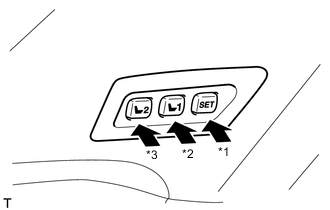
Switch Name *1 SET *2 M1 *3 M2
-
Check the memory and restore operation.
Tech Tips
If the M1 switch and M2 switch are simultaneously pressed while the SET switch is pressed and held, the seat position will not be stored.
-
Turn the ignition switch to ON and move the shift lever to P. (for Automatic Transaxle, CVT)
-
Turn the ignition switch to ON and parking brake switch on. (for Manual Transaxle)
-
Move the seat to the foremost and uppermost position via the seat switch.
-
Check that the buzzer sounds for 0.5 seconds and the seat position is memorized when the M1 switch of the memory switch and the SET switch are pressed and held, or the SET switch is pressed and then the M1 switch is pressed within 3 seconds.
-
Move the seat out of the foremost and uppermost position via the seat switch.
-
Check that the buzzer sounds for 0.5 seconds and the seat position is memorized when the M2 switch of the memory switch and the SET switch are pressed and held, or the SET switch is pressed and then the M2 switch is pressed within 3 seconds.
-
Check that the buzzer sounds for 0.1 seconds and the seat automatically moves into the foremost and uppermost position (memorized position) when the M1 switch of the memory switch is pressed.
-
Check that the buzzer sounds for 0.1 seconds and the seat automatically moves out of the foremost and uppermost position (memorized position) when the M2 switch of the memory switch is pressed.
-
-
Clear the memory.
-
Turn the ignition switch to ON.
-
Press the front power seat switch (front vertical switch) downward 3 times.
Tech Tips
Perform each switch operation within 10 seconds of the previous operation.
-
Within 10 seconds of the above operation, begin the following operation: perform the rearward reclining operation and upward lifter operation simultaneously for 10 seconds or more (a buzzer sounds for 0.5 seconds). This will clear the memory.
-
-