THEFT DETERRENT SYSTEM Intrusion Sensor Cancel Switch Circuit
DESCRIPTION
-
When the intrusion sensor cancel switch on the map light is pressed, the sensor off signal is sent to the main body ECU (instrument panel junction block) which causes the intrusion sensor to stop operating.
WIRING DIAGRAM
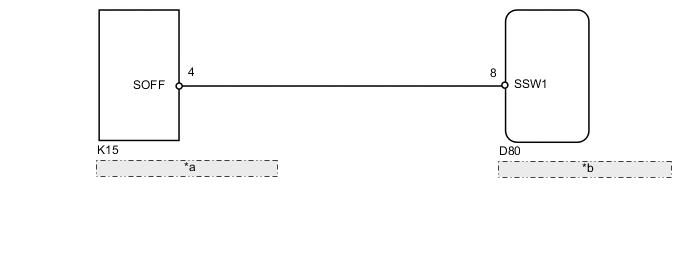
| *a | Map Light Assembly (Intrusion Sensor Cancel Switch) |
| *b | Main Body ECU (Instrument Panel Junction Block) |
PROCEDURE
-
READ VALUE USING INTELLIGENT TESTER (INTRUSION SENSOR CANCEL SWITCH)
-
Using the intelligent tester, read the Data List.
Main Body Tester Display Measurement Item/Range Normal Condition Diagnostic Note Intrusion Sens OFF SW Intrusion sensor cancel switch /
ON or OFF
ON: Intrusion sensor and glass breakage sensor active (switch off)
OFF: Intrusion sensor and glass breakage sensor not active (switch on)
- OK ON (intrusion sensor active [switch off]) appears on screen.
OK 
REPLACE MAIN BODY ECU (INSTRUMENT PANEL JUNCTION BLOCK)
NG 
-
-
CHECK HARNESS AND CONNECTOR (MAIN BODY ECU [INSTRUMENT PANEL JUNCTION BLOCK] - MAP LIGHT ASSEMBLY)
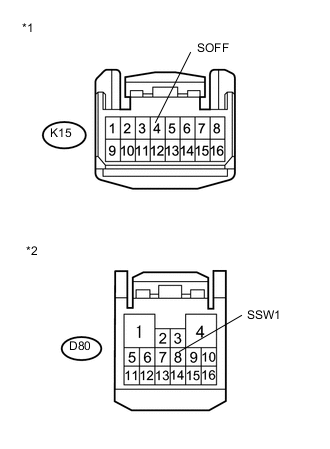
Text in Illustration *1 Front view of wire harness connector
(to Map Light)
*2 Front view of wire harness connector
(to Main Body ECU [Instrument Panel Junction Block])
-
Disconnect the K15 light connector.
-
Disconnect the D80 ECU connector.
-
Measure the resistance according to the value(s) in the table below.
Standard Resistance Tester Connection Condition Specified Condition D80-8 (SSW1) - K15-4 (SOFF) Always Below 1 Ω D80-8 (SSW1) or K15-4 (SOFF) - Body ground Always 10 kΩ or higher
NG
REPAIR OR REPLACE HARNESS OR CONNECTOR
OK
-
-
CHECK MAP LIGHT ASSEMBLY (INTRUSION SENSOR CANCEL SWITCH [OPERATION])
-
Temporarily replace the map light assembly (intrusion sensor cancel switch) with a new or normally functioning one Click here.
-
Turn the intrusion sensor off by pressing the intrusion sensor cancel switch. Check if the switch operates normally by checking that the theft deterrent system does not operate when you move your hand in front of the sensor.
OK Intrusion sensor cancel switch operates normally.
OK
END (MAP LIGHT ASSEMBLY [INTRUSION SENSOR CANCEL SWITCH] IS FAULTY)
NG
REPLACE MAIN BODY ECU (INSTRUMENT PANEL JUNCTION BLOCK)
-