ENGINE IMMOBILISER SYSTEM(w/ Entry and Start System) Security Indicator Light Circuit
DESCRIPTION
-
When the theft deterrent system is in the disarmed state, the security indicator flashes continuously if the immobiliser system is set, but does not illuminate if the immobiliser system is not set.
WIRING DIAGRAM
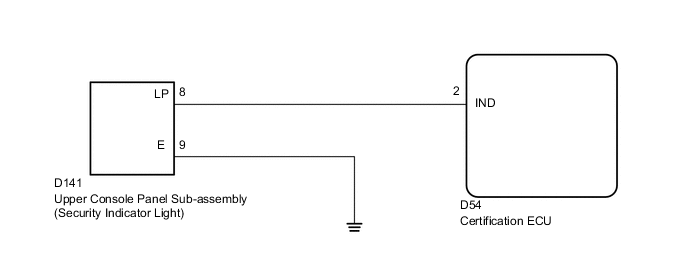
PROCEDURE
-
PERFORM ACTIVE TEST USING INTELLIGENT TESTER (SECURITY INDICATOR)
-
Check that the security indicator light illuminates when operating it with the Active Test.
Entry&Start Tester Display Test Part Control Range Diagnostic Note Security Indicator Security indicator ON / OFF - OK Security indicator illuminates.
OK 
REPLACE CERTIFICATION ECU
NG 
-
-
INSPECT UPPER CONSOLE PANEL SUB-ASSEMBLY (SECURITY INDICATOR LIGHT)
-
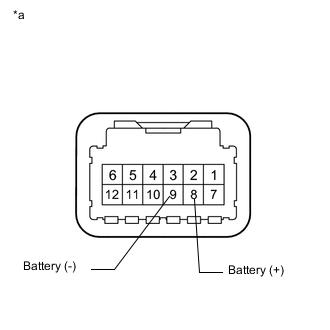
Text in Illustration *a Component without harness connected
(Upper Console Panel Sub-assembly (Security Indicator Light))
Remove the upper console panel sub-assembly (security indicator light) Click here.
-
Connect the positive (+) lead from the battery to terminal 8 and the negative (-) lead to terminal 9, and then check that security indicator illuminates.
OK Security indicator illuminates.
NG
REPLACE UPPER CONSOLE PANEL SUB-ASSEMBLY (SECURITY INDICATOR LIGHT) Click here
OK
-
-
CHECK HARNESS AND CONNECTOR (UPPER CONSOLE PANEL SUB-ASSEMBLY (SECURITY INDICATOR LIGHT) - CERTIFICATION ECU AND BODY GROUND)
-
Disconnect the D141 upper console panel sub-assembly (security indicator light) connector.
-
Disconnect the D54 certification ECU connector.
-
Measure the resistance according to the value(s) in the table below.
Standard Resistance Tester Connection Condition Specified Condition D141-8 (LP) - D54-2 (IND) Always Below 1 Ω D141-9 (E) - Body ground Always Below 1 Ω D141-8 (LP) or D54-2 (IND) - Body ground Always 10 kΩ or higher
OK
REPLACE CERTIFICATION ECU
NG
REPAIR OR REPLACE HARNESS OR CONNECTOR
-