AUDIO AND VISUAL SYSTEM(for Radio and Display Type) USB Audio System Recognition/Play Error
DESCRIPTION
When a USB device or "iPod" is connected to the USB jack of the No. 1 stereo jack adapter assembly, it must have playable files. The device must also communicate with and be recognized by the radio and display receiver assembly. This diagnosis procedure is for when a device is not recognized, or files from the device cannot be played normally.
WIRING DIAGRAM
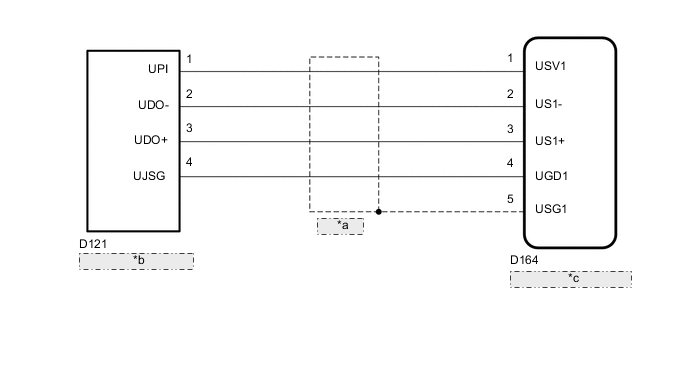
| *a | Shielded |
| *b | No. 1 Stereo Jack Adapter Assembly |
| *c | Radio and Display Receiver Assembly |
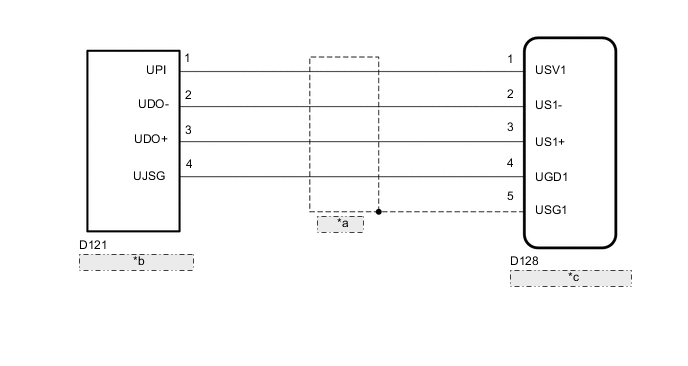
| *a | Shielded |
| *b | No. 1 Stereo Jack Adapter Assembly |
| *c | Radio and Display Receiver Assembly |
CAUTION / NOTICE / HINT
Tech Tips
-
When a large amount of data is in a USB device, it may take a while to begin play.
-
When using a USB device, files that are protected by copy protection cannot be played.
-
When files are not played in the sorted order, perform the following procedure before inspection.
-
Add numbers in front of the file names.
-
Put the files in a folder and copy the folder data to the USB device.
PROCEDURE
-
CHECK USB DEVICE OR "iPod"
-
Disconnect the USB device or "iPod" from the No. 1 stereo jack adapter assembly.
-
Check if playable files are present on the USB device or "iPod".
Tech Tips
Refer to System Description for playable files Click here.
-
Check if the USB device is a compatible format or "iPod" is a compatible version.
Tech Tips
Refer to System Description for compatible formats and versions Click here.
Result Result Proceed to No playable files exist, or incompatible device format or version A Playable files exist, and compatible device format or version B
A 
USB DEVICE FORMAT IS INCOMPATIBLE, "iPod" VERSION IS INCOMPATIBLE, OR NO PLAYABLE FILES PRESENT
B 
-
-
CHECK HARNESS AND CONNECTOR (RADIO AND DISPLAY RECEIVER ASSEMBLY - NO. 1 STEREO JACK ADAPTER ASSEMBLY)
-
Disconnect the D164*1 or D128*2 radio and display receiver assembly connector.
-
*1: for LHD
-
*2: for RHD
-
-
Disconnect the D121 No. 1 stereo jack adapter assembly connector.
-
Measure the resistance according to the value(s) in the table below.
Standard Resistance for LHD Tester Connection Condition Specified Condition D164-1 (USV1) - D121-1 (UPI) Always Below 1 Ω D164-2 (US1-) - D121-2 (UDO-) Always Below 1 Ω D164-3 (US1+) - D121-3 (UDO+) Always Below 1 Ω D164-4 (UGD1) - D121-4 (UJSG) Always Below 1 Ω D164-1 (USV1) - Body ground Always 10 kΩ or higher D164-2 (US1-) - Body ground Always 10 kΩ or higher D164-3 (US1+) - Body ground Always 10 kΩ or higher D164-4 (UGD1) - Body ground Always 10 kΩ or higher D164-5 (USG1) - Body ground Always 10 kΩ or higher for RHD Tester Connection Condition Specified Condition D128-1 (USV1) - D121-1 (UPI) Always Below 1 Ω D128-2 (US1-) - D121-2 (UDO-) Always Below 1 Ω D128-3 (US1+) - D121-3 (UDO+) Always Below 1 Ω D128-4 (UGD1) - D121-4 (UJSG) Always Below 1 Ω D128-1 (USV1) - Body ground Always 10 kΩ or higher D128-2 (US1-) - Body ground Always 10 kΩ or higher D128-3 (US1+) - Body ground Always 10 kΩ or higher D128-4 (UGD1) - Body ground Always 10 kΩ or higher D128-5 (USG1) - Body ground Always 10 kΩ or higher
NG
REPAIR OR REPLACE HARNESS OR CONNECTOR
OK
-
-
CHECK RADIO AND DISPLAY RECEIVER ASSEMBLY (NO. 1 STEREO JACK ADAPTER ASSEMBLY POWER SOURCE)
-
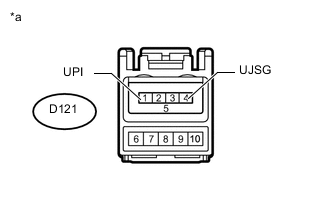
Text in Illustration *a Front view of wire harness connector
(to No. 1 Stereo Jack Adapter Assembly)
Disconnect the No. 1 stereo jack adapter assembly connector.
-
Measure the voltage according to the value(s) in the table below.
Standard Voltage Tester Connection Switch Condition Specified Condition D121-1 (UPI) - D121-4 (UJSG) Ignition switch ACC 4.5 to 5.5 V
NG
REPLACE RADIO AND DISPLAY RECEIVER ASSEMBLY Click here
OK
-
-
FORMAT USB DEVICE OR RESTORE "iPod" AND RECHECK
-
Delete all files in the USB device or "iPod" and format/ restore it.
-
Save the data again and check if it can be played on the in-vehicle device.
Note
Formatting a USB device or restoring an "iPod" erases all music on the device. Make sure that backup music data is available before performing this operation.
OK Malfunction disappears.
OK
END
NG
-
-
REPLACE USB DEVICE OR "iPod"
-
Turn the ignition switch off.
Tech Tips
When one of these DTCs has been stored, it is necessary to turn off the ignition switch to make it possible for the vehicle to recognize a new device when it is connected.
-
Turn the ignition switch to ACC.
-
Connect a known good USB device or "iPod" to the No. 1 stereo jack adapter assembly.
Tech Tips
-
If the malfunction occurred when a USB device was in use, use another USB device for the inspection. If the malfunction occurred when an "iPod" was in use, use another "iPod" for the inspection.
-
Refer to System Description for compatible formats and versions Click here.
-
NEXT
-
-
CHECK USB DEVICE OR "iPod"
-
Check if a USB device or "iPod" is recognized by the radio and display receiver assembly, and if information such as track, artist and album names is displayed on the screen.
OK Malfunction disappears.
OK
END (USB DEVICE OR "iPod" IS INCOMPATIBLE OR DEFECTIVE)
NG
PROCEED TO NEXT SUSPECTED AREA SHOWN IN PROBLEM SYMPTOMS TABLE Click here
-