STEERING COLUMN ASSEMBLY(for Manual Tilt and Manual Telescopic Steering Column) REMOVAL

CAUTION / NOTICE / HINT
CAUTION:
Some of these service operations affect the SRS. Read the precautionary notices concerning the SRS before servicing the steering column Click here.
Tech Tips
-
Use the same procedure for RHD and LHD vehicles.
-
The procedure listed below is for LHD vehicles.
PROCEDURE
-
PLACE FRONT WHEELS FACING STRAIGHT AHEAD
-
DISCONNECT CABLE FROM NEGATIVE BATTERY TERMINAL
CAUTION:
Wait at least 90 seconds after disconnecting the cable from the negative (-) battery terminal to disable the SRS system.
Note
-
w/ Navigation System for HDD:
After the ignition switch is turned off, the HDD navigation system requires approximately a minute to record various types of memory and settings. As a result, after turning the ignition switch off, wait a minute or more before disconnecting the cable from the negative (-) battery terminal.
-
When disconnecting the cable, some systems need to be initialized after the cable is reconnected Click here.
-
-
REMOVE STEERING PAD
-
REMOVE STEERING WHEEL ASSEMBLY
-
Fully extend and tilt up the steering wheel.
-
Remove the steering wheel assembly Click here.
-
-
REMOVE LOWER STEERING COLUMN COVER
Note
Removing the steering column cover in an incorrect order will cause the steering column cover to break.
-
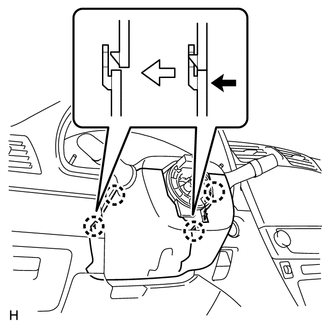
Push the right and left sides of the lower steering column cover and detach the 4 claws.
-
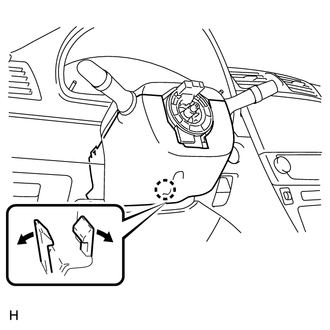
Insert fingers into the opening of the tilt lever of the lower steering column cover to detach the claw.
Tech Tips
Spread the claw to detach it.
-
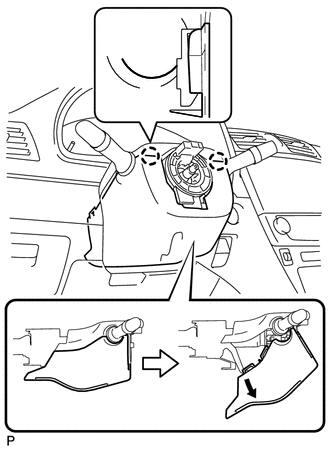
Turn the lower steering column cover to detach the 2 claws and remove the lower steering column cover as shown in the illustration.
-
-
REMOVE UPPER STEERING COLUMN COVER
Note
Removing the steering column cover in an incorrect order will cause the steering column cover to break.
-
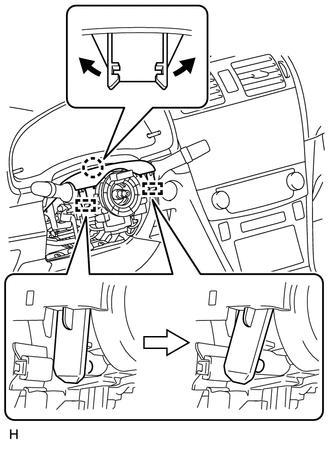
Detach the claw and 2 pins, and remove the upper steering column cover.
-
-
REMOVE COMBINATION SWITCH ASSEMBLY WITH SPIRAL CABLE SUB-ASSEMBLY
-
Disconnect the connectors from the combination switch assembly with spiral cable sub-assembly.
-
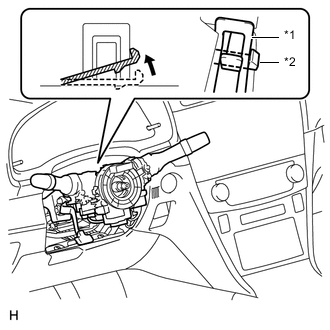
Text in Illustration *1 Clamp *2 Claw Use pliers to hold the clamp and raise the claw with a screwdriver. Remove the combination switch assembly with spiral cable sub-assembly from the steering column assembly.
-
-
REMOVE COLUMN HOLE COVER SILENCER SHEET
-
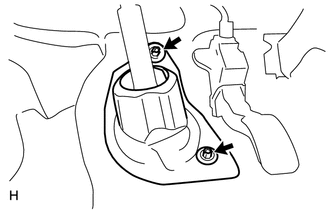
Fold back the floor carpet, and then remove the 2 clips and then column hole cover silencer sheet.
-
-
DISCONNECT NO. 2 STEERING INTERMEDIATE SHAFT ASSEMBLY
-
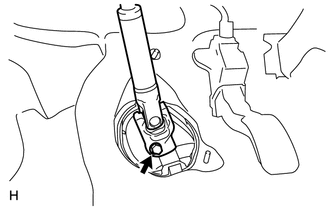
Remove the bolt.
Note
Do not disconnect the No. 2 steering intermediate shaft assembly from the steering intermediate shaft.
-
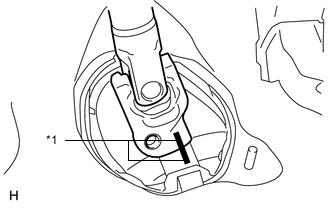
Text in Illustration *1 Matchmark Put matchmarks on the No. 2 steering intermediate shaft assembly and steering intermediate shaft.
-
Disconnect the No. 2 steering intermediate shaft assembly from the steering intermediate shaft.
-
-
REMOVE UPPER INSTRUMENT PANEL SUB-ASSEMBLY
-
Remove the upper instrument panel sub-assembly Click here.
-
-
REMOVE LOWER NO. 1 INSTRUMENT PANEL AIRBAG ASSEMBLY
-
Remove the lower No. 1 instrument panel airbag assembly Click here.
-
-
REMOVE BRAKE PEDAL SUPPORT SUB-ASSEMBLY
-
REMOVE POWER STEERING ECU ASSEMBLY (for LHD)
-
REMOVE POWER STEERING ECU ASSEMBLY (for RHD)
-
REMOVE STEERING COLUMN ASSEMBLY
-
Disconnect the connectors and detach the wire harness clamps from the steering column assembly.
-
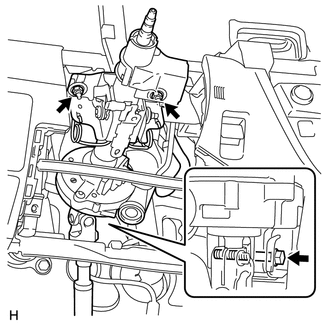
Remove the bolt, 2 nuts and steering column assembly.
Note
-
Do not release the tilt lever when the steering column assembly is not installed on the vehicle.
-
Do not drop or strike the steering column assembly. If dropped or struck, replace it with a new one.
-
-
-
REMOVE STEERING COLUMN PROTECTOR (for Manual Transaxle RHD)
-
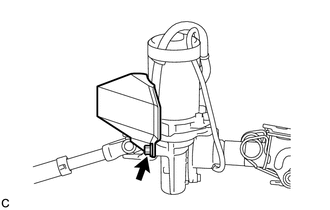
Remove the bolt and steering column protector from the steering column assembly.
-
-
REMOVE NO. 2 STEERING INTERMEDIATE SHAFT ASSEMBLY
-
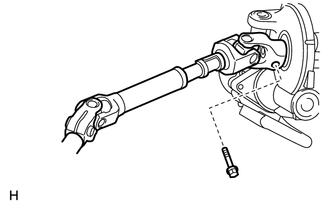
Remove the bolt.
Note
Do not remove the No. 2 steering intermediate shaft assembly from the steering column assembly.
-
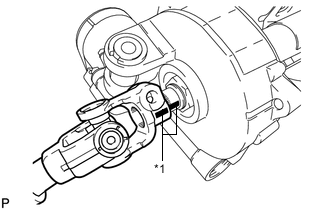
Text in Illustration *1 Matchmark Put matchmarks on the No. 2 steering intermediate shaft assembly and steering column assembly.
-
Remove the No. 2 steering intermediate shaft assembly from the steering column assembly.
-