SFI SYSTEM, Diagnostic DTC:P0137
| DTC Code | DTC Name |
|---|---|
| P0137 | Oxygen Sensor Circuit Low Voltage (Bank 1 Sensor 2) |
DESCRIPTION
Tech Tips
Sensor 2 refers to the sensor mounted behind the three way catalytic converter and located far from the engine assembly.
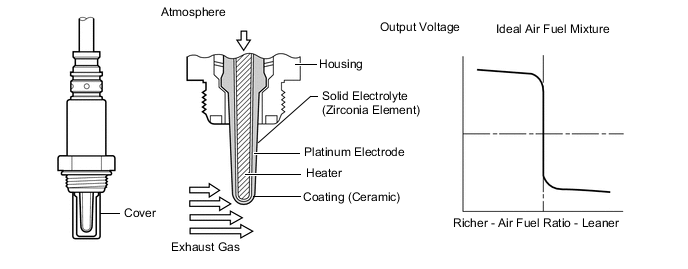
A three way catalytic converter is used in order to convert carbon monoxide, hydrocarbons and nitrogen oxide into less harmful substances. To allow the three way catalytic converter to function effectively, it is necessary to keep the air fuel ratio of the engine near the stoichiometric air fuel ratio. For the purpose of helping the ECM to deliver accurate air fuel ratio control, a heated oxygen sensor is used.
The heated oxygen sensor is located behind the three way catalytic converter, and detects the oxygen concentration in the exhaust gas. Since the sensor is integrated with the heater that heats the sensing portion, it is possible to detect the oxygen concentration even when the intake air volume is low (the exhaust gas temperature is low).
When the air fuel ratio becomes lean, the oxygen concentration in the exhaust gas is rich. The heated oxygen sensor informs the ECM that the post three way catalytic converter air fuel ratio is lean (low voltage, i.e. below 0.45 V).
Conversely, when the air fuel ratio is richer than the stoichiometric air fuel level, the oxygen concentration in the exhaust gas becomes lean. The heated oxygen sensor informs the ECM that the post three way catalytic converter air fuel ratio is rich (high voltage, i.e. higher than 0.45 V). The heated oxygen sensor has the property of changing its output voltage drastically when the air fuel ratio is close to the stoichiometric level.
The ECM uses the supplementary information from the heated oxygen sensor to determine whether the air fuel ratio after the three way catalytic converter is rich or lean, and adjusts the fuel injection time accordingly. Thus, if the heated oxygen sensor is working improperly due to internal malfunctions, the ECM is unable to compensate for deviations in the primary air fuel ratio control.
| DTC No. | DTC Detection Condition | Trouble Area |
|---|---|---|
| P0137 |
|
|
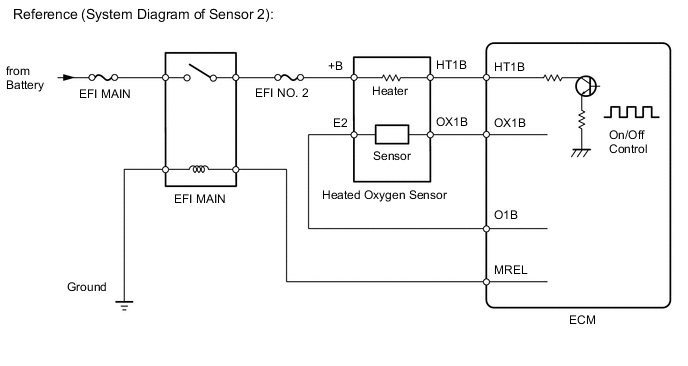
WIRING DIAGRAM
Refer to DTC P0031 Click here.
CONFIRMATION DRIVING PATTERN
Tech Tips
-
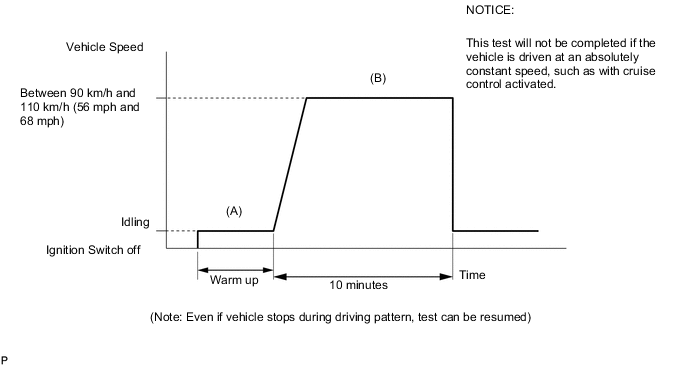
This confirmation driving pattern is used in the "Perform Confirmation Driving Pattern" procedure of the following diagnostic troubleshooting procedure.
-
Performing this confirmation pattern will activate the heated oxygen sensor monitor. (The catalyst monitor is performed simultaneously.) This is very useful for verifying the completion of the repair.
-
Connect the intelligent tester to the DLC3.
-
Turn the ignition switch to ON.
-
Turn the tester on.
-
Enter the following menus: Powertrain / Engine and ECT / DTC / Clear.
-
Clear DTCs.
-
Start the engine and warm it up (Procedure "A").
-
Drive the vehicle at between 90 km/h and 110 km/h (56 mph and 68 mph) for at least 10 minutes (Procedure "B").
-
Enter the following menus: Powertrain / Engine and ECT / Utility / All Readiness.
-
Input DTCs: P0137.
-
Check that DTC MONITOR is NORMAL. If DTC MONITOR is INCOMPLETE, perform the driving pattern by accelerating the vehicle to a higher speed and using second gear to decelerate the vehicle.
CAUTION / NOTICE / HINT
Tech Tips
Intelligent tester only:
Malfunctioning areas can be identified by performing the Control the Injection Volume for A/F sensor function provided in the Active Test. The Control the Injection Volume for A/F sensor function can help to determine whether the Air Fuel Ratio (A/F) sensor, Heated Oxygen (HO2) sensor and other potential trouble areas are malfunctioning.
The following instructions describe how to conduct the Control the Injection Volume for A/F sensor operation using the intelligent tester.
-
Connect the intelligent tester to the DLC3.
-
Start the engine and turn the tester on.
-
Warm up the engine at an engine speed of 2500 rpm for approximately 90 seconds.
-
Enter the following menus: Powertrain / Engine and ECT / Active Test / Control the Injection Volume for A/F sensor.
-
Perform the Active Test operation with the engine idling (press the RIGHT or LEFT button to change the fuel injection volume).
-
Monitor the output voltages of the A/F and HO2 sensors (AFS Voltage B1S1 and O2S B1S2) displayed on the tester.
Tech Tips
-
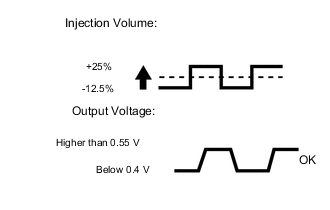
The Control the Injection Volume for A/F sensor operation lowers the fuel injection volume by 12.5% or increases the injection volume by 25%.
-
Each sensor reacts in accordance with increases and decreases in the fuel injection volume.
| Tester Display (Sensor) | Injection Volume | Status | Voltage |
|---|---|---|---|
| AFS Voltage B1S1 (A/F) |
+25% | Rich | Below 3.1 V |
| AFS Voltage B1S1 (A/F) |
-12.5% | Lean | Higher than 3.4 V |
| O2S B1S2 (HO2) |
+25% | Rich | Higher than 0.55 V |
| O2S B1S2 (HO2) |
-12.5% | Lean | Below 0.4 V |
Note
The air fuel ratio sensor has an output delay of a few seconds and the heated oxygen sensor has a maximum output delay of approximately 20 seconds.
| Case | A/F Sensor (Sensor 1) Output Voltage |
HO2 Sensor (Sensor 2) Output Voltage |
Main Suspected Trouble Area |
|---|---|---|---|
| 1 | 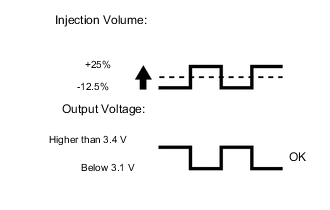 |
 |
- |
| 2 | 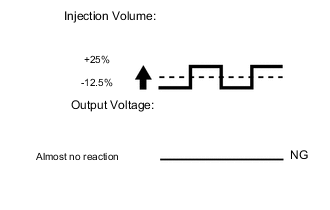 |
|
|
| 3 | |
|
|
| 4 | |
|
|
-
Following the Control the Injection Volume for A/F sensor procedure enables technicians to check and graph the voltage outputs of both the A/F and HO2 sensors.
-
To display the graph, enter the following menus: Powertrain / Engine and ECT / Active Test / Control the Injection Volume for A/F Sensor / A/F Control System / AFS Voltage B1S1 and O2S B1S2.
Tech Tips
-
Read freeze frame data using the intelligent tester. Freeze frame data records the engine condition when malfunctions are detected. When troubleshooting, freeze frame data can help determine if the vehicle was moving or stationary, if the engine was warmed up or not, if the air fuel ratio was lean or rich, and other data from the time the malfunction occurred.
PROCEDURE
-
READ OUTPUT DTC (IN ADDITION P0137)
-
Connect the intelligent tester to the DLC3.
-
Turn the ignition switch to ON.
-
Turn the tester on.
-
Enter the following menus: Powertrain / Engine and ECT / DTC.
-
Read DTCs.
Result Result Proceed to DTC P0137 is output A DTC P0137 and other DTCs are output B
B 
GO TO DTC CHART Click here
A 
-
-
CHECK FOR EXHAUST GAS LEAK
-
Check for exhaust gas leakage.
OK No gas leakage.
NG
REPAIR OR REPLACE EXHAUST GAS LEAK POINT
OK
-
-
INSPECT HEATED OXYGEN SENSOR (HEATER RESISTANCE)
-
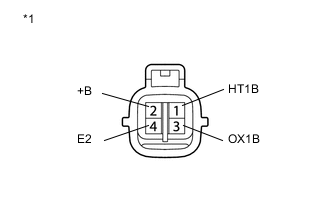
Text in Illustration *1 Component without harness connected
(Heated Oxygen Sensor [Sensor 2])
Disconnect the heated oxygen sensor connector.
-
Measure the resistance according to the value(s) in the table below.
Standard Resistance Tester Connection Condition Specified Condition 1 (HT1B) - 2 (+B) 20°C (68°F) 11 to 16 Ω 1 (HT1B) - 4 (E2) Always 10 kΩ or higher -
Reconnect the heated oxygen sensor connector.
NG
REPLACE HEATED OXYGEN SENSOR Click here
OK
-
-
CHECK HARNESS AND CONNECTOR (HEATED OXYGEN SENSOR - ECM)
-
Disconnect the heated oxygen sensor connector.
-
Disconnect the ECM connector.
-
Measure the resistance according to the value(s) in the table below.
Standard Resistance (Check for Open) Tester Connection Condition Specified Condition B25-1 (HT1B) - B39-63 (HT1B) Always Below 1 Ω B25-3 (OX1B) - B39-80 (OX1B) Always Below 1 Ω B25-4 (E2) - B39-79 (O1B-) Always Below 1 Ω Standard Resistance (Check for Short) Tester Connection Condition Specified Condition B25-1 (HT1B) or B39-63 (HT1B) - Body ground Always 10 kΩ or higher B25-3 (OX1B) or B39-80 (OX1B) - Body ground Always 10 kΩ or higher B25-4 (E2) or B39-79 (O1B-) - Body ground Always 10 kΩ or higher -
Reconnect the heated oxygen sensor connector.
-
Reconnect the ECM connector.
NG
REPAIR OR REPLACE HARNESS OR CONNECTOR (ECM - HEATED OXYGEN SENSOR)
OK
-
-
REPLACE HEATED OXYGEN SENSOR
-
Replace the heated oxygen sensor Click here.
NEXT
-
-
PERFORM CONFIRMATION DRIVING PATTERN
Tech Tips
Refer to the Confirmation Driving Pattern.
NEXT
-
CHECK WHETHER DTC OUTPUT RECURS (DTC P0137 IS OUTPUT AGAIN)
-
Connect the intelligent tester to the DLC3.
-
Turn the ignition switch to ON.
-
Turn the tester on.
-
Enter the following menus: Powertrain / Engine and ECT / Utility / All Readiness.
-
Input DTCs: P0137.
-
Check that DTC monitor is NORMAL. If DTC monitor is INCOMPLETE, perform the driving pattern by accelerating the vehicle to a higher speed and using second gear to decelerate the vehicle.
Result Result Proceed to NORMAL
(No DTC output)
A ABNORMAL
(DTC P0137 stored)
B
A
END
B
REPLACE AIR FUEL RATIO SENSOR Click here
-