REPAIR INSTRUCTION CUSTOMIZE PARAMETERS
-
CUSTOMIZING FUNCTION WITH INTELLIGENT TESTER
Tech Tips
The following items can be customized.
Note
-
When the customer requests a change in a function, first make sure that the function can be customized.
-
Be sure to make a note of the current settings before customizing.
-
When troubleshooting a function, first make sure that the function is set to the default setting.
-
POWER DOOR LOCK CONTROL SYSTEM
Door Lock Display Default Contents Setting Auto Lock ON Function that locks all the doors when the vehicle speed reaches a certain level. ON/OFF Auto Lock/Shift* OFF Function that locks all the doors when the shift lever is moved from P to any position other than P while the engine is running and all the doors are closed. ON/OFF Auto Unlock/Shift* OFF Function that unlocks all the doors when the shift lever is moved to P from any position other than P while the ignition switch is ON. ON/OFF All Unlock/Open-Close OFF Function that unlocks the other doors when the driver side door is opened within 10 seconds after the ignition switch is turned off. ON/OFF *: except Manual Transaxle
-
WIRELESS DOOR LOCK CONTROL SYSTEM (w/ Entry and Start System)
Wireless Door Lock Display Default Contents Setting Hazard Answer Back ON When the lock switch on the transmitter is pressed, this function illuminates the hazard warning lights once. When the unlock switch is pressed, the hazard warning lights illuminate twice. ON/OFF Wireless Control ON Function that turns the wireless door lock function ON or OFF. ON/OFF Open Door Warning ON If a door is not completely closed and the transmitter lock switch is pressed, this function makes the buzzer sound for 10 seconds. ON/OFF Auto Lock Time 30 s Function that changes the time until relocking after unlocking the doors with the wireless door lock function. 30 s/60 s/120 s Wireless Buzzer Volume Level7 Function that changes the wireless buzzer volume. Level0/Level1/Level2/Level3/Level4/Level5/Level6/Level7 -
WIRELESS DOOR LOCK CONTROL SYSTEM (w/o Entry and Start System)
Wireless Door Lock Display Default Contents Setting Hazard Answer Back ON When the lock switch on the transmitter is pressed, this function illuminates the hazard warning lights once. When the unlock switch is pressed, the hazard warning lights illuminate twice. ON/OFF Wireless Control ON Function that turns the wireless door lock function ON or OFF. ON/OFF Auto Lock Time 30 s Function that changes the time until relocking after unlocking the doors with the wireless door lock function. 30 s/60 s/120 s -
ENTRY AND START SYSTEM (for Entry Function)
Entry&Start Display Default Contents Setting Ignition Available Area
(Entry ignition available area)
ALL Function to choose the available area for the key to start the engine and cancel the steering lock. FRONT/ALL Park Wait Time (Waiting time to permit unlocking door after locking) 2.5s Function that sets the waiting time to permit unlocking the door after the door is locked with the entry lock function. 0.5s/1.5s/2.5s/5s Trunk Open Mode (Luggage compartment door open mode when vehicle is locked)*1 ON Function to permit opening of the luggage compartment door. ON/OFF Back Door Opening Operation (Back door open mode when vehicle is locked)*2 LONG Function to choose the back door open operation mode when the vehicle is locked. LONG/TWICE/OFF
-
*1: for Sedan
-
*2: for Wagon
Warning Display Default Contents Setting Key Left in Vehicle Buzzer ON Function that warns the driver when a key is taken out of the vehicle by a passenger. ON/OFF Key Low Battery Warning (Warn when key battery becomes weak) ON Function that warns the driver that the key battery power is low. ON/OFF
-
ENTRY UNLOCK MODE SWITCHING FUNCTION
-
To use the entry unlock mode switching function, make sure the engine switch is off and simultaneously press and hold the lock switch on the key and another key switch for 5 seconds.
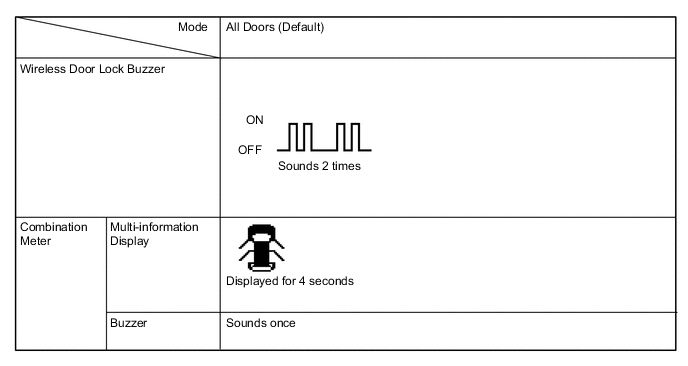
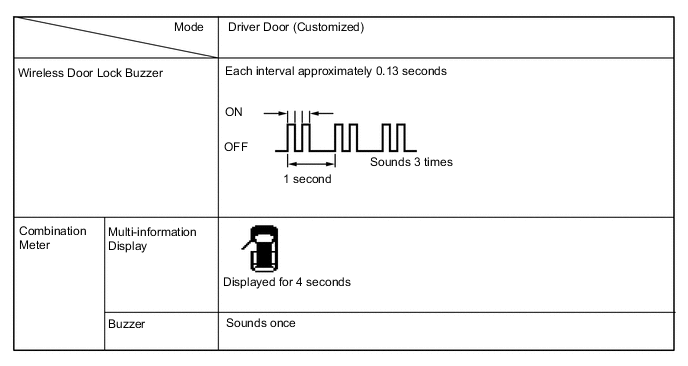
When the switches are pressed and held for 5 seconds, the entry door unlock mode changes in the following order: all door unlock mode, driver door unlock mode.
Note
After pressing and holding the switches for 5 seconds, wait 5 seconds before performing the same procedure again.
-
All door unlock mode (default):
When a touch sensor is touched, all doors unlock.
-
Driver door unlock mode:
When the driver door touch sensor is touched, only the driver door unlocks. When another touch sensor is touched, all doors unlock.
-
The certification ECU receives this signal from the key and changes the entry and start system to the appropriate entry unlock mode.
-
The certification ECU sounds the wireless door lock buzzer and combination meter buzzer to inform the user that the mode has been switched.
Tech Tips
The function only changes the entry unlock mode of the entry and start system. It does not switch the unlocking of the wireless door lock control.
-
All door unlock mode:
-
Driver door unlock mode:
Tech Tips
The above illustration is for LHD vehicles. For RHD vehicles, the left side and right side are reversed.
-
-
KEY CANCEL
The key cancel operation disables the following functions:
-
Entry Unlock/Lock
-
Key Lock-in Prevention
-
Entry Back Door Open
-
Warning
-
Entry Ignition
-
The operation procedures are as follows:
Precondition:
Engine switch off, driver side door closed and unlocked.
-
Unlock the driver side door once with the unlock switch of the key.
-
Open the driver door within 5 seconds.
-
Unlock the driver side door twice with the unlock switch of the key within 5 seconds.
-
Perform close → open twice for the driver door within 30 seconds.
(Driver door: Open condition → Close → Open → Close → Open)
-
Unlock the driver side door twice with the unlock switch of the key within 5 seconds.
-
Perform close → open once for the driver door within 30 seconds.
(Driver door: Open condition → Close → Open)
-
Close the driver door within 5 seconds.
When key cancel is activated, the wireless door lock buzzer sounds twice.
To return to the original condition, perform the procedures again. When the original condition is returned, the wireless door lock buzzer sounds once.
-
-
-
LIGHTING SYSTEM (for Interior)
Illuminated Entry Display Default Content Setting Lighting Time 15s A function that changes the duration that the lights remain on after closing the doors (the lights quickly fade out when the ignition switch is turned to ON). 7.5s/15s/30s I/L when ACC OFF ON A function that turns on the lights when the ignition switch is turned from ON or ACC to off (the room light turns on when the interior light switch is set to DOOR). ON/OFF I/L ON W/Door Key Unlock ON A function that turns on the room light when the door is unlocked with the door key cylinder (the room light turns on when the map light switch is set to DOOR).*1 ON/OFF Room Light when Aprchd ON A function that turns on the room light when the key is brought within the vehicle exterior detection area (the room light turns on when the map light switch is set to DOOR).*2 ON/OFF Inside Foot Light ON A function that enables or disables the operation of the No. 1 interior illumination light assemblies.*3 ON/OFF Light Control ON A function that illuminates the No. 1 interior illumination light assemblies when the ignition switch is ON and the shift lever is not in P.*3 ON/OFF
-
*1: w/o Entry and Start System
-
*2: w/ Entry and Start System
-
*3: w/ No. 1 Interior Illumination Light
-
-
METER / GAUGE SYSTEM
Warning Display Default Description Setting Key Remind Sound*1 Slow Function to change the cycle of the key remind buzzer Normal, Slow or Fast Driver Side Seatbelt Warning Buzzer*2 ON Function to turn on/off the seat belt warning buzzer ON or OFF P-Seatbelt Warning Buzzer*2 ON Function to turn on/off the seat belt warning buzzer ON or OFF Rear Seatbelt Warning Buzzer*2 ON Function to turn on/off the seat belt warning buzzer ON or OFF Lane Change Flashing Times Setting 3 Function to change the lane change flashing times OFF, 3, 4, 5, 6 or 7
-
*1: w/o Entry and Start System
-
*2: This setting is only valid for the buzzer which sounds at 20 km/h (12 mph) or more.
Display Display Default Description Setting ECO Drive Indicator Light*1 ON Function to enable or disable the eco driving indicator light ON or OFF ECO Drive Indicator Zone*2 ON Function to enable or disable the eco driving indicator zone display in the multi-information display ON or OFF ODO Display Time After IG OFF Setting 30s Function to change the ODO display time after the ignition switch is turned off 30s, 60s, 600s or OFF
-
*1: except Manual Transaxle
-
*2: for CVT
-
-
SEAT BELT WARNING SYSTEM
Seat Belt Warning Display Default Contents Setting Driver Side Seatbelt Warning Buzzer ON If the driver side seat belt is unfastened and the vehicle is driven at approximately 20 km/h (12.5 mph) or more, the system sounds the seat belt warning buzzer. ON/OFF Front Passenger Side Seatbelt Warning Buzzer ON If the front passenger side seat belt is unfastened with the front passenger seat occupied, and the vehicle is driven at approximately 20 km/h (12.5 mph) or more, the system sounds the seat belt warning buzzer. ON/OFF Rear Seatbelt Warning Buzzer ON After a rear door is opened and closed, if a rear seat belt is unfastened and the vehicle is driven at approximately 20 km/h (12.5 mph) or more, the system sounds the seat belt warning buzzer. ON/OFF Display Display Default Contents Setting ECO Drive Indicator ON To enable or disable the eco driving bar display. ON/OFF -
AIR CONDITIONING SYSTEM (for Automatic Air Conditioning System)
Air Conditioner Display Default Contents Setting Set Temperature Shift Normal Function to set the temperature shift. +2 C/+1 C/Normal/-1 C/-2 C Evaporator Control Automatic Function to set the evaporator control to the automatic position (Automatic) to save power, or to the coldest position (Manual) to dehumidify the air and to prevent the windows from fogging up. Automatic/Manual Compressor Mode Automatic Function to turn the A/C on automatically by pressing the AUTO button when the blower is on and the A/C is off. Automatic/Manual Air Inlet Mode Automatic Function to automatically change to recirculation mode when the A/C is turned on. Automatic/Manual Foot/DEF Auto Mode ON Function to turn on the airflow from the front and rear footwell register ducts and front defroster automatically when auto mode is on. ON/OFF Foot/DEF Automatic Blow Up Function ON Function to change the blower level automatically when the front defroster is on. ON/OFF Refrigerant Shortage Check ON Function to cancel the refrigerant gas volume check (check performed during normal operation) when item is OFF ON/OFF Fan speed increment control Normal Function to define how fast the air conditioning blower goes to target speed when first activating the air conditioning Slow/Normal/Fast Outside Air Mode Auto Switch Function ON Function to automatically change the air inlet to FRESH mode when the vehicle is parked ON/OFF -
AIR CONDITIONING SYSTEM (for Manual Air Conditioning System)
Air Conditioner Display Default Contents Setting Refrigerant Shortage Check ON Function to cancel the refrigerant gas volume check (check performed during normal operation) when item is OFF ON/OFF Outside Air Mode Auto Switch Function ON Function to automatically change the air inlet to FRESH mode when the vehicle is parked ON/OFF -
LIGHTING SYSTEM (for Exterior)
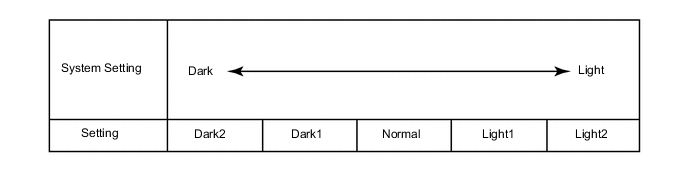
Warning Display Description Default Setting ECU Lane Change Flashing Times Setting Function to change the number of flashes for the lane change flasher 3 OFF, 3, 4, 5, 6 or 7 Combination meter assembly Light Control Display Description Default Setting ECU Sensitivity*1 A function to adjust the ambient light sensitivity of the automatic light control system.*2 Normal Normal, Dark2, Dark1, Light1 or Light2 Main body ECU (Instrument panel junction block assembly) Follow Me Home Lighting Time*1 Changes the low beam headlight lighting time when ignition switch is off and light control switch is pulled to flash the headlights once. 30 s 30 s, 60 s, 90 s or 120 s Main body ECU (Instrument panel junction block assembly)
-
*1: w/ Automatic Light Control System
Tech Tips
The sensitivity adjustment may be difficult to confirm. Check by driving the customer's vehicle.
Figure 1. *2
Tech Tips
When the setting is closer to the "Light" side, the system turns the lights on even when the surrounding area is relatively bright. When the setting is closer to the "Dark" side, the system waits until the surrounding area is darker before turning on the lights.
-
-
AUTOMATIC HIGH BEAM SYSTEM
Light Control Display Default Content Setting Relevant ECU Automatic High Beam ON A function that enables or disable the automatic high beam ON or OFF Main body ECU (Multiplex network body ECU)
-
-
CUSTOMIZING FUNCTION WITH MULTI-INFORMATION DISPLAY (w/ Radio and Display Type)
Tech Tips
The following items can be customized.
Note
-
When the customer requests a change in a function, first make sure that the function can be customized.
-
Be sure to make a note of the current settings before customizing.
-
When troubleshooting a function, first make sure that the function is set to the default setting.
-
Turn the ignition switch to ON.
-
Enter the following menus: Setup / Vehicle.
-
Select the setting by referring to the table below.
-
ROAD SIGN ASSIST SYSTEM
Settings Tab Display Default Content Setting Relevant ECU RSA Setup ON System ON/OFF setting ON or OFF Pre-crash safety city sensor -
POWER DOOR LOCK CONTROL SYSTEM
Door Lock Display Default Content Setting Speed sensitive auto locking ON Function that locks all the doors when the vehicle speed reaches a certain level. ON/OFF -
AIR CONDITIONING SYSTEM (for Automatic Air Conditioning System)
Climate settings Display Default Contents Setting Efficient Ventilation Mode On In case of turning the A/C on to cool the cabin down quickly, this function changes the mode automatically to recirculation air mode On/Off
-
Enter the following menu: SETUP / Vehicle / Climate control setting.
-
Select the setting by referring to the table below.
Climate control setting Display Default Contents Setting Ventilation level in auto mode Medium Function to define how fast the air conditioning blower goes to target speed when first activating the air conditioning Fast/Medium/Soft
-
-
LIGHTING SYSTEM (for Exterior)
Light Control Display Default Content Setting Light sensor sensitivity 0
(middle bar)
A function to adjust the ambient light sensitivity of the automatic light control system.* -2, -1, 0, +1 or +2 Tech Tips
The sensitivity adjustment may be difficult to confirm. Check by driving the customer's vehicle.
Figure 2. *
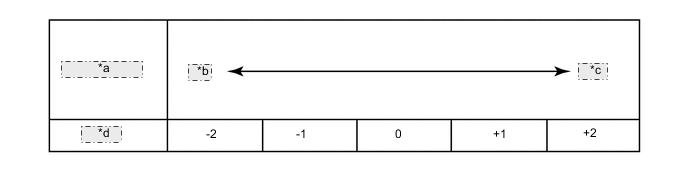
*a System Setting *b Dark *c Light *d Setting Tech Tips
When the setting is closer to the "Light" side, the system turns the lights on even when the surrounding area is relatively bright. When the setting is closer to the "Dark" side, the system waits until the surrounding area is darker before turning on the lights.
-
-
CUSTOMIZING FUNCTION WITH COMBINATION METER ASSEMBLY
-
Customizing with the combination meter assembly (for Multi-information Display [Color Type])
-
Turn the ignition switch to ON.
-
Enter the following menus: Settings Tab.
-
Select the setting by referring to the table below.
Note
Be sure to record the current value before customizing.
Settings Tab Meter Display Default Description Setting Time Adjustment - Function to change the time on the display - Instrument Panel Light - Function to change the brightness - Language English Function to change the language on the display English, German, French, Spanish, Italian, Portuguese, Dutch, Swedish, Norwegian, Danish, Russian, Finnish, Greek, Polish, Ukrainian, Turkish, Hungarian, Czech, Slovak or Romanian -
Enter the following menus: Settings Tab / Settings.
-
Select the setting by referring to the table below.
Note
Be sure to record the current value before customizing.
Settings Meter Display Default Description Setting Eco Driving Indicator Light*1 ON Function to activate/ deactivate the eco driving indicator light ON or OFF Drive Info 1
-
Current Fuel Economy (Bar Type)
-
Average Fuel Economy (After Reset)
Function to change the item to be displayed on Drive Info 1
-
Current Fuel Economy (Bar Type)
-
Current Fuel Economy (Value Type)
-
Average Fuel Economy (After Reset)
-
Average Fuel Economy (After Start)
-
Average Fuel Economy (After Refuel)
-
Average Speed (After Reset)
-
Average Speed (After Start)
-
Elapsed Time (After Reset)
-
Elapsed Time (After Start)
-
Distance (Range)
-
Distance (After Start)
-
Other (Blank)
Drive Info 2
-
Average Speed (After Reset)
-
Distance (Range)
Function to change the item to be displayed on Drive Info 2
-
Current Fuel Economy (Bar Type)
-
Average Fuel Economy (After Reset)
-
Average Fuel Economy (After Start)
-
Average Fuel Economy (After Refuel)
-
Average Speed (After Reset)
-
Average Speed (After Start)
-
Elapsed Time (After Reset)
-
Elapsed Time (After Start)
-
Distance (Range)
-
Distance (After Start)
-
Other (Blank)
Pop-up Display - Function to change the interrupt display setting of each item - Initialize display - The setting items can be initialized - Setup*2 - Press and hold the steering pad switch assembly to perform initialization -
-
*1: except Manual Transaxle
-
*2: w/ Tire Pressure Warning System
-
-
w/ Road Signal Assist System:
Enter the following menus: Settings Tab / Settings / Road Sign Assist Setup.
-
Select the setting by referring to the table below.
Note
Be sure to record the current value before customizing.
Road Sign Assist Setup Display Default Content Setting Notification Method Only Visual Speed limit exceeded notification method setting No Notification, Only Visual or Visual and Audible Excess Speed 2 km/h (1 mph) Speed limit exceeded notification level setting* 10 km/h (5 mph), 5 km/h (3 mph) or 2 km/h (1 mph) Other Notifications Only Visual No overtaking notification method setting No Notification, Only Visual or Visual and Audible
-
*: When the speed unit settings of the meter are changed, the displayed unit also changes.
-
-
Enter the following menus: Settings Tab / Settings / Units.
-
Select the setting by referring to the table below.
Note
Be sure to record the current value before customizing.
Units Meter Display Default Description Setting km, mile km(km/L) Function to change the units on the display km(km/L), km(L/100km), mile (MPG) °C, °F °C Function to change the units on the display °C, °F
-
-
Customizing with the combination meter assembly (for Multi-information Display [Monochrome Type])
-
While on the "SETTINGS" screen of the multi-information display, pressing and holding the DISP switch in the steering pad switch assembly switches to customization mode.
Display Default Description Setting CLOCK - Function to change the time on the display - CLOCK FORMAT - Function to change the time on the display - LANGUAGE English Function to change the language on the display English, French, Germany, Spanish, Italian, Russian, Portuguese or Turkish UNIT km (km/L) Function to enable or disable the eco driving indicator zone display in the multi-information display km (km/L), km (L/100 km) or miles (MPG) ECO INDICATOR* ON Function to activate/deactivate the eco driving indicator light ON or OFF
-
*: except Manual Transaxle
-
-
-