SEAT BELT WARNING SYSTEM Front Passenger Side Seat Belt Warning Light Malfunction
DESCRIPTION
When the power switch on (IG), the occupant detection ECU sends a signal to the airbag sensor assembly to indicate the state of the front seat inner belt assembly RH and also whether the front passenger seat is occupied. The airbag sensor assembly sends those signals to the combination meter assembly via CAN communication. The combination meter assembly illuminates, blinks or turns off the seat belt warning light on the combination meter assembly in accordance with these signals.
Tech Tips
The seat belt warning light on the combination meter assembly is used for both the driver seat and front passenger seat.
WIRING DIAGRAM
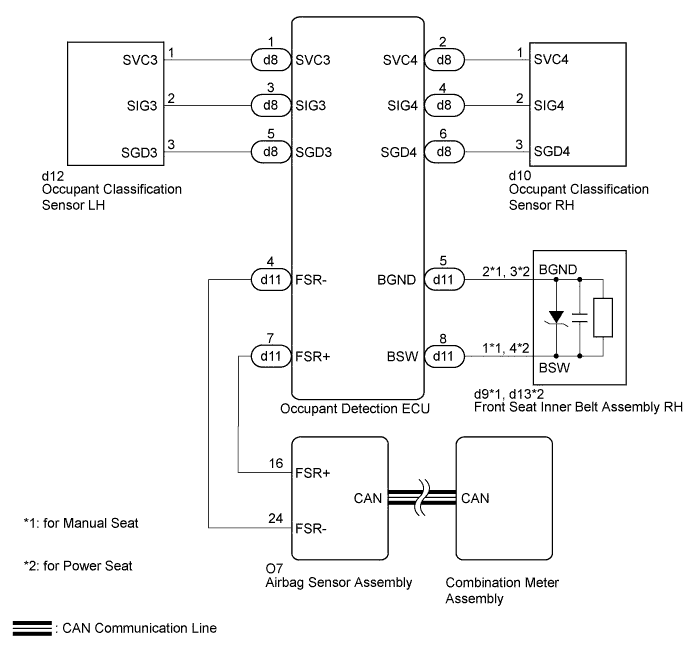
INSPECTION PROCEDURE
Note
The seat belt warning system uses the CAN communication system. First, confirm that there is no malfunction in the CAN communication system. Refer to the How to Proceed with Troubleshooting procedure Click here.
PROCEDURE
-
CHECK DTC OUTPUT (OCCUPANT CLASSIFICATION SYSTEM)
-
Clear DTCs Click here.
-
Recheck for DTCs Click here.
Result Result Proceed to DTC is not output A DTC is output B
B 
GO TO OCCUPANT CLASSIFICATION SYSTEM Click here
A 
-
-
CHECK DTC OUTPUT (AIRBAG SYSTEM)
-
Clear DTCs Click here.
-
Recheck for DTCs Click here.
Result Result Proceed to DTC is not output A DTC is output B
B
GO TO AIRBAG SYSTEM Click here
A
-
-
READ VALUE USING TECHSTREAM
-
Connect the Techstream to the DLC3.
-
Turn the power switch on (IG).
-
Turn the Techstream on.
-
Enter the following menus: Body Electrical / Occupant Detection / Data List.
-
Read the Data List according to the display on the Techstream.
Occupant Detection (Occupant Detection ECU) Tester Display Measurement Item/Range Normal Condition Diagnostic Note Passenger Buckle SW Front passenger buckle switch/Set, Unset or NG Set: Seat belt fastened
Unset: Seat belt not fastened
NG: Data not determined
- Result Result Proceed to Unset or Set is displayed on the Techstream screen according to the front passenger seat belt condition A Unset or Set is not displayed normally on the Techstream screen according to the front passenger seat belt condition B NG is displayed on the Techstream screen C
B
REPLACE FRONT SEAT INNER BELT ASSEMBLY RH Click here
C
REPLACE OCCUPANT DETECTION ECU Click here
A
-
-
READ VALUE USING TECHSTREAM
-
Connect the Techstream to the DLC3.
-
Turn the power switch on (IG).
-
Turn the Techstream on.
-
Enter the following menus: Body Electrical / SRS Airbag / Data List.
-
Read the Data List according to the display on the Techstream.
SRS Airbag (Airbag Sensor Assembly) Tester Display Measurement Item/Range Normal Condition Diagnostic Note Right side Buckle SW RH buckle switch/Unset, Set or NG Unset: Seat belt is not fastened
Set: Seat belt is fastened
NG: Data not determined
- Result Result Proceed to Unset or Set is displayed on the Techstream screen according to the front passenger seat belt condition A
-
Unset or Set is not displayed normally on the Techstream screen according to the front passenger seat belt condition
-
NG is displayed on the Techstream screen
B -
B
REPLACE AIRBAG SENSOR ASSEMBLY Click here
A 
USE SIMULATION METHOD TO CHECK Click here
-