ELECTRICAL KEY OSCILLATOR (for Front Floor) REMOVAL

-
REMOVE SHIFT LEVER KNOB SUB-ASSEMBLY
-
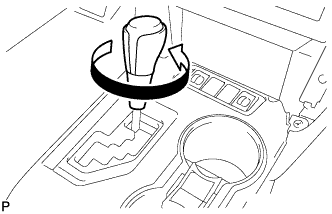
Turn the shift lever knob sub-assembly counterclockwise and remove the shift lever knob sub-assembly.
-
-
REMOVE FRONT PANEL GARNISH LH
-
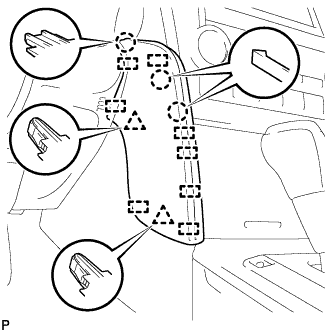
Disengage the 3 claws, 2 clips and 8 guides to remove the front panel garnish LH.
-
-
REMOVE FRONT PANEL GARNISH RH
-
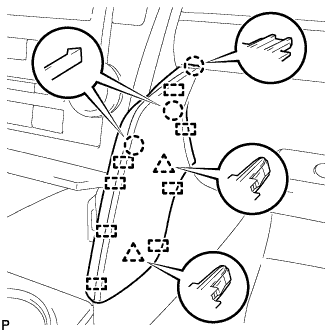
Disengage the 3 claws, 2 clips and 8 guides to remove the front panel garnish RH.
-
-
REMOVE REAR CONSOLE UPPER PANEL SUB-ASSEMBLY
-
Open the upper console panel sub-assembly door.
-
Move the shift lever to N.
-
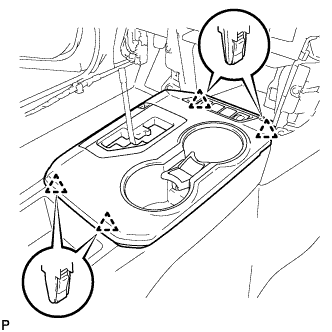
Disengage the 4 clips.
-
Disconnect each connector and remove the rear console upper panel sub-assembly.
-
-
REMOVE UPPER CONSOLE BOX SUB-ASSEMBLY
-
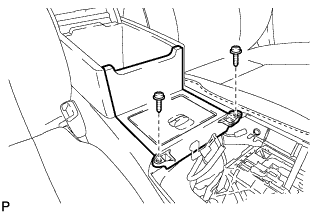
Remove the 2 screws.
-
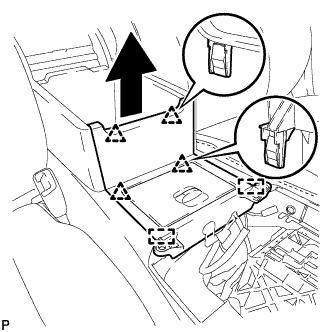
Disengage the 4 clips and 2 guides remove the upper console box sub-assembly as shown in the illustration.
-
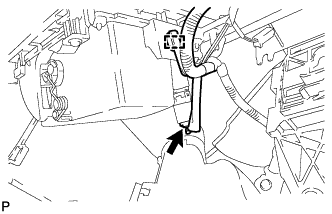
Disengage the clamp.
-
Disconnect the connector to remove the upper console box sub-assembly.
-
-
REMOVE NO. 4 CONSOLE BOX DUCT
-
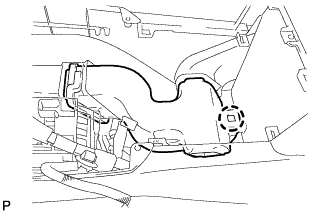
Disengage the claw and remove the No. 4 console box duct.
-
-
REMOVE NO. 1 INDOOR ELECTRICAL KEY ANTENNA ASSEMBLY
-
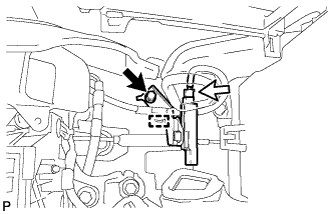
Disengage the clamp.
-
Remove the bolt.
-
Disconnect the connector and remove the No. 1 indoor electrical key antenna assembly.
Note
Be careful when removing the indoor electrical key antenna assembly. If the antenna is dropped, replace it with a new one.
-