CLEARANCE SONAR MAIN SWITCH INSPECTION

-
INSPECT BACK SONAR OR CLEARANCE SONAR SWITCH ASSEMBLY
-
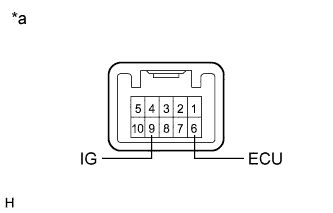
Text in Illustration *a Component without harness connected
(Back Sonar or Clearance Sonar Switch Assembly)
Measure the resistance according to the value(s) in the table below.
Standard Resistance Tester Connection Switch Condition Specified Condition 9 (IG) - 6 (ECU) Clearance sonar main switch on Below 1 Ω 9 (IG) - 6 (ECU) Clearance sonar main switch off 10 kΩ or higher If the result is not as specified, replace the back sonar or clearance sonar switch assembly.
-
Check that the switch illuminates.
-
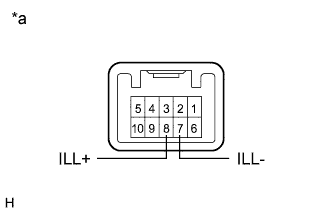
Text in Illustration *a Component without harness connected
(Back Sonar or Clearance Sonar Switch Assembly)
Apply auxiliary battery voltage to the back sonar or clearance sonar switch assembly and check that the switch illuminates.
OK Tester Connection Specified Condition Auxiliary battery positive (+) → Terminal 8 (ILL+)
Auxiliary battery negative (-) → Terminal 7 (ILL-)
Illuminates If the result is not as specified, replace the back sonar or clearance sonar switch assembly.
-
-
Check switch indicator operation.
-
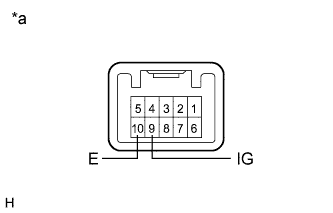
Text in Illustration *a Component without harness connected
(Back Sonar or Clearance Sonar Switch Assembly)
Apply auxiliary battery voltage to the back sonar or clearance sonar switch assembly and check that the switch indicator illuminates.
OK Tester Connection Switch Condition Specified Condition Auxiliary battery positive (+) → Terminal 9 (IG)
Auxiliary battery negative (-) → Terminal 10 (E)
Clearance sonar main switch on Indicator Illuminates If the result is not as specified, replace the back sonar or clearance sonar switch assembly.
-
-