SAFETY CONNECT SYSTEM ACN CALL END

-
ACN CALL END
This function terminates the ACN (Automatic Collision Notification) to the telematics provider. After a collision in which the DCM receives "Collision Detection Signal", the vehicle will send the emergency call notification to the telematics provider until the ACN call end utility has been run, or the BUB (Back-Up Battery) (if equipped) is depleted. Use the ACN Call End utility to stop the ACN call.
Note
The BUB (Back-Up Battery) must not be replaced while an ACN call is in progress.
Tech Tips
After the ACN call end utility has been completed, the BUB (Back-Up Battery) must be replaced.
-
Connect the Techstream to the DLC3.
-
Turn the power switch on (IG).
-
Turn the Techstream on.
-
Choose "Telematics" from the System Selection Menu, and then click "Utility".
-
Click "DCM Service" on the Utility Selection Menu.
-
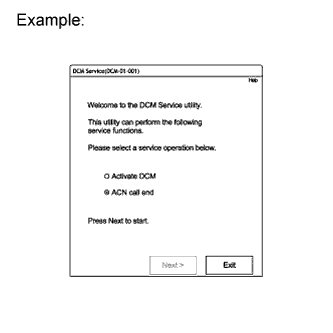
Choose "ACN call end" and then click "Next" on the DCM Service Utility.
-
Follow the instructions by Techstream.
-