HYBRID BATTERY SYSTEM, Diagnostic DTC:P0A80-123

| DTC Code | DTC Name |
|---|---|
| P0A80-123 | Replace Hybrid Battery Pack |
DESCRIPTION
-
The HV battery uses nickel metal-hydride batteries and does not require external charging. The power management control ECU controls the SOC (state of charge) of the HV battery at a constant level during driving. The HV battery is composed of 34 modules, and each module consists of six 1.2 V cells in series. The battery smart unit monitors battery block voltage at 17 locations. Each battery block is composed of 2 modules in a set.
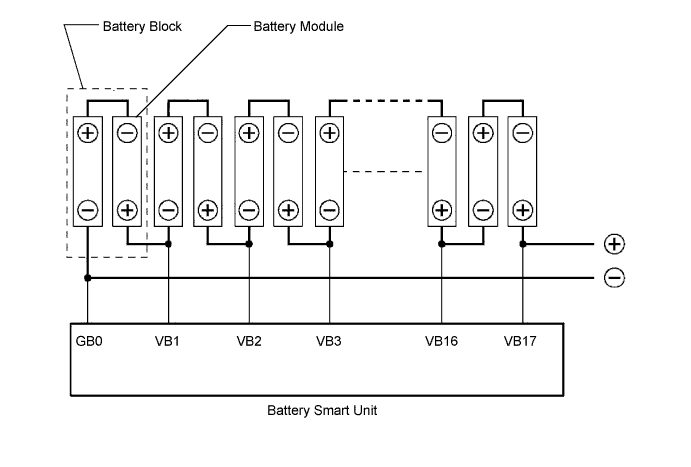
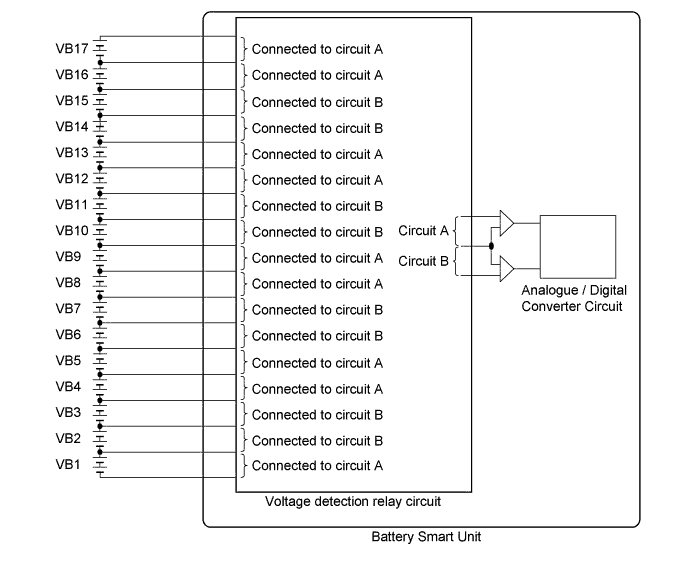
DTC No. INF Code DTC Detection Condition Trouble Area P0A80 123 Difference in voltage between battery blocks is larger than the standard (2 trip detection)
-
HV battery
-
Battery smart unit
Tech Tips
-
P0A80-123 will not be set unless the vehicle is driven for approximately 10 minutes after clearing the DTC. (As 2 trip detection logic is used, check for DTCs including pending DTCs.)
-
DTC P0A80-123 is stored when a malfunction is detected in the HV battery or battery smart unit. If the HV supply battery is malfunctioning, the malfunction may not be reproduced when the condition of HV supply battery changes due to difference in the driving load (amperage), battery SOC and battery temperature. Therefore, use the freeze frame data when performing a repair.
-
When the HV battery is malfunctioning:
-
- Voltage of 1 or a few battery blocks are dropped. (voltage difference from that of next block is 1 V or more.)
-
- Voltage of all battery blocks is output randomly with no pattern.
-
When the battery smart unit is malfunctioning:
-
- Differences in battery block voltages have a certain pattern.
-
MONITOR DESCRIPTION
The battery smart unit, which monitors the voltage of the battery blocks, determines that malfunction has occurred if a voltage difference between the battery blocks exceeds the standard. When the malfunction detection condition is satisfied, the power management control ECU will illuminates the MIL and set a DTC.
MONITOR STRATEGY
| Related DTCs | P0A80 (INF 123): Battery cell malfunction |
| Required sensors / components | Main: Battery voltage sensor inside battery smart unit Sub: Battery current sensor, battery temperature sensor |
| Frequency of operation | Continuous |
| Duration | TMC's intellectual property |
| MIL operation | TMC's intellectual property |
| Sequence of operation | None |
TYPICAL ENABLING CONDITIONS
| The monitor will run whenever the following DTCs are not present | TMC's intellectual property |
| Other conditions belong to TMC's intellectual property | - |
TYPICAL MALFUNCTION THRESHOLDS
| TMC's intellectual property | - |
COMPONENT OPERATING RANGE
| Battery smart unit | DTC P0A80 (INF 123) is not detected |
CONFIRMATION DRIVING PATTERN
-
Connect the Techstream to the DLC3.
-
Turn the power switch on (IG) and turn the Techstream on.
-
Clear the DTCs (even if no DTCs are stored, perform the clear DTC procedure).
-
Turn the power switch off.
-
Turn the power switch on (READY) and turn the Techstream on.
-
Perform a universal trip.
-
With the select lever in N, leave the vehicle until SOC drops to 30 %.
Tech Tips
Although DTC P3000 (INF 388) may be stored if the SOC drops to 20 % or lower, this is not a malfunction.
-
Enter the following menus: Powertrain / Hybrid Control / Trouble Codes.
-
Check that permanent DTCs are cleared.
Tech Tips
-
If the permanent DTC is not cleared, repeat steps 6 and 7.
-
If a permanent DTC is output, the system is malfunctioning.
-
If no permanent DTC is output, the system is normal.
-
INSPECTION PROCEDURE
CAUTION:
When disposing of an HV battery, make sure to return it through an authorized collection agent who is capable of handling it safely. If the HV battery is returned via the manufacturer specified route, it will be returned properly and in a safe manner by an authorized collection agent.
PROCEDURE
-
CHECK DTC OUTPUT (HYBRID CONTROL)
-
Connect the Techstream to the DLC3.
-
Turn the power switch on (IG).
-
Enter the following menus: Powertrain / Hybrid Control / Trouble Codes.
-
Read output DTCs Click here.
Result Result Proceed to P0AFC-123 is not output. A P0AFC-123 is also output. B -
Turn the power switch off.
-
Disconnect the Techstream from the DLC3.
B 
GO TO DTC CHART (P0AFC-123) Click here
A 
-
-
CHECK FREEZE FRAME DATA
-
Connect the Techstream to the DLC3.
-
Turn the power switch on (IG).
-
Enter the following menus: Powertrain / Hybrid Control / Trouble Codes.
-
Read output DTCs.
-
Using the Techstream, make a note of the freeze frame data item "Battery Block Vol -V01 to V17".
-
Compare the freeze frame data item "Battery Block Vol -V01 to V17" values with those shown in the following combination tables.
Table 1 Circuit A Battery Block Circuit B Battery Block Condition Battery Block Vol-V01 (VB1) Battery Block Vol-V02 (VB2) "Battery Block Vol - V01" - "Battery Block Vol - V02" = 0.3 V or more Battery Block Vol-V04 (VB4) Battery Block Vol-V03 (VB3) "Battery Block Vol - V04" - "Battery Block Vol - V03" = 0.3 V or more Battery Block Vol-V05 (VB5) Battery Block Vol-V06 (VB6) "Battery Block Vol - V05" - "Battery Block Vol - V06" = 0.3 V or more Battery Block Vol-V08 (VB8) Battery Block Vol-V07 (VB7) "Battery Block Vol - V08" - "Battery Block Vol - V07" = 0.3 V or more Battery Block Vol-V09 (VB9) Battery Block Vol-V10 (VB10) "Battery Block Vol - V09" - "Battery Block Vol - V10" = 0.3 V or more Battery Block Vol-V12 (VB12) Battery Block Vol-V11 (VB11) "Battery Block Vol - V12" - "Battery Block Vol - V11" = 0.3 V or more Battery Block Vol-V13 (VB13) Battery Block Vol-V14 (VB14) "Battery Block Vol - V13" - "Battery Block Vol - V14" = 0.3 V or more Battery Block Vol-V16 (VB16) Battery Block Vol-V15 (VB15) "Battery Block Vol - V16" - "Battery Block Vol - V15" = 0.3 V or more Battery Block Vol-V17 (VB17) Battery Block Vol-V14 (VB14) "Battery Block Vol - V17" - "Battery Block Vol - V14" = 0.3 V or more Table 2 Circuit A Battery Block Circuit B Battery Block Condition Battery Block Vol-V01 (VB1) Battery Block Vol-V02 (VB2) "Battery Block Vol - V02" - "Battery Block Vol - V01" = 0.3 V or more Battery Block Vol-V04 (VB4) Battery Block Vol-V03 (VB3) "Battery Block Vol - V03" - "Battery Block Vol - V04" = 0.3 V or more Battery Block Vol-V05 (VB5) Battery Block Vol-V06 (VB6) "Battery Block Vol - V06" - "Battery Block Vol - V05" = 0.3 V or more Battery Block Vol-V08 (VB8) Battery Block Vol-V07 (VB7) "Battery Block Vol - V07" - "Battery Block Vol - V08" = 0.3 V or more Battery Block Vol-V09 (VB9) Battery Block Vol-V10 (VB10) "Battery Block Vol - V10" - "Battery Block Vol - V09" = 0.3 V or more Battery Block Vol-V12 (VB12) Battery Block Vol-V11 (VB11) "Battery Block Vol - V11" - "Battery Block Vol - V12" = 0.3 V or more Battery Block Vol-V13 (VB13) Battery Block Vol-V14 (VB14) "Battery Block Vol - V14" - "Battery Block Vol - V13" = 0.3 V or more Battery Block Vol-V16 (VB16) Battery Block Vol-V15 (VB15) "Battery Block Vol - V15" - "Battery Block Vol - V16" = 0.3 V or more Battery Block Vol-V17 (VB17) Battery Block Vol-V14 (VB14) "Battery Block Vol - V14" - "Battery Block Vol - V17" = 0.3 V or more Tech Tips
Make sure to compare Battery Block Vol-V17 to Battery Block Vol-V14 in accordance with the table above.
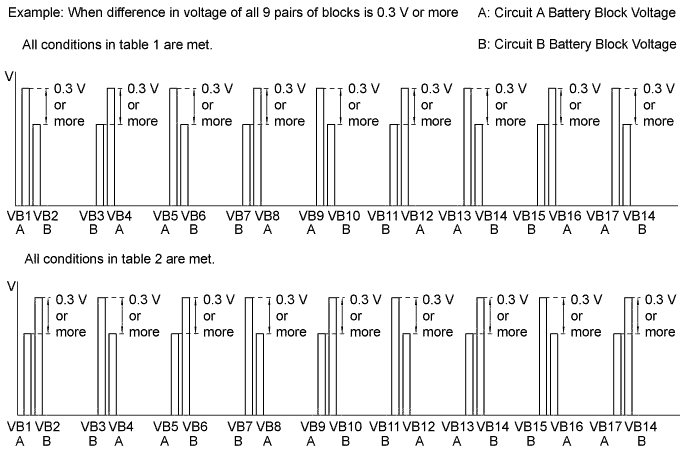
Tech Tips
When an internal malfunction occurs in the battery smart unit, this symptom (difference in voltage of 0.3 V or more for all 9 pairs of blocks) will occur.
Result Result Proceed to All conditions in table 1 are met. A All conditions in table 2 are met. Other than above. B -
Turn the power switch off.
-
Disconnect the Techstream from the DLC3.
B
REPLACE HV BATTERY Click here
A 
REPLACE BATTERY SMART UNIT Click here
-