HYBRID CONTROL SYSTEM, Diagnostic DTC:P314A-828

| DTC Code | DTC Name |
|---|---|
| P314A-828 | Inverter Coolant Pump Speed Signal |
DESCRIPTION
Refer to the description for DTC P0C73-776 Click here.
If the water pump speed (measured value) signal is not sent to the power management control ECU when the power switch is on (READY), this DTC is stored.
| DTC No. | INF Code | DTC Detection Condition | Trouble Area |
|---|---|---|---|
| P314A | 828 | When either of the following conditions is met:
|
|
| DTC No. | Active Test |
|---|---|
| P314A-828 | Activate the Water Pump*1 |
-
*1: This is an Active Test of the inverter water pump assembly.
MONITOR DESCRIPTION
The power management control ECU monitors speed of the inverter water pump assembly. If there is an abnormality in speed, the power management control ECU will illuminate the MIL and set a DTC.
MONITOR STRATEGY
| Related DTCs | P314A (INF 828): Water pump malfunction |
| Required sensors / components | Inverter Water Pump Assembly |
| Frequency of operation | Continuous |
| Duration | TMC's intellectual property |
| MIL operation | Immediately |
| Sequence of operation | None |
TYPICAL ENABLING CONDITIONS
| The monitor will run whenever the following DTCs are not present | TMC's intellectual property |
| Other conditions belong to TMC's intellectual property | - |
TYPICAL MALFUNCTION THRESHOLDS
| TMC's intellectual property | - |
COMPONENT OPERATING RANGE
| Power management control ECU | DTC P314A (INF 828) is not detected |
CONFIRMATION DRIVING PATTERN
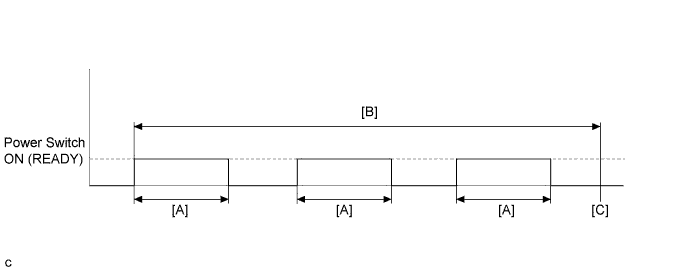
-
Connect the Techstream to the DLC3.
-
Turn the power switch on (IG) and turn the Techstream on.
-
Clear the DTCs (even if no DTCs are stored, perform the clear DTC procedure).
-
Turn the power switch off.
-
Turn the power switch on (READY) and after a few seconds, turn the power switch off. [A]
-
Repeat [A] 3 times. [B]
-
Turn the power switch on (IG) and turn the Techstream on.
-
Enter the following menus: Powertrain / Hybrid Control / Trouble Codes. [C]
-
Check that permanent DTCs are cleared.
-
If the permanent DTCs are not cleared, perform the universal trip, and then check for permanent DTCs again.
Tech Tips
-
If a permanent DTC is output, the system is malfunctioning.
-
If no permanent DTC is output, the system is normal.
WIRING DIAGRAM
Refer to the wiring diagram for DTC P0C73-776 Click here.
INSPECTION PROCEDURE
Note
If DTC P0A78-284, 286, P0A7A-322, 324, P0A94-553 or 557 is output, replace the inverter with converter assembly after this inspection.
Tech Tips
After the repair, clear the DTCs and perform the following procedure to check that DTCs are not output.
-
Turn the power switch on (READY) and wait for 2 minutes or more.
PROCEDURE
-
CLEAR DTC
-
Connect the Techstream to the DLC3.
-
Turn the power switch on (IG).
-
Enter the following menus: Powertrain / Hybrid Control / Trouble Codes.
-
Clear DTCs and freeze frame data.
-
Turn the power switch off.
NEXT 
-
-
PERFORM ACTIVE TEST USING TECHSTREAM (ACTIVATE THE WATER PUMP)
Note
Be sure to perform the inspection with the auxiliary battery voltage at 11 V or more.
Tech Tips
When the auxiliary battery voltage is low, the inverter water pump assembly may not operate.
-
Connect the Techstream to the DLC3.
-
Turn the power switch on (IG).
-
Enter the following menus: Powertrain / Hybrid Control / Active Test / Activate the Water Pump.
-
Perform the Activate the Water Pump Active Test.
-
Touch the inverter water pump assembly and check that it is operating (vibrating).
OK The inverter water pump is operating (vibrating). -
Turn the power switch off.
NG 
OK
-
-
CHECK CONNECTOR CONNECTION CONDITION (POWER MANAGEMENT CONTROL ECU CONNECTOR)
-
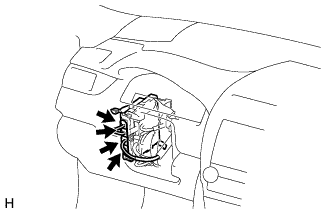
Check the connector connections and contact pressure of the relevant terminals for the power management control ECU connectors Click here.
OK The connectors are connected securely and there are no contact pressure problems.
NG 
CONNECT SECURELY
OK
-
-
CHECK CONNECTOR CONNECTION CONDITION (INVERTER WATER PUMP ASSEMBLY CONNECTOR)
-
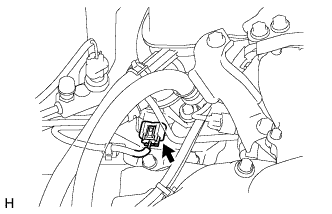
Check the connector connections and contact pressure of the relevant terminals for the inverter water pump assembly connector Click here.
OK The connectors are connected securely and there are no contact pressure problems.
NG
CONNECT SECURELY
OK
-
-
CHECK HARNESS AND CONNECTOR (POWER MANAGEMENT CONTROL ECU - INVERTER WATER PUMP ASSEMBLY)
-
Disconnect connector A38 from the power management control ECU.
-
Disconnect connector A50 from the inverter water pump assembly.
-
Measure the resistance according to the value(s) in the table below.
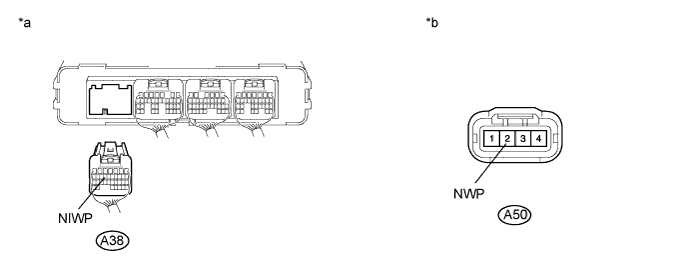
Text in Illustration *a Rear view of wire harness connector
(to Power Management Control ECU)
*b Front view of wire harness connector
(to Inverter Water Pump Assembly)
Standard Resistance Tester Connection Switch Condition Specified Condition A38-14 (NIWP) - A50-2 (NWP) Power switch off Below 1 Ω A38-14 (NIWP) or A50-2 (NWP) -Body ground and other terminals Power switch off 10 kΩ or higher -
Connect the power management control ECU connector.
-
Connect the inverter water pump assembly connector.
NG
REPAIR OR REPLACE HARNESS OR CONNECTOR
OK
-
-
CHECK POWER MANAGEMENT CONTROL ECU
-
Disconnect connector A50 from the inverter water pump assembly.
-
Turn the power switch on (IG).
-
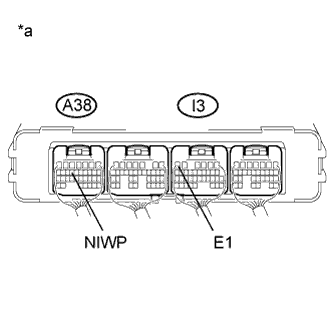
Text in Illustration *a Component with harness connected
(Power Management Control ECU)
Measure the voltage according to the value(s) in the table below.
Standard Voltage Tester Connection Switch Condition Specified Condition A38-14 (NIWP) - I3-6 (E1) Power switch on (IG) 11 to 14 V -
Turn the power switch off.
-
Connect the inverter water pump assembly connector.
NG
REPLACE POWER MANAGEMENT CONTROL ECU Click here
OK
-
-
CLEAR DTC
-
Connect the Techstream to the DLC3.
-
Turn the power switch on (IG).
-
Enter the following menus: Powertrain / Hybrid Control / Trouble Codes.
-
Clear DTCs and freeze frame data.
-
Turn the power switch off.
NEXT
-
-
PERFORM ACTIVE TEST USING TECHSTREAM (ACTIVATE THE WATER PUMP)
Note
Be sure to perform the inspection with the auxiliary battery voltage at 11 V or more.
Tech Tips
When the auxiliary battery voltage is low, the inverter water pump assembly may not operate.
-
Connect the Techstream to the DLC3.
-
Turn the power switch on (IG).
-
Enter the following menus: Powertrain / Hybrid Control / Active Test / Activate the Water Pump.
-
Perform the "Activate the Water Pump" Active Test.
-
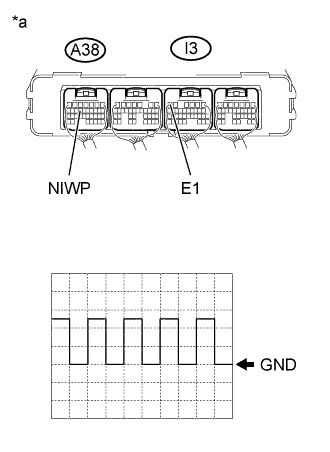
Text in Illustration *a Component with harness connected
(Power Management Control ECU)
Connect an oscilloscope between the power management control ECU terminals specified in the table below, and measure the waveform.
Item Content Terminal A38-14 (NIWP) - I3-6 (E1) Equipment Setting 5 V/DIV., 100 ms./DIV. Condition Power switch on (IG), during Active Test OK The duration of wavelength is 300 msec or less. -
Turn the power switch off.
NG
REPLACE INVERTER WATER PUMP ASSEMBLY Click here
OK 
REPLACE POWER MANAGEMENT CONTROL ECU Click here
-
-
CHECK CONNECTOR CONNECTION CONDITION (INVERTER WATER PUMP ASSEMBLY CONNECTOR)
-
Check the connector connections and contact pressure of the relevant terminals for the inverter water pump assembly connector Click here.
OK The connectors are connected securely and there are no contact pressure problems.
NG
CONNECT SECURELY
OK
-
-
CHECK INSTALLATION CONDITION (INV W/PMP RELAY)
-
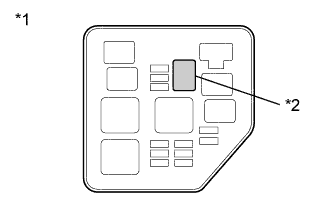
Text in Illustration *1 No. 2 Engine Room Relay Block *2 INV W/PMP Relay Check installation condition of the INV W/PMP relay.
OK INV W/PMP relay is installed correctly.
NG
INSPECT RELAY (INV W/PMP) Click here
OK
-
-
CHECK HARNESS AND CONNECTOR (IGCT RELAY - INV W/PMP RELAY)
-
Remove the IGCT relay and INV W/PMP relay from the No. 2 engine room relay block.
-
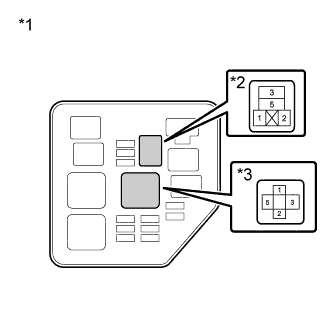
Text in Illustration *1 No. 2 Engine Room Relay Block *2 INV W/PMP Relay *3 IGCT Relay Measure the resistance according to the value(s) in the table below.
Standard Resistance Tester Connection Switch Condition Specified Condition 5 (IGCT relay) - 1 (INV W/PMP relay) Power switch off Below 1 Ω Note
Do not apply excessive force when using the probes of the tester to perform the inspection. If excessive force is used, the holders will be damaged.
-
Install the IGCT relay and INV W/PMP relay.
NG
CHECK INSTALLATION CONDITION (INV W/PMP RLY FUSE) Click here
OK
-
-
INSPECT RELAY (INV W/PMP)
-
Text in Illustration *1 No. 2 Engine Room Relay Block *2 INV W/PMP Relay Remove the INV W/PMP relay from the No. 2 engine room relay block.
-
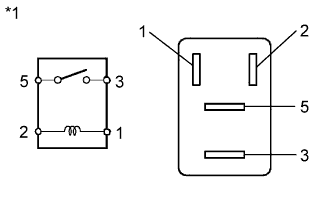
Text in Illustration *1 INV W/PMP Relay Measure the resistance according to the value(s) in the table below.
Standard Resistance Tester Connection Condition Specified Condition 3 - 5 Auxiliary battery voltage is not applied between terminals 1 and 2 10 kΩ or higher Auxiliary battery voltage is applied between terminals 1 and 2 Below 1Ω -
Install the INV W/PMP relay.
NG
CHECK RELAY HOLDER TERMINAL (INV W/PMP RELAY) Click here
OK
-
-
CHECK HARNESS AND CONNECTOR (INVERTER WATER PUMP ASSEMBLY - BODY GROUND)
-
Disconnect the A50 inverter water pump assembly connector.
-
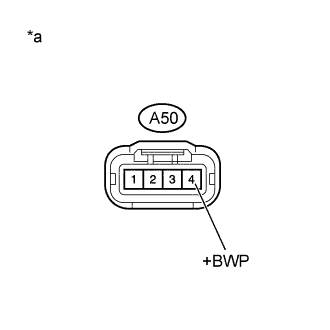
Text in Illustration *a Front view of wire harness connector
(to Inverter Water Pump Assembly)
Measure the voltage according to the value(s) in the table below.
Standard Voltage Tester Connection Switch Condition Specified Condition A50-4 (+BWP) - Body ground Power switch on (IG) 11 to 14 V Note
Turning the power switch on (IG) with the power management control ECU connector disconnected causes other DTCs to be stored. Clear the DTCs after performing this inspection.
-
Connect the inverter water pump assembly connector.
NG
CHECK INSTALLATION CONDITION (INV W/PMP FUSE) Click here
OK
-
-
CHECK HARNESS AND CONNECTOR (INVERTER WATER PUMP ASSEMBLY - BODY GROUND)
-
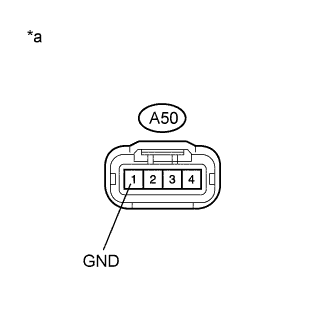
Text in Illustration *a Front view of wire harness connector
(to Inverter Water Pump Assembly)
Disconnect connector A50 from the inverter water pump assembly.
-
Measure the resistance according to the value(s) in the table below.
Standard Resistance Tester Connection Switch Condition Specified Condition A50-1 (GND) - Body ground Power switch off Below 1 Ω -
Connect the inverter water pump assembly connector.
NG
REPAIR OR REPLACE HARNESS OR CONNECTOR
OK
REPLACE INVERTER WATER PUMP ASSEMBLY Click here
-
-
CHECK INSTALLATION CONDITION (INV W/PMP FUSE)
-
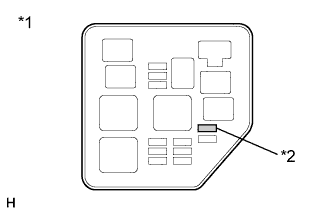
Text in Illustration *1 No. 2 Engine Room Relay Block *2 INV W/PMP Fuse Check installation condition of the INV W/PMP fuse.
OK INV W/PMP fuse is installed correctly.
NG
CONNECT SECURELY
OK
-
-
INSPECT RELAY (INV W/PMP)
-
Text in Illustration *1 No. 2 Engine Room Relay Block *2 INV W/PMP Relay Remove the INV W/PMP relay from the No. 2 engine room relay block.
-
Text in Illustration *1 INV W/PMP Relay Measure the resistance according to the value(s) in the table below.
Standard Resistance Tester Connection Condition Specified Condition 3 - 5 Auxiliary battery voltage is not applied between terminals 1 and 2 10 kΩ or higher Auxiliary battery voltage is applied between terminals 1 and 2 Below 1Ω -
Install the INV W/PMP relay.
NG
CHECK RELAY HOLDER TERMINAL (INV W/PMP RELAY) Click here
OK
-
-
CHECK HARNESS AND CONNECTOR (INVERTER WATER PUMP ASSEMBLY - NO. 2 ENGINE ROOM RELAY BLOCK)
-
Remove the INV W/PMP relay from the No. 2 engine room relay block.
-
Disconnect the A50 inverter water pump assembly connector.
-
Measure the resistance according to the value(s) in the table below.
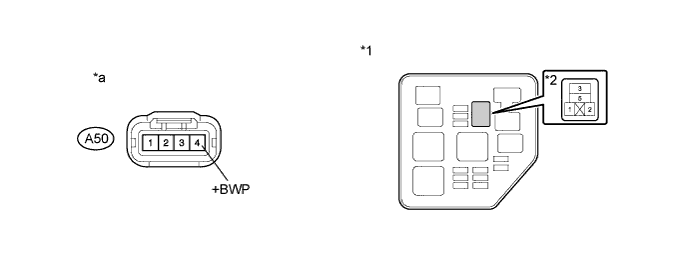
Text in Illustration *1 No. 2 Engine Room Relay Block *2 INV W/PMP Relay *a Front view of wire harness connector
(to Inverter Water Pump Assembly)
- - Standard Resistance Tester Connection Switch Condition Specified Condition A50-4 (+BWP) - 3 (INV W/PMP relay) Power switch off Below 1 Ωr A50-4 (+BWP) or 3 (INV W/PMP relay) - Body ground and other terminals Power switch off 10 kΩ or higher Note
Do not apply excessive force when using the probes of the tester to perform the inspection. If excessive force is used, the terminals will be damaged.
-
Install the INV W/PMP relay.
-
Connect the inverter water pump assembly connector.
NG
REPAIR OR REPLACE HARNESS OR CONNECTOR
OK
-
-
CHECK FUSE (INV W/PMP)
-
Text in Illustration *1 No. 2 Engine Room Relay Block *2 INV W/PMP Fuse Remove the INV W/PMP fuse from the No. 2 engine room relay block.
-
Measure the resistance according to the value(s) in the table below.
Standard Resistance Tester Connection Condition Specified Condition INV W/PMP fuse Always Below 1Ω -
Install the INV W/PMP fuse.
NG
REPLACE INVERTER WATER PUMP ASSEMBLY Click here
OK
REPAIR OR REPLACE HARNESS OR CONNECTOR (INV W/PMP FUSE HOLDER TERMINAL OR INV W/PMP RELAY HOLDER TERMINAL)
-
-
REPLACE INVERTER WATER PUMP ASSEMBLY
NEXT
REPLACE FUSE (INV W/PMP)
-
CHECK RELAY HOLDER TERMINAL (INV W/PMP RELAY)
-
Check the terminals of the INV W/PMP relay holder.
OK The terminals of the INV W/PMP relay holder are not bent, loose or corroded.
NG
CHECK FUSE (INV W/PMP RLY) Click here
OK
-
-
CHECK FUSE (INV W/PMP RLY)
-
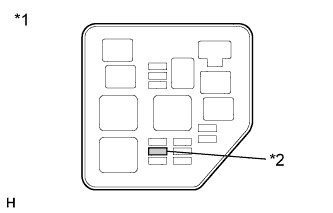
Text in Illustration *1 No. 2 Engine Room Relay Block *2 INV W/PMP RLY Fuse Remove the INV W/PMP RLY fuse from the No. 2 engine room relay block.
-
Measure the resistance according to the value(s) in the table below.
Standard Resistance Tester Connection Condition Specified Condition INV W/PMP RLY fuse Always Below 1Ω -
Install the INV W/PMP RLY fuse.
NG
REPLACE RELAY (INV W/PMP) Click here
OK
REPLACE RELAY (INV W/PMP)
-
-
REPLACE RELAY (INV W/PMP)
NEXT
REPLACE FUSE (INV W/PMP RLY)
-
CHECK RELAY HOLDER TERMINAL (INV W/PMP RELAY)
-
Check the terminals of the INV W/PMP relay holder.
OK The terminals of the INV W/PMP relay holder are not bent, loose or corroded.
NG
REPAIR OR REPLACE HARNESS OR CONNECTOR (INV W/PMP RELAY HOLDER TERMINAL) Click here
OK
REPLACE RELAY (INV W/PMP)
-
-
CHECK FUSE (INV W/PMP RLY)
-
Text in Illustration *1 No. 2 Engine Room Relay Block *2 INV W/PMP RLY Fuse Remove the INV W/PMP RLY fuse from the No. 2 engine room relay block.
-
Measure the resistance according to the value(s) in the table below.
Standard Resistance Tester Connection Condition Specified Condition INV W/PMP RLY fuse Always Below 1Ω -
Install the INV W/PMP RLY fuse.
NG
REPAIR OR REPLACE HARNESS OR CONNECTOR (INV W/PMP RELAY HOLDER TERMINAL) Click here
OK
-
-
REPAIR OR REPLACE HARNESS OR CONNECTOR (INV W/PMP RELAY HOLDER TERMINAL)
NEXT
REPLACE RELAY (INV W/PMP)
-
REPAIR OR REPLACE HARNESS OR CONNECTOR (INV W/PMP RELAY HOLDER TERMINAL)
NEXT
REPLACE RELAY (INV W/PMP)
-
REPAIR OR REPLACE HARNESS OR CONNECTOR (INV W/PMP RELAY HOLDER TERMINAL)
NEXT
-
REPLACE FUSE (INV W/PMP RLY)
NEXT
REPLACE RELAY (INV W/PMP)
-
CHECK INSTALLATION CONDITION (INV W/PMP RLY FUSE)
-
Text in Illustration *1 No. 2 Engine Room Relay Block *2 INV W/PMP RLY Fuse Check installation condition of the INV W/PMP RLY fuse.
OK INV W/PMP RLY fuse is installed correctly.
NG
INSPECT RELAY (INV W/PMP) Click here
OK
-
-
CHECK FUSE (INV W/PMP RLY)
-
Text in Illustration *1 No. 2 Engine Room Relay Block *2 INV W/PMP RLY Fuse Remove the INV W/PMP RLY fuse from the No. 2 engine room relay block.
-
Measure the resistance according to the value(s) in the table below.
Standard Resistance Tester Connection Condition Specified Condition INV W/PMP RLY fuse Always Below 1Ω -
Install the INV W/PMP RLY fuse.
NG
CHECK FUSE HOLDER TERMINAL (INV W/PMP RLY FUSE) Click here
OK
REPAIR OR REPLACE HARNESS OR CONNECTOR (INV W/PMP RLY FUSE HOLDER TERMINAL)
-
-
CHECK FUSE HOLDER TERMINAL (INV W/PMP RLY FUSE)
-
Check the terminals of the INV W/PMP RLY fuse holder.
OK The terminals of the INV W/PMP RLY fuse holder are not bent, loose or corroded.
NG
REPAIR OR REPLACE HARNESS OR CONNECTOR (INV W/PMP RLY FUSE HOLDER TERMINAL) Click here
OK
REPLACE FUSE (INV W/PMP RLY)
-
-
REPAIR OR REPLACE HARNESS OR CONNECTOR (INV W/PMP RLY FUSE HOLDER TERMINAL)
NEXT
REPLACE FUSE (INV W/PMP RLY)
-
INSPECT RELAY (INV W/PMP)
-
Text in Illustration *1 No. 2 Engine Room Relay Block *2 INV W/PMP Relay Remove the INV W/PMP relay from the No. 2 engine room relay block.
-
Text in Illustration *1 INV W/PMP Relay Measure the resistance according to the value(s) in the table below.
Standard Resistance Tester Connection Condition Specified Condition 3 - 5 Auxiliary battery voltage is not applied between terminals 1 and 2 10 kΩ or higher Auxiliary battery voltage is applied between terminals 1 and 2 Below 1Ω -
Install the INV W/PMP relay.
NG
REPLACE RELAY (INV W/PMP) Click here
OK
CONNECT SECURELY (INV W/PMP RLY FUSE)
-
-
INSPECT RELAY (INV W/PMP)
-
Text in Illustration *1 No. 2 Engine Room Relay Block *2 INV W/PMP Relay Remove the INV W/PMP relay from the No. 2 engine room relay block.
-
Text in Illustration *1 INV W/PMP Relay Measure the resistance according to the value(s) in the table below.
Standard Resistance Tester Connection Condition Specified Condition 3 - 5 Auxiliary battery voltage is not applied between terminals 1 and 2 10 kΩ or higher Auxiliary battery voltage is applied between terminals 1 and 2 Below 1Ω -
Install the INV W/PMP relay.
NG
REPLACE RELAY (INV W/PMP) Click here
OK
CONNECT SECURELY (INV W/PMP RELAY)
-
-
REPLACE RELAY (INV W/PMP)
NEXT
CONNECT SECURELY (INV W/PMP RLY FUSE)
-
REPLACE RELAY (INV W/PMP)
NEXT
CONNECT SECURELY (INV W/PMP RELAY)